Published: May 2, 2026 · 16 min read
Next.js Image Optimization in Micro Frontend: Complete Guide
You ship a brand-new product page, open it in production, and every product card renders a broken image icon. The browser console is full of red: Invalid src prop on next/image, hostname "cdn.myapp.com" is not configured under images in your next.config.js. You add the CDN to remotePatterns in the host's next.config.js — the host's pages render fine but the Products remote still fails. You add it to the remote — works in production, breaks in local dev because local dev pulls images from http://localhost:4001. This is the next.js image optimization micro frontend problem: every Next.js application in the federation has its own images block, every block has its own allowlist, and a single missing entry only surfaces on the specific remote that needed it. In the previous article on the shared Redux store, you saw how every remote must mirror the same shared block to keep singletons honest. The same discipline applies to images — every CDN that any remote ever fetches from must appear in every Next.js remote's remotePatterns and in the host's. This article covers remotePatterns, AVIF/WebP format negotiation, deviceSizes/imageSizes, minimumCacheTTL, and the single enableImageLoaderFix flag that makes next/image work correctly when one Next.js application loads another via Module Federation.
In this guide, you will:
- See the exact error
next/imagethrows when a hostname is missing fromremotePatterns - Build a complete
imagesblock for the host with CDNs, formats, deviceSizes, imageSizes, and cache TTL - Compare local development vs production image configs (the
http://localhostentry that must be stripped before deploy) - Mirror the same
imagesblock in every Next.js remote and understand why - Wire up
enableImageLoaderFixinNextFederationPlugin'sextraOptionsso static images inside remotes resolve correctly when loaded by the host - Use the
<Image>component withfill,sizes,priority, andplaceholder="blur"correctly - Trace a single image request from
/_next/imagethrough the optimizer, format negotiation, and edge cache - Avoid the eight image-optimization gotchas that show up only in production
The Cross-Domain Image Problem
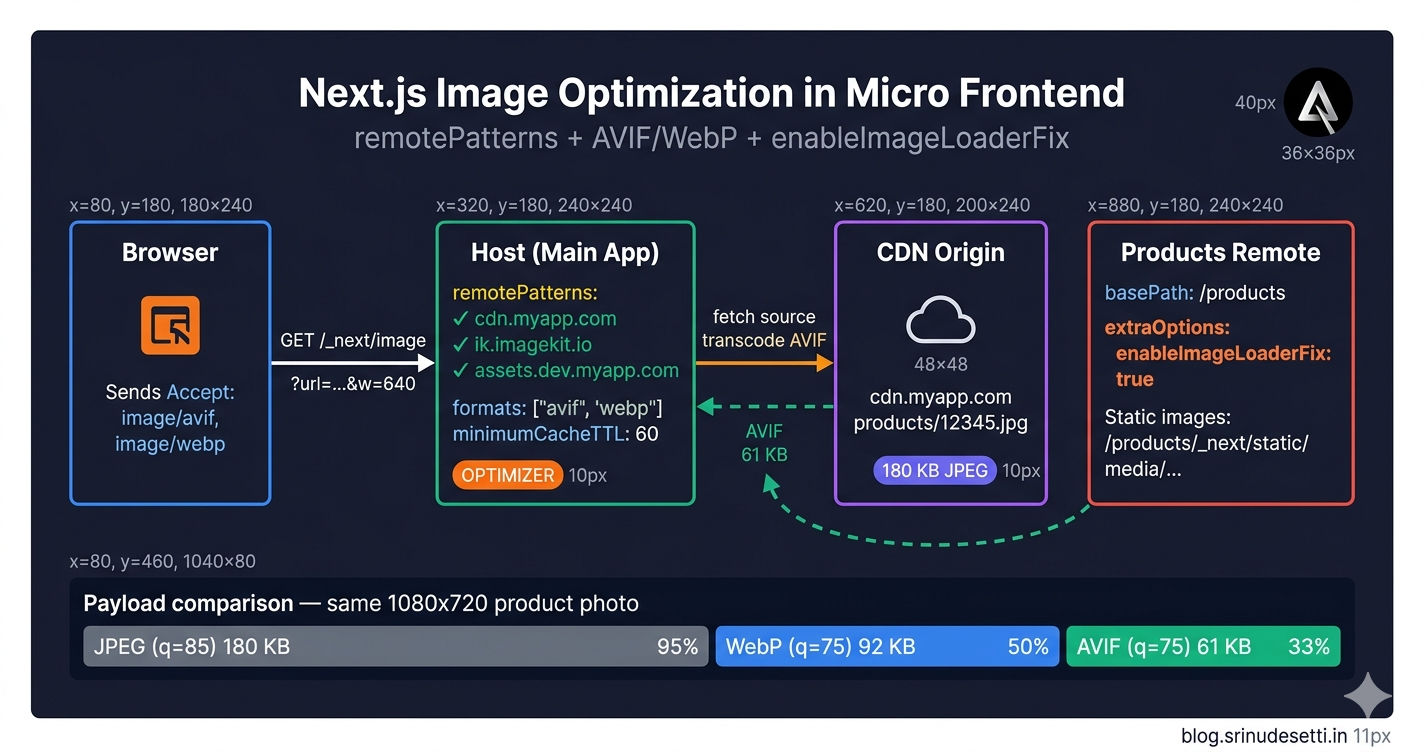
next/image is a server-side image optimizer. It accepts a src URL, fetches the source, transcodes to AVIF or WebP based on the browser's Accept header, resizes to the closest match in deviceSizes, and caches the result at the Next.js edge. To prevent your server from being turned into an open image proxy, Next.js refuses to fetch any URL whose hostname is not explicitly allowlisted via images.remotePatterns. That refusal is the right default — but it means a hybrid micro frontend has a coordination problem that single-app projects never face.
The host fetches images from a product CDN. The Products remote fetches the same CDN plus a transformation CDN. The Content remote serves marketing assets from a third domain. Local dev pulls some images from http://localhost:4001 (a React remote running its dev server). Every Next.js application in the federation needs its own images block, and every block must allowlist every hostname that any component it might render could ever request. Miss one entry and the bug only surfaces on the specific remote, on the specific user's first visit to that section.
Why remotePatterns instead of the older domains array. The legacy domains: ['cdn.myapp.com'] config was deprecated in Next.js 14 because it could not constrain protocol, port, or pathname — making it easy to over-allowlist. remotePatterns lets you say protocol: 'https' AND pathname: '/products/**' so a CDN entry only applies to a specific URL prefix. Every example in this article uses remotePatterns.
Step 1 — Configure the Host's images Block
The host owns the public-facing domain. Every <Image> request from the host's pages and from the host's locally-rendered components hits the host's /_next/image endpoint. The host's images.remotePatterns is what gates that request.
Five fields define the entire optimization pipeline:
| Field | Purpose |
|---|---|
remotePatterns | Allowlist of hostnames next/image is allowed to fetch from |
formats | Output formats Next.js will negotiate based on the browser's Accept header |
deviceSizes | Widths used for the srcset attribute on responsive images |
imageSizes | Widths used for fixed-width images and sizes-prop calculations |
minimumCacheTTL | Floor (seconds) for how long Next.js caches an optimized image at the edge |
The compress: true line enables gzip/brotli on the response. Image bytes are already compressed (AVIF/WebP), but the JSON manifests, HTML, and cache headers benefit from gzip — costs nothing, no reason to skip it.
Step 2 — Local vs Production: The Single Difference That Matters
Local development needs http://localhost in remotePatterns because React remotes serve static images from their dev servers (http://localhost:4001, http://localhost:4002). Production must NOT have that entry, because leaving an HTTP localhost rule in production lets a request like https://www.myapp.com/_next/image?url=http://localhost/admin succeed against the production server's loopback interface.
The contract: every entry that appears in production must also appear in local. The reverse is not true — http://localhost belongs ONLY in local. The same local-vs-production split governs the React remote webpack.config.js blocks covered in the shared Redux store article — local enables HTTPS dev server, disables splitChunks, and uses localhost:PORT URLs; production enables vendor chunking and switches to deploy-relative paths.
Step 3 — Mirror the images Block in Every Next.js Remote
Every Next.js remote also runs as a standalone Next.js application — cd apps/Products && next dev -p 3001 brings up the remote on its own port with its own Next.js server. When that standalone server renders an <Image>, the request hits the remote's /_next/image endpoint. When the same remote is loaded inside the host as a federated module, the host's nginx routes /products/* to the remote's container — so the optimization request still ends up at the remote's /products/_next/image. Either way, the remote's images.remotePatterns is the allowlist that gets checked.
The shape is identical to the host's. The CDN list is mirrored. The Content remote (apps/Content/next.config.js) gets the same treatment — same shape, same CDN list, same formats array. The discipline mirrors the singleton shared block — every workspace declares the same set of allowlisted hostnames or the federation has a hole.
Step 4 — enableImageLoaderFix: The Module Federation Fix
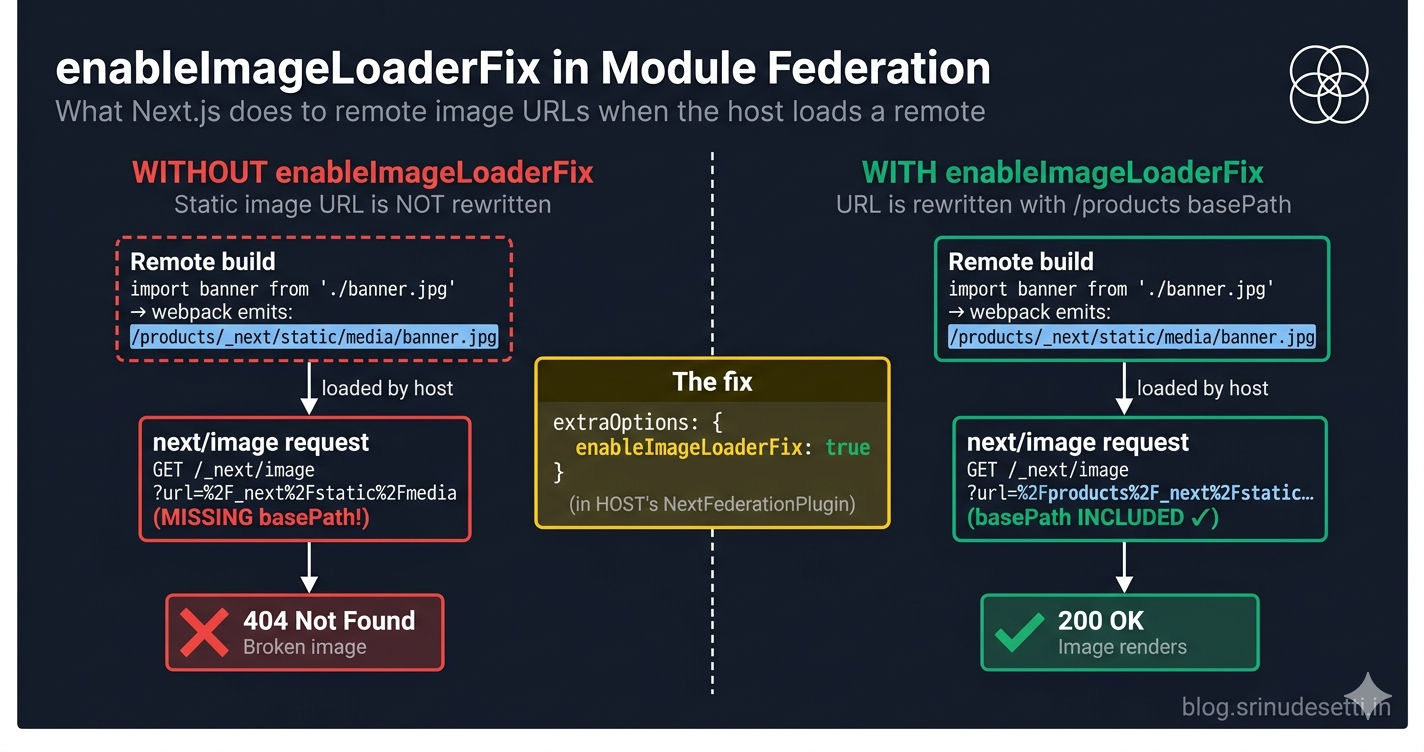
The host loads a Next.js remote built with basePath: '/products'. Inside that remote, a developer writes import banner from './banner.jpg' and renders <Image src={banner} />. Webpack rewrites the import to /products/_next/static/media/banner.[hash].jpg because of the basePath (covered in detail in the basePath + assetPrefix article). When the remote runs standalone, that path resolves correctly — the remote's server has the file at /products/_next/static/media/.
When the host loads the remote as a federated module, the request lands on the host's Next.js server, not the remote's. The host has no file at /_next/static/media/banner.[hash].jpg and returns a 404. The image breaks.
enableImageLoaderFix patches the URL inside the remote's bundle to include the remote's basePath, so the request goes to /products/_next/static/media/banner.[hash].jpg instead of /_next/static/media/banner.[hash].jpg. The host's reverse proxy routes /products/* to the remote's container, which serves the file from disk. Image resolves.
The flag goes on the host's NextFederationPlugin, not on each remote. The remote's static URLs are emitted at build time; the host's federation runtime is what rewrites them to include the basePath. Pair it with enableUrlLoaderFix to get the same treatment for url-loader assets — fonts loaded via import and SVGs imported as URLs.
Without enableImageLoaderFix, every Next.js remote loaded inside a Next.js host will silently 404 on every static image. Local dev catches it (you see broken icons immediately). Production catches it the moment a real user navigates to /products. There is no warning at build time — webpack happily builds the remote with the broken paths.
How an Image Request Actually Flows
The configuration above is declarative. The actual work happens when a user opens a page and the browser issues GET /_next/image?url=https://cdn.myapp.com/products/12345.jpg&w=640&q=75. Five steps later, an AVIF-encoded image lands in the browser cache.
The flow is the same whether the image lives on a public CDN or inside a federated remote. The only difference is whether enableImageLoaderFix rewrote the URL with a basePath before the request left the browser.
Step 5 — Format Negotiation: AVIF First, WebP Fallback
The formats: ['image/avif', 'image/webp'] line is short but does a lot of work. Next.js inspects the browser's Accept header and tries each format from left to right. The first format the browser advertises support for is what gets returned.
Real-world payload comparison for a 1080x720 product photo:
| Format | Quality | Size | Reduction vs JPEG |
|---|---|---|---|
| Original JPEG | 85 | 180 KB | baseline |
| WebP | 75 | 92 KB | 49% smaller |
| AVIF | 75 | 61 KB | 66% smaller |
The order matters. Listing ['image/webp', 'image/avif'] would make Next.js try WebP first — and since most modern browsers advertise both, WebP would win and AVIF-capable clients would download larger files than they could handle. Listing only WebP would skip AVIF entirely. AVIF is supported in Chrome 85+, Firefox 93+, Safari 16+, and Edge 121+ — the modern majority. Browsers that do not advertise AVIF (older Safari, IE-derived) fall back to WebP. Browsers that advertise neither get the original format. See the web.dev guide on AVIF and WebP (opens in a new tab) for the underlying compression details.
Step 6 — deviceSizes and imageSizes: Tune to Your Real Widths
deviceSizes is the list of widths Next.js generates entries for in the srcset attribute on responsive images. imageSizes is the list used for fixed-width images and as the source list when calculating breakpoints from a sizes prop. Together they define every variant the optimizer will ever produce.
| Field | Default | Used For |
|---|---|---|
deviceSizes | [640, 750, 828, 1080, 1200, 1920] | Responsive <Image> with fill or no fixed width |
imageSizes | [16, 32, 48, 64, 96, 128, 256, 384] | Fixed-width <Image>, icons, avatars, thumbnails |
Adding more entries increases build time, storage at the edge cache, and the srcset attribute size. Removing entries means the browser has to downscale or upscale to fit the rendered width. The right values are the actual rendered widths in your design system. If your hero banner is exactly 1440px on desktop, add 1440 to deviceSizes — without it, the browser has to download 1920 and downscale, wasting bytes. If your product card thumbnails are exactly 200px, add 200 to imageSizes.
Step 7 — <Image> Usage Inside a Remote
The configuration above does nothing on its own — you still have to use the <Image> component correctly. The four props that decide whether the image is a performance win or a performance disaster are src, sizes, priority, and fill/width+height.
The sizes prop is the single most-skipped optimization. Without it, next/image defaults to 100vw and the browser picks the largest entry in deviceSizes — meaning mobile users on 3G download a 1920px-wide image to render in a 320px slot. With sizes="(max-width: 640px) 50vw, (max-width: 1024px) 33vw, 25vw", the browser knows the rendered width at each breakpoint and picks the right srcset entry.
For above-the-fold hero images, swap loading="lazy" for priority and add a blurDataURL placeholder to avoid the white flash before the real image arrives.
priority does three specific things: removes loading="lazy", adds <link rel="preload" as="image"> to the page head, and skips IntersectionObserver registration. Use it on exactly one image per page — the LCP candidate. Marking every product card as priority forces the browser to download every image at once, blocks the network queue, and tanks the LCP score. See the Next.js Image component docs (opens in a new tab) for the full prop reference.
Local vs Production — The Three Differences
Local development and production differ in three lines and nowhere else. Everything outside this table is identical between the two environments.
| Aspect | Local Development | Production |
|---|---|---|
remotePatterns includes http://localhost | Yes — required for React remotes serving from http://localhost:PORT | No — strip before deploy; allowing localhost in production opens an open-proxy hole |
| Source CDN hostname | assets.dev.myapp.com, static.dev.myapp.com | cdn.myapp.com, images.myapp.com |
minimumCacheTTL typical value | 60 | 60 to 3600 (low if a CDN sits in front; higher if Next.js is the only cache) |
formats order | ['image/avif', 'image/webp'] | ['image/avif', 'image/webp'] |
deviceSizes | Default | Default |
imageSizes | Default | Default |
compress: true | Optional | Recommended |
The discipline is the same as for the Module Federation shared block: the production config is a strict subset of the local config (minus dev-only entries), not a separate config that has drifted over time. Lint rules can enforce that http://localhost never appears in the production config.
Common Gotchas When Optimizing Images in a Next.js MFE
After running this configuration in production for months, eight specific gotchas account for almost every image-related incident. Every one of them is a deviation from the discipline above — a missing CDN entry in one remote, a missing enableImageLoaderFix on the host, a missing sizes prop on a responsive image.
If you remember one debugging step: open the browser's Network tab, find the failing /_next/image?url=... request, and check whether the hostname in the url query parameter is in the remotePatterns of the Next.js application that owns the request URL. That single check resolves Gotchas 1, 2, and 7.
What's Next
You now have a complete next/image configuration that works across a hybrid Next.js micro frontend — remotePatterns mirrored across host and every remote, AVIF/WebP format negotiation, tuned deviceSizes and imageSizes, a sensible minimumCacheTTL, the enableImageLoaderFix flag that makes federated remotes serve their static images correctly, and the <Image> props (fill, sizes, priority, placeholder="blur") that turn the configuration into actual Lighthouse wins. The next article covers Content Security Policy (CSP) headers in Next.js MFE — why CSP matters when remote JavaScript loads at runtime, the complete headers() config block, the script-src and connect-src breakdown for analytics + payment gateways, the frame-src rule for Razorpay iframes, and the security headers (X-Content-Type-Options, X-Frame-Options, X-XSS-Protection) that complete the lockdown.
← Back to Shared Redux Store in Next.js MFE
Continue to Content Security Policy Headers in Next.js MFE →
Frequently Asked Questions
Why does next/image throw 'hostname is not configured' in a Next.js micro frontend?
next/image is a server-side image optimizer. It refuses to fetch any URL whose hostname is not explicitly allowlisted via images.remotePatterns in next.config.js. In a hybrid micro frontend, the host loads images from one CDN, the Products remote loads from another, and local development pulls from http://localhost — every hostname must appear in the host's remotePatterns AND in every Next.js remote's remotePatterns. The error hostname "cdn.myapp.com" is not configured under images means the request reached a Next.js instance whose allowlist does not include that hostname. The fix is to mirror the CDN list across the host and every Next.js remote in the federation, and to keep dev-only entries like http://localhost out of the production config.
What does enableImageLoaderFix do in NextFederationPlugin extraOptions?
enableImageLoaderFix patches the URL that next/image generates inside a federated remote so that the host can route the request back to the remote's static directory. Without the fix, a remote built with basePath: '/products' generates image URLs like /_next/static/media/banner.[hash].jpg — but the host has no file at that path and returns 404. With the fix, the URL is rewritten to /products/_next/static/media/banner.[hash].jpg, and the host's nginx (or the host's /products proxy rule) routes it to the Products remote's container where the file actually lives. Set extraOptions: { enableImageLoaderFix: true } in the host's NextFederationPlugin block — not in each remote. The companion flag enableUrlLoaderFix does the same thing for url-loader assets like fonts and SVGs.
Why does each Next.js remote need its own images.remotePatterns config?
Every Next.js remote runs as a standalone Next.js application. When you run cd apps/Products && next dev -p 3001 for local development, the remote's own next.config.js is what governs every <Image> request — the host is not in the picture. When the same remote is loaded inside the host as a federated module, the optimization request still passes through the remote's /products/_next/image endpoint because the host's nginx proxies /products/* to the remote's container. Either way, the remote's images.remotePatterns is the allowlist that gets checked. Mirroring the same CDN entries across host and remote is the same discipline as mirroring Module Federation's shared block — every workspace must declare the same hostnames or the federation breaks at runtime.
Should I use AVIF and WebP together, or pick one?
Use both, in the order ['image/avif', 'image/webp']. Next.js negotiates per-request based on the browser's Accept header. AVIF-capable browsers (Chrome 85+, Firefox 93+, Safari 16+) download AVIF — about 30% smaller than WebP and 60% smaller than the original JPEG. Older Safari (15 and below) falls back to WebP, which is supported almost everywhere modern. Browsers that send Accept: */* get the original format. Listing only WebP wastes bandwidth on AVIF-capable clients; listing only AVIF breaks fallback for older Safari. The order matters because Next.js tries each format from left to right — AVIF first means modern browsers never pay the WebP encoding cost.
What deviceSizes and imageSizes values should I configure for a Next.js MFE?
deviceSizes is the list of widths Next.js generates for the srcset attribute on responsive images. The defaults [640, 750, 828, 1080, 1200, 1920] cover the standard breakpoints from mobile portrait to large desktop. imageSizes is the list of widths used for fixed-width images and for sizes-prop calculations — the default [16, 32, 48, 64, 96, 128, 256, 384] covers icons, avatars, and thumbnails. Adding more sizes increases build time and storage at the edge cache; the right values are the actual rendered widths in your design. If your hero banner renders at exactly 1440px on desktop, add 1440 to deviceSizes so the browser does not have to scale up from 1200 or down from 1920. If your product thumbnails are always 200px, add 200 to imageSizes.
What is minimumCacheTTL and why set it to 60 seconds?
minimumCacheTTL is the floor (in seconds) for how long Next.js's edge cache keeps an optimized image before re-fetching the source. Setting it to 60 means an optimized image is cached for at least one minute even if the source server returns Cache-Control: max-age=0. Sixty seconds is a sane default during active deployment — short enough that a logo swap or banner update propagates within a minute, long enough that repeat requests during a single user session always hit the cache. For long-lived static assets (product images that never change once uploaded), the right pattern is to set minimumCacheTTL low and put a CDN in front of Next.js with a long max-age. The CDN caches forever; Next.js re-validates within a minute. Setting minimumCacheTTL to 31536000 (1 year) is risky because URL-change-based cache busting requires every consumer to update the URL — a single hardcoded reference defeats the bust.
Should I pass priority to every Next.js image on the page?
No. priority should be on EXACTLY ONE image per page — the LCP candidate (the largest above-the-fold image). priority does three things: removes loading="lazy", adds <link rel="preload" as="image"> to the page head, and skips IntersectionObserver registration. Marking every product card as priority forces the browser to download every image at once, blocking the LCP, blowing up the network queue, and defeating the entire point of lazy-loading. The right pattern: set priority on the hero banner; let every product card and below-the-fold image lazy-load by default. Combined with the sizes prop on responsive images, this is the difference between a Lighthouse Performance score in the 80s and one in the 95+ range.