Published: May 12, 2026 · 18 min read
Sharing Redux Store Across Micro Frontends
A user logs in through the Auth React micro frontend at /login. Within the same browser tab, they navigate to /cart — the Cart remote mounts and immediately redirects them back to /login because its useSelector(selectIsLoggedIn) returns false. Open Redux DevTools and there are two stores: one created by Auth, one created by Cart. Each remote dispatched into its own store and the other never knew. This is the cross-cutting state problem at the heart of every multi-remote architecture, and the fix is a properly federated redux store micro frontend singleton — one store, owned by the host, shared by every React and Next.js remote in the application. In the previous article on Content Security Policy in a Next.js MFE, you saw how every directive (script-src, connect-src, frame-src) gates a different category of cross-origin call. The shared store is the equivalent coordination problem on the JavaScript side: every remote that needs cart state, auth tokens, or support tickets must read from and write to the SAME store object, regardless of which webpack bundle it shipped in.
This article walks the complete singleton-store pattern that opens Section 4 — Shared State Management: the store package layout, the slices, the typed hooks, the host-side Provider setup for both a React host and a Next.js host, the webpack/next.config shared block that makes the singleton binding, and the eight production gotchas that account for almost every "state is not propagating" bug.
In this guide, you will:
- See the cross-remote state problem in concrete terms — Auth dispatches, Cart never sees it
- Build the federated
@myapp/storepackage withconfigureStore, slices, typed hooks, and re-exportedreact-reduxprimitives - Wire up the React host with
bootstrap.js+<Provider>and the Next.js host withClientReduxProvider+ssr: false - Compare local development vs production webpack shared blocks (full
localhost:PORTURLs vs/path/URLs, splitChunks, contenthash) - Mirror the singleton declaration across the host and every remote with
strictVersion+requiredVersion - Read and write the same store from a React Auth remote (
OTPVerify) and a Next.js Products remote (AddToCartButton) - Understand why every remote keeps its own
<Provider>wrapper for standalone development without breaking the federated singleton - Avoid the eight gotchas that surface only after a real-world deploy — duplicate stores, eager-consumption errors, nested providers, hydration mismatches
The Cross-Remote State Problem
A real micro frontend has authentication state, cart state, support tickets, and chat messages — all of which need to be visible to multiple remotes simultaneously. The user logs in through the Auth remote, adds a product to the cart from the Products remote, opens a support ticket through the Support remote, and the host's header must reflect every change. There is no parent component to lift state into; the remotes are loaded lazily and may not even be mounted at the same time.
The naive options all fail at the seams:
| Approach | Why it fails in an MFE |
|---|---|
| Prop drilling | The host does not directly render every remote's children — props cannot reach a lazy-loaded component three levels down |
localStorage polling | Racy, every remote re-implements read/write logic, no schema enforcement, change events not guaranteed |
BroadcastChannel / postMessage | Every remote must subscribe to every event, no type safety, easy to ship a typo and silently lose updates |
| Per-remote stores | Exact problem from the cross-remote diagram — dispatches stay isolated to whichever store the remote happened to create |
| Federated singleton store | One store, one source of truth, useSelector works across remote boundaries with no extra code |
A single Redux store, federated as a Module Federation singleton, sidesteps every row above. The host creates the store. Every remote imports useSelector and useDispatch from the same federated package. Module Federation's runtime guarantees there is exactly one store instance regardless of how many remotes are mounted.
The same singleton pattern works for any global state library. Zustand, Jotai, and TanStack Query store instances all federate the same way as long as the store creation function lives inside a singleton package. Redux Toolkit is the example here because it is the most widely used pattern in production MFEs — see Module Federation shared dependencies for the underlying mechanism.
Federated Redux Store Architecture for a Micro Frontend
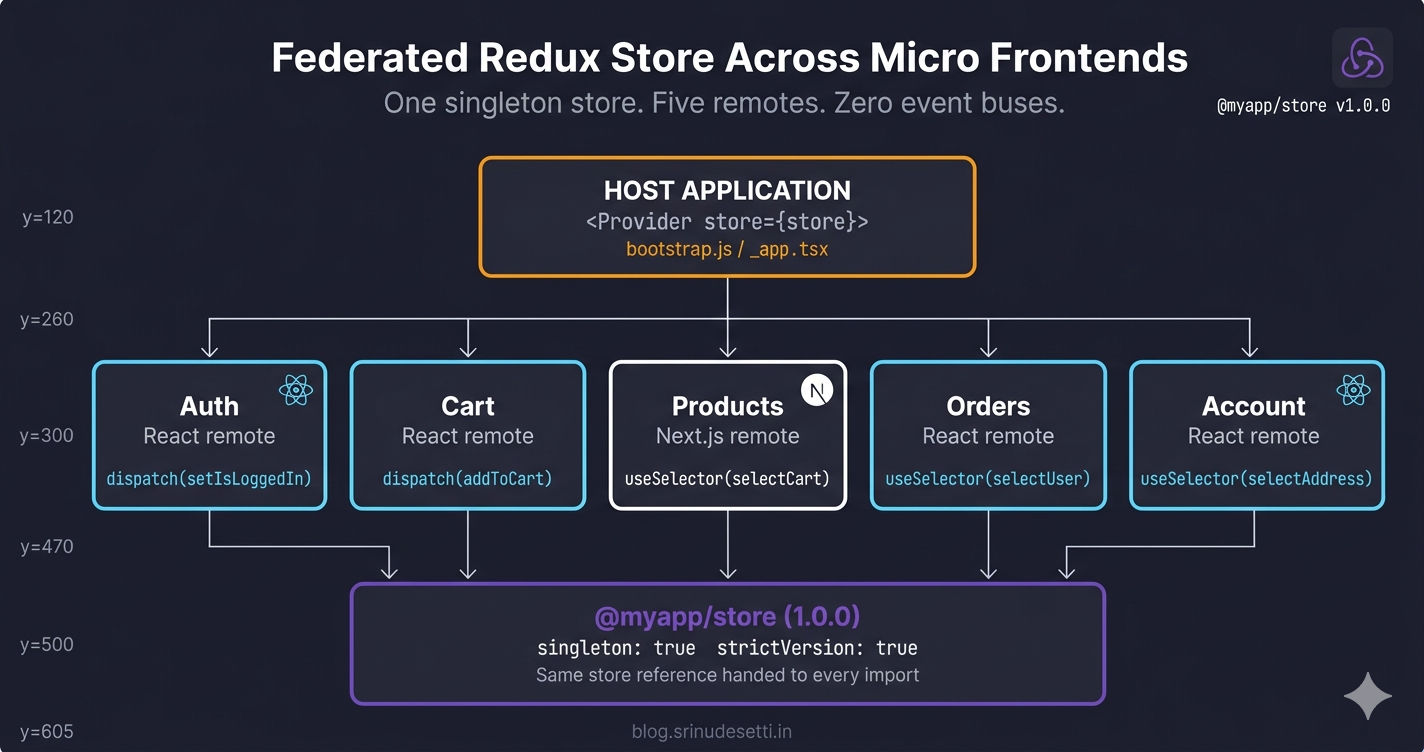
The architecture below shows the host owning a single store instance and five remotes — four React (Auth, Cart, Orders, Account) and one Next.js (Products) — all consuming the same store via Module Federation singletons. The store package is published as a workspace dependency at version 1.0.0, locked across every webpack and next.config block.
The crucial property is that the store is created once, in the host, on the client. Every remote that later imports from the store package receives the host's instance, not a fresh copy. Module Federation's singleton: true flag is what makes this guarantee binding — without it, each remote would silently bundle its own copy and you would be back to the cross-remote state problem.
Step 1 — Build the Federated Store Package
The store lives in a workspace package — the same Turborepo or pnpm workspace pattern from the React MFE monorepo guide. Three files matter: package.json (the versioning contract), src/store.js (the configureStore call), and index.js (the public API every remote imports).
Package manifest with version locking
The package.json is small but every field matters. The version field is what Module Federation matches against requiredVersion: '1.0.0' in every remote's shared block. The peerDependencies declare React without bundling it, so the federated singleton React from the host is the one that gets used.
Store factory and singleton
configureStore runs once at module load. The makeStore() factory exists to support per-request server stores (used in rare SSR cases), and store is the default browser singleton that the host imports.
serializableCheck: false is required because the cart slice carries Date objects in some payloads. Without it, Redux Toolkit (opens in a new tab) emits a warning on every dispatch — harmless, but noisy. The trade-off is that you must not store non-serializable values you cannot recreate from JSON.
Step 2 — Define the Slices Every Remote Will Touch
The user slice owns authentication state. The Auth remote dispatches setAt, setIsLoggedIn, and setUser. Every other remote — Cart, Orders, Account, Header — reads with selectors like selectIsLoggedIn and selectAccessToken.
The selectors are the API surface that remotes depend on. Adding a new field to initialState is safe; renaming a field requires bumping the package version because every consumer references the field by name.
The cart slice owns line items and totals. The Products remote dispatches addToCart, the Cart remote dispatches updateQuantity, and the host's header reads selectTotalCartItems for the badge.
Step 3 — Export Selectors, Hooks, and Provider
Every remote should import everything Redux-related through @myapp/store — never from react-redux directly. The index.js is the only entry point remotes touch. It re-exports actions, selectors, hooks, and — critically — Provider, useSelector, and useDispatch from react-redux.
Routing every Redux primitive through @myapp/store guarantees that Module Federation's singleton negotiation handles the call. If a remote imports react-redux directly, webpack might bundle a separate copy at build time, and the bundled copy disagrees with the federated copy on internal state — leading to the silent production bugs covered in the gotchas section.
Step 4 — Webpack Shared Config (Local vs Production)
The shared block is where the singleton contract is signed. Five packages need the singleton flag, and the store itself needs strictVersion: true to fail loudly if any remote ships a different version. Local and production configs differ ONLY in URLs, mode, and chunking — the shared block is byte-identical so the singleton stays valid in both environments.
The differences between local and production are mechanical — same shared block, same singleton declarations, only the surrounding plumbing changes:
| Aspect | Local Development | Production / Server |
|---|---|---|
mode | development | production |
output.filename | [name].bundle.js | [name].[contenthash].js |
| Remote URLs | 'Auth@https://localhost:4001/remoteEntry.js' | 'Auth@/auth/remoteEntry.js' |
devServer | HTTPS + CORS headers + port 4000 | Not present |
optimization.splitChunks | false (fast HMR) | chunks: 'all' with vendor groups |
optimization.moduleIds | Default | 'deterministic' (cache-friendly hashes) |
| Shared block | Identical | Identical |
Each remote uses the same shared block (matched byte-for-byte) so Module Federation can resolve every singleton at runtime.
Never let the shared block drift between host and remote. Module Federation matches shared dependencies by exact package name string. A remote that lists '@myapp/store' without singleton: true, or with a different requiredVersion, ships its own copy of the store at runtime. The two stores look identical to the developer but are different memory references — dispatch in one is invisible to useSelector in the other. The same discipline from shared dependencies in Module Federation applies to the store package.
Step 5 — Provider Setup in the Host
The host wires the <Provider> at the very top of the React tree so every federated remote becomes a descendant of the same store. The exact wiring differs between a React host and a Next.js host because of how each framework boots — but both end up with the SAME store singleton at the React root.
React host: bootstrap.js with <Provider> + <BrowserRouter>
The index.js → bootstrap.js indirection is non-negotiable for any host that consumes federated remotes. Without it, webpack's eager-consumption check fires and the build crashes at runtime with Shared module is not available for eager consumption.
Next.js host: ClientReduxProvider with ssr: false
A Next.js host cannot wrap the Provider directly in _app.tsx because Module Federation containers attach to window, and window does not exist during the server build. The pattern is a thin client-only wrapper imported with next/dynamic.
The Next.js half is covered in detail in the shared Redux store in Next.js Module Federation guide — including the makeServerStore factory and the SSR/CSR trade-offs.
Step 6 — Read and Write the Store from Any Remote
Every remote — React or Next.js — uses the same imports. The hooks come from @myapp/store, the selectors come from @myapp/store, the action creators come from @myapp/store. There is no Provider import inside an exposed component because the host's Provider is already up the tree.
React remote: dispatch from Auth's OTPVerify
Next.js remote: read + dispatch from Products' AddToCartButton
The two files use the SAME imports, the SAME hooks, the SAME selectors. The only difference is 'use client' at the top of the Next.js file — required by the Next.js framework, not by the federated store.
How Module Federation Negotiates the Store at Runtime
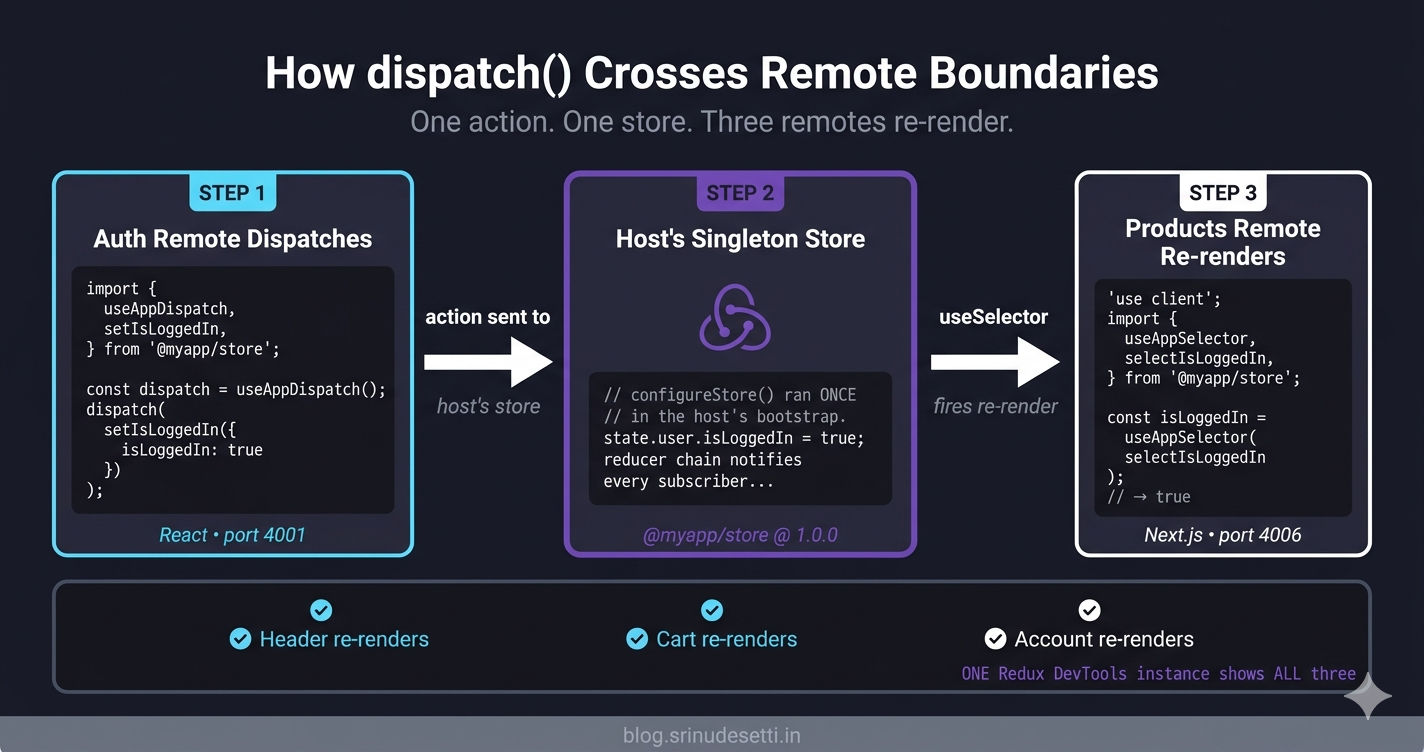
The runtime sequence is what makes the singleton binding hold. The shared scope is webpack's runtime registry of every shared package; every host and every remote contributes its declarations at boot, and the highest-resolution version wins (or, with strictVersion, the build fails).
The whole guarantee comes down to one store object in memory, accessed through one shared module reference. The webpack runtime is what enforces it. Without singleton: true, the runtime would freely load a second copy if a remote requested a different version. With singleton: true AND strictVersion: true, the runtime refuses any version mismatch and surfaces a loud error in the console — easy to catch in CI and impossible to miss in production.
Each Remote Keeps Its Own Standalone Provider
Every remote in this architecture also has its own bootstrap.js with <Provider> — even though the host's Provider already wraps it in production. This duplication exists for one reason: standalone development. A developer working on the Cart remote alone can run cd apps/Cart && npm start and visit https://localhost:4002 directly, where there is no host to provide a <Provider>. The remote's own bootstrap.js wraps itself with one so that useSelector and useDispatch still work in isolation.
The convention is strict: only the remote's standalone bootstrap.js wraps with <Provider>. Components exposed via Module Federation (the ones in the exposes block of webpack.config.js) MUST NOT include a <Provider> in their rendered tree. They rely on the host's provider being the closest ancestor when loaded inside the host.
Debugging the Federated Store
The single most useful debugging tool is the Redux DevTools browser extension (opens in a new tab) — combined with a one-line dev-only window helper.
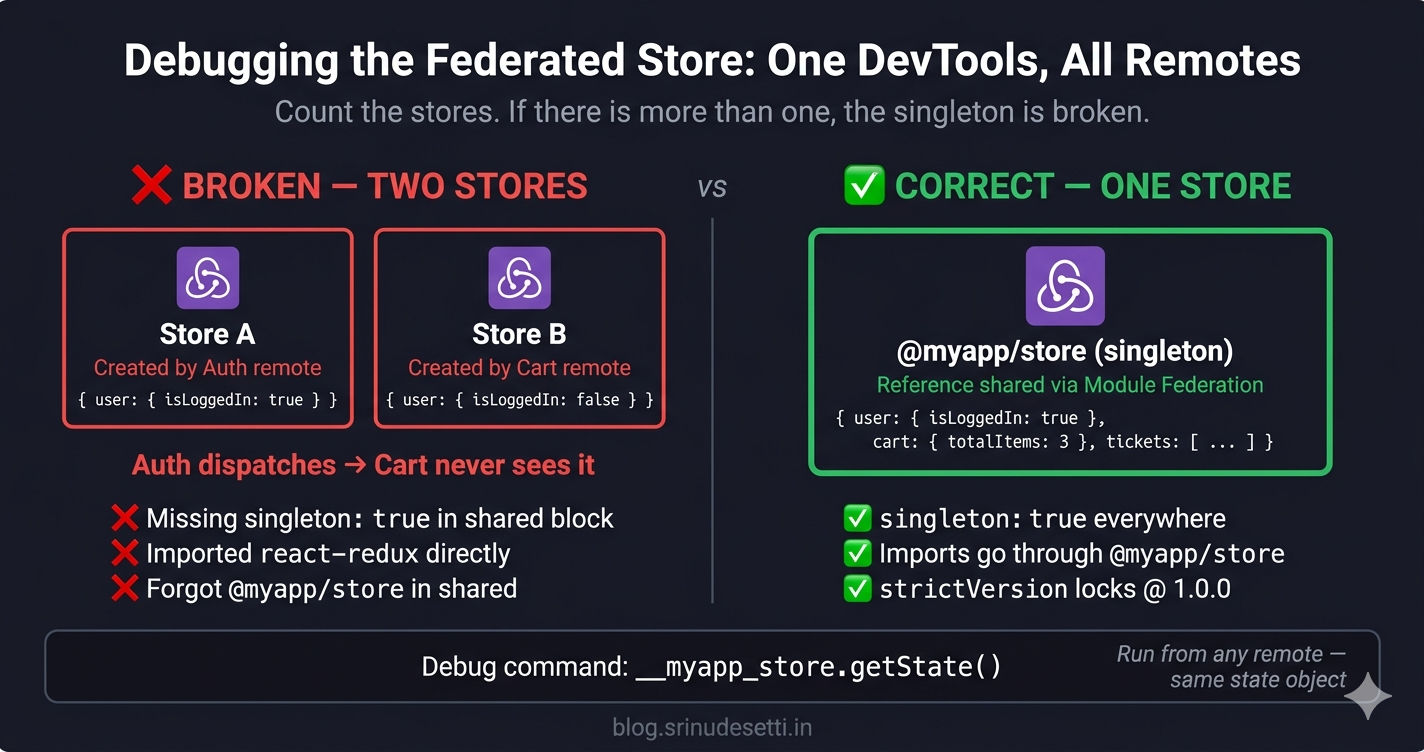
In the browser DevTools console, __myapp_store.getState() dumps the full state at any moment. Every remote's dispatch (Auth, Cart, Products, Orders) shows up in the SAME Redux DevTools instance — proof the singleton is working. If you see two stores in the DevTools Stores panel, the singleton is broken; jump to the gotchas section.
Common Redux Store Micro Frontend Gotchas in Production
After running this pattern across multiple production MFE deployments, eight gotchas account for almost every "state is not propagating" or "store is not working" incident. Every one of them is either a singleton declaration that drifted, a Provider in the wrong place, or a React/Next.js subtlety around when the federated container can run.
If you remember one debugging step: count the stores in Redux DevTools. If there is more than one, the singleton is broken. The fix is always either adding a missing singleton: true flag in some remote's shared block, removing a duplicate <Provider> from an exposed component, or replacing an import { useSelector } from 'react-redux' with import { useSelector } from '@myapp/store'.
What's Next
You now have a complete federated Redux store — @myapp/store package with configureStore, slices, typed hooks, and re-exported react-redux primitives; webpack shared blocks (local + production) with singleton: true and strictVersion: true; a React host wired through bootstrap.js and <Provider>; a Next.js host wired through ClientReduxProvider + next/dynamic with ssr: false; and React + Next.js remotes that read and write the same store with no event bus, postMessage, or localStorage round-trip. The next article — Article 26: Redux Toolkit Slices for MFE State — drills into slice design at scale: how to split a growing store across multiple slices, when to extract a feature into its own slice file, the naming conventions that keep selectors collision-free across remotes, and the patterns for cross-slice derivations using createSelector. After that, Article 27 covers custom hooks that compose multiple selectors into a single reusable contract, and Article 28 wraps Section 4 with permission-based routing built on top of the same federated store.
← Back to Content Security Policy in Next.js Micro Frontend
Continue to Redux Toolkit Slices for MFE State →
Frequently Asked Questions
How do I share a Redux store across micro frontends?
Publish the store as a workspace package (for example @myapp/store) that exports a single configureStore instance, then federate it with Module Federation as a singleton with strictVersion: true and requiredVersion: '1.0.0'. The host imports { store } from @myapp/store inside its entry file (bootstrap.js for a React host, ClientReduxProvider wrapped in next/dynamic with ssr: false for a Next.js host) and wraps the entire app with <Provider store={store}>. Every remote declares the same shared block in its webpack.config.js or next.config.js. At runtime, the first import of @myapp/store loads the package and creates the store; every subsequent import inside any remote receives the same reference. dispatch() in a React Auth remote is visible to useSelector() in a Next.js Products remote within a microtask, with no event bus or postMessage code.
Why does each remote need to declare @myapp/store as singleton in its shared block?
Module Federation matches shared dependencies by package name string at runtime. If only the host declares @myapp/store as a singleton and a remote omits it (or declares it without singleton: true), the remote's webpack bundle includes its own copy of the store package. At runtime you end up with TWO physical store instances — one created by the host, one created by the remote. dispatch() in the remote mutates the remote's store; useSelector() in the host reads from the host's store; they never see each other's updates. The fix is identical declarations in EVERY workspace: 'react', 'react-dom', 'react-redux', '@reduxjs/toolkit', and '@myapp/store' all flagged singleton: true with the same requiredVersion. Adding strictVersion: true on the store turns a silent runtime drift into a deploy-time build failure if any remote ships a different version.
Why does the React host need a separate index.js -> bootstrap.js indirection?
Module Federation needs the shared scope to be resolved before any code that imports a shared dependency runs. If index.js synchronously imports React, react-dom, react-redux, and @myapp/store, webpack tries to evaluate those imports before negotiating the shared scope. That throws Shared module is not available for eager consumption at runtime. The fix is to keep index.js minimal — its only line is import('./bootstrap'). The dynamic import gives webpack a hook to fetch every remote's remoteEntry.js, resolve the shared scope, and only then evaluate bootstrap.js (which contains the React.render call and the imports of react / react-dom / @myapp/store). Both React hosts and React remotes use this two-file pattern; Next.js hosts skip it because Next.js handles the entry-point split internally.
Should an exposed remote component wrap its return in <Provider>?
No. The host already wraps the entire app in <Provider store={store}>, including every federated remote. Wrapping a remote's exposed component in another <Provider> creates a NESTED react-redux context. Both providers point to the same federated store singleton, so state values are consistent, but React emits a warning and useSelector inside that subtree starts reading from whichever Provider is closer in the tree. The convention is: wrap ONLY the remote's standalone bootstrap.js (the file that runs when the remote is opened directly on its own dev server) with <Provider>. Components exposed via Module Federation (CartMFE, MiniCartPreview, OTPVerify) MUST NOT include a <Provider> in their rendered tree — they rely on the host's provider being the closest ancestor when loaded inside the host.
What happens if a Next.js remote tries to read the federated store on the server?
It crashes during next build with ReferenceError: window is not defined. Module Federation containers attach to the window object — the federated @myapp/store package transitively touches window through react-redux internals. On the Next.js server runtime, window does not exist. Importing @myapp/store at the top of a server-rendered page throws on the very first build. The pattern that works is: keep federated state strictly client-side. Wrap the Provider in a ClientReduxProvider component and import it via next/dynamic with ssr: false. The first paint is a plain HTML shell with no user-specific state; the client takes over once the federated container loads. The same trade-off is covered in detail in the Next.js-specific guide on the shared Redux store in Next.js Module Federation. SSR continues to work for everything that does NOT depend on federated state — product titles, marketing copy, blog posts.
Why import useSelector from @myapp/store instead of react-redux directly?
The store package re-exports Provider, useSelector, useDispatch from react-redux, plus typed wrappers useAppSelector and useAppDispatch. Routing every Redux primitive through @myapp/store guarantees that Module Federation's singleton negotiation handles the call. If a remote imports react-redux directly, webpack might bundle a separate copy at build time. The bundled copy and the federated copy disagree on internal state — the bundled useSelector subscribes to whichever store the bundled Provider sees (which may be a fresh one), while the federated useSelector subscribes to the host's singleton. Symptoms include useSelector returning stale values, undefined errors after a deploy that worked locally, or Redux DevTools showing two stores in the Stores panel. Centralizing all Redux primitives behind @myapp/store also lets you upgrade react-redux major versions without touching every remote's import statements.
How do I debug when state is not propagating between micro frontends?
Three checks in order. First, install the Redux DevTools browser extension and open the Stores panel — exactly one store should appear. Multiple stores means singleton negotiation failed and you have a duplicate copy of @myapp/store, react-redux, or @reduxjs/toolkit somewhere. Second, expose the store on window in development (window.__myapp_store = store) and run __myapp_store.getState() from any page; both Auth and Cart should mutate the same object when their respective dispatches fire. Third, audit the shared block in every webpack.config.js and next.config.js — every remote MUST declare @myapp/store, react, react-dom, react-redux, and @reduxjs/toolkit as singletons with the exact same requiredVersion. The most common bug is one remote forgetting react-redux: { singleton: true } in its shared block, which silently bundles its own react-redux and creates a second store instance even though @myapp/store is correctly federated. Adding strictVersion: true to @myapp/store catches the version-drift category at deploy time instead of in production.