Published: October 15, 2026 · 5 min read
Kubernetes Introduction — Cluster, Nodes and Autoscaling
Docker runs your app in a container on one machine. But what if that machine dies at night? What if traffic doubles during a sale? Kubernetes answers both. It runs your containers on a group of servers and keeps them alive for you.
Here is the whole class in short:
- A cluster is a group of servers that work together as one.
- A cluster has two kinds of machines: master nodes and worker nodes.
- DevOps engineers and developers give their tasks to the master node.
- The master node manages the worker nodes.
- The master node schedules those tasks onto the worker nodes.
- Your containers are created on the worker nodes.
- The master node is also called the control plane node.
- You connect to a cluster in two ways: kubectl, or the web UI dashboard.
- Autoscaling means the cluster adds and removes containers by itself.
- A cluster gives you high availability — a machine can fail and your app keeps running.
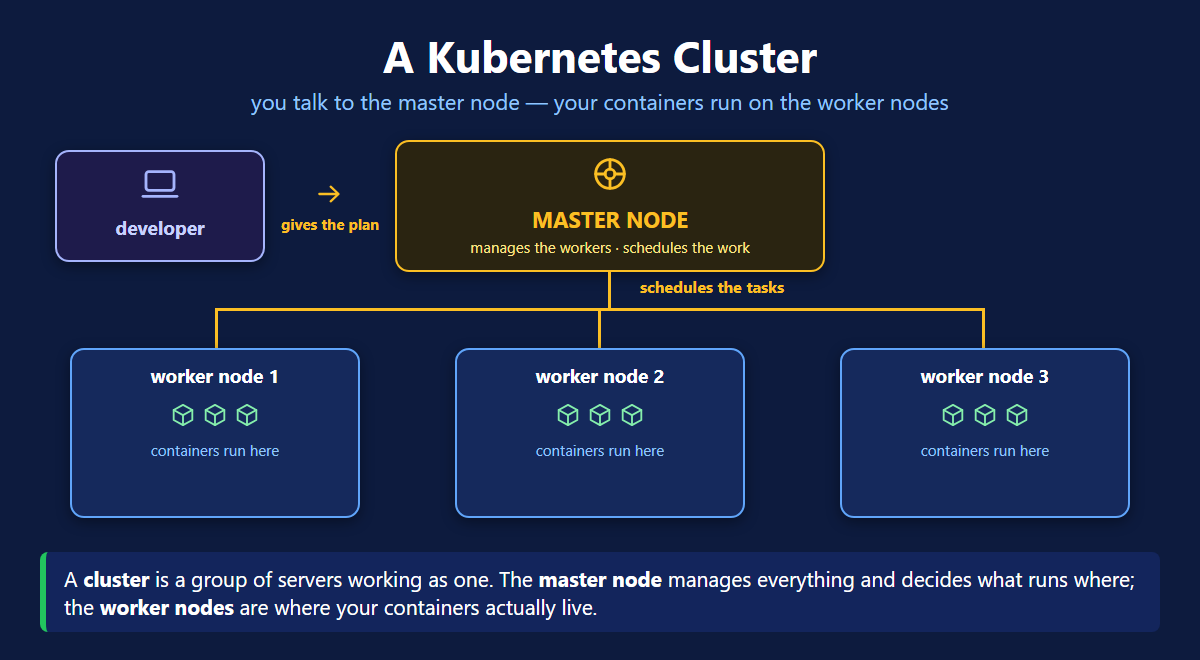
What Is a Cluster?
A cluster is a group of servers that work together as one.
One server has two problems:
- It dies, and your app dies with it.
- It fills up, and you are stuck.
A cluster fixes both. One machine dies, the rest keep going. Need more power? Add another machine.
Master Node and Worker Nodes
A cluster has two kinds of machines.
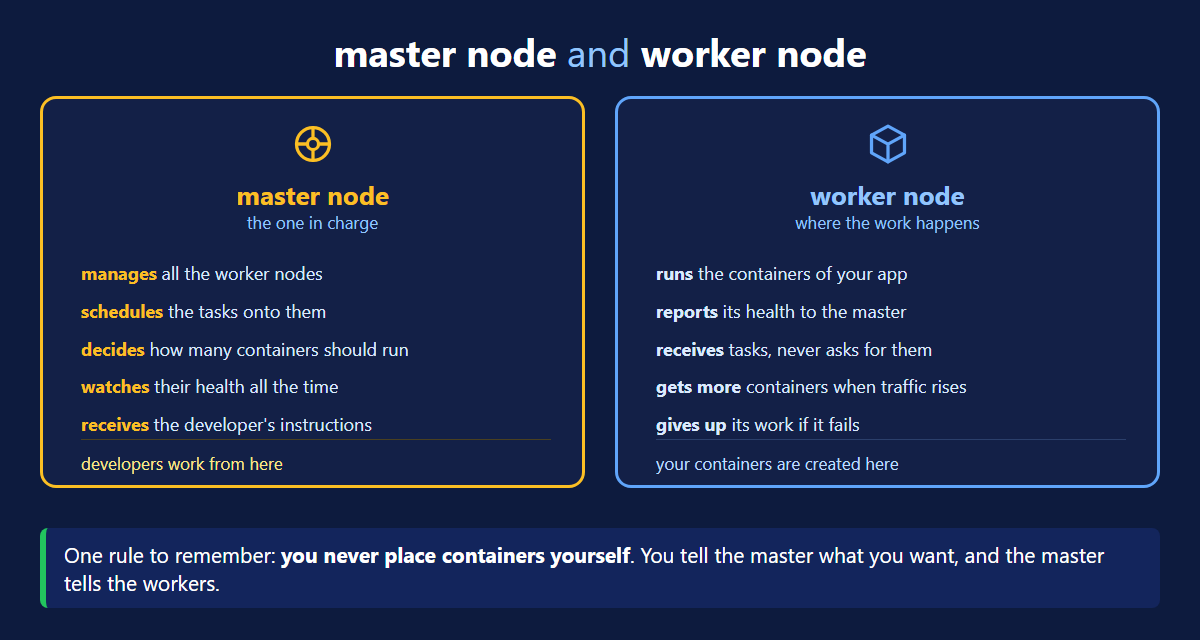
Master node
- manages the worker nodes
- schedules the tasks onto them
- takes your instructions — you work from here
Worker node
- runs your containers
- reports its health to the master
- decides nothing by itself
You give the task to the master. The master gives it to a worker. Your containers are created on the worker.
Think of a restaurant. The master node is the head chef. The worker nodes are the cooking stations. You give your order to the chef, not to a station.
Autoscaling
auto means by itself. scaling means changing the size.
So autoscaling means the cluster adds and removes containers by itself, based on the requests coming in.
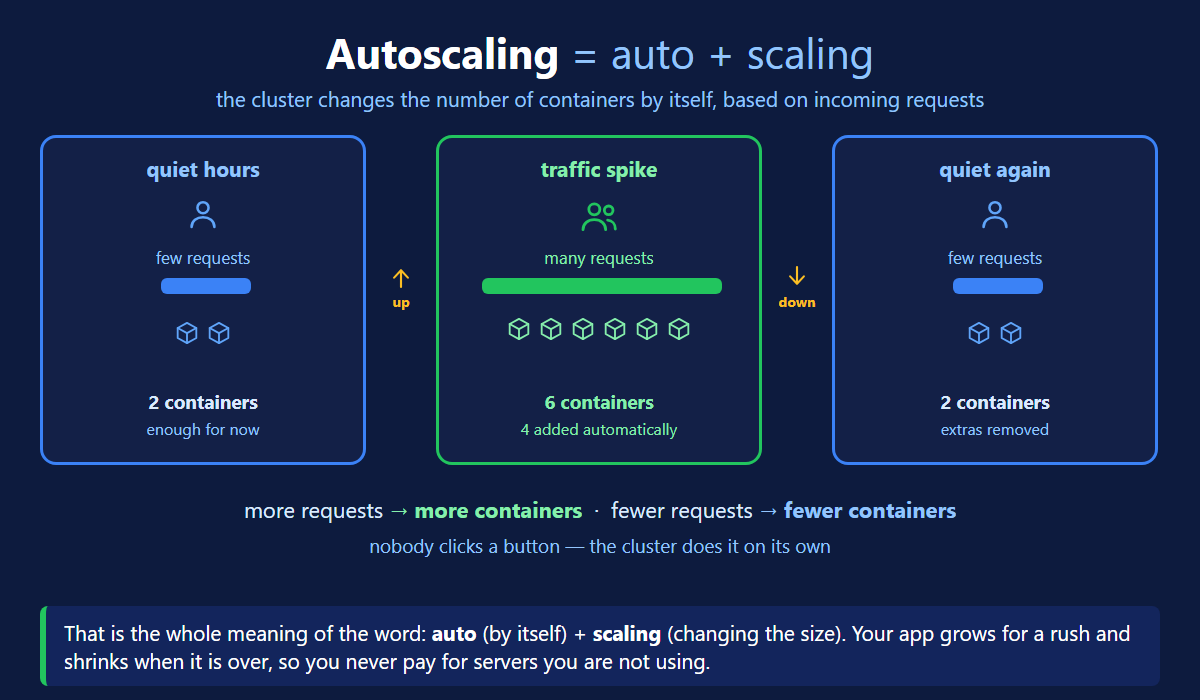
An example. Tuesday morning, few visitors. Two containers are enough.
Then a sale starts. Thousands of people arrive. The cluster starts four more containers. Now there are six, and the site stays fast.
The sale ends. The cluster removes those four. Back to two.
Nobody clicked a button. You set the rule once, and the cluster does the rest.
| Who reacts to the traffic | |
|---|---|
| Without autoscaling | you — at 2am, if you are awake |
| With autoscaling | the cluster — day and night |
High Availability
High availability means your app stays up even when a machine dies.
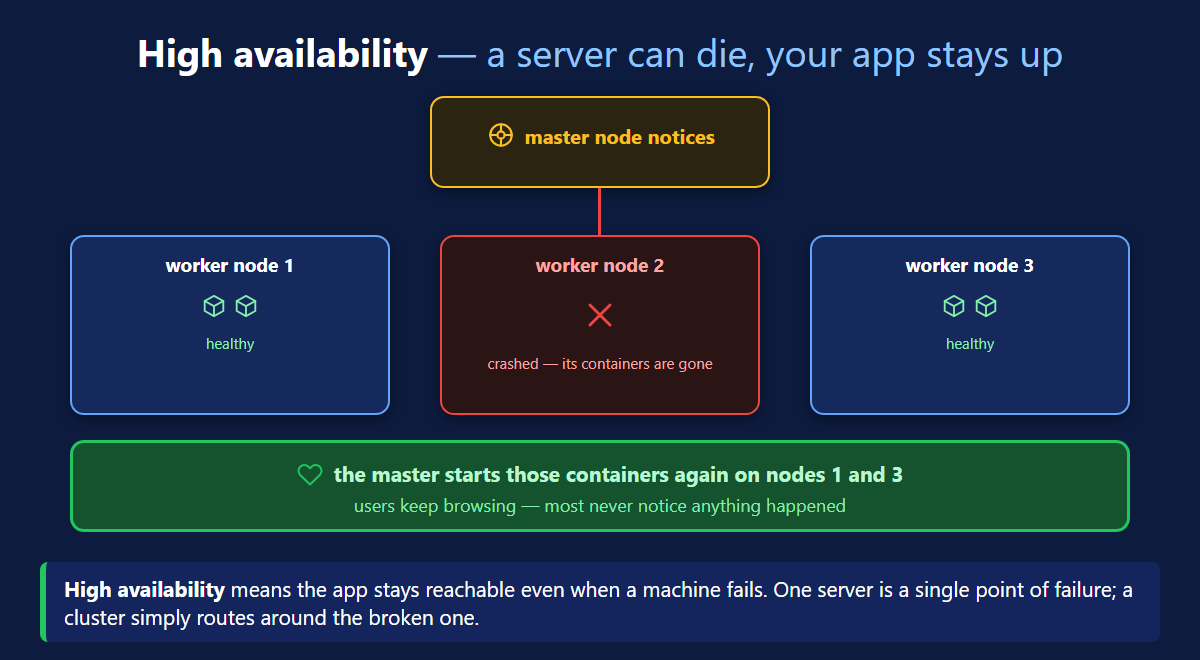
Worker 2 crashes. The master sees it. It starts those containers again on worker 1 and worker 3. Users keep browsing.
On one server this is an outage. In a cluster it is a normal day.
The Control Plane Node
The master node has a second name: control plane node. Same machine.
It handles all the cluster work. The workers handle the app work.
You will hear both names. New documents say control plane node. Most classes still say master node.
Two Ways to Connect
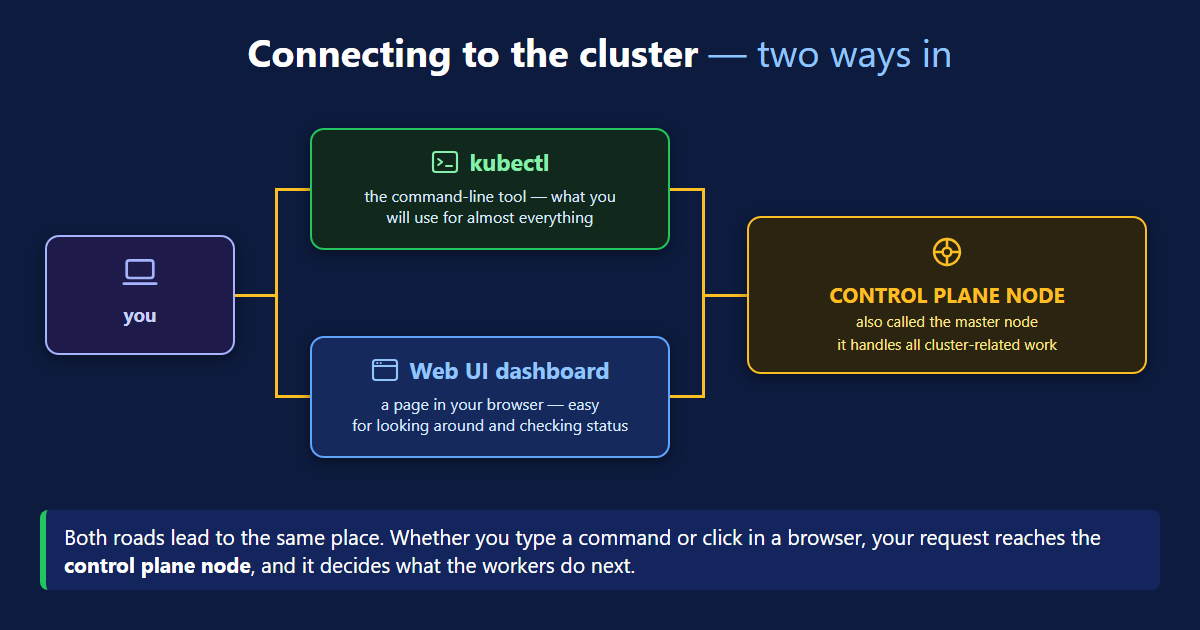
- kubectl — the command line tool. You type a command. You will use this most.
- Web UI dashboard — a page in your browser. You click instead of typing. Good for looking around.
Both reach the same control plane node.
Do not mix up two names. kubectl is the tool you use. kubelet is a small agent that runs on every node. They sound the same, but they are different things.
Quick Recap
| Term | Meaning |
|---|---|
| Cluster | a group of servers working as one |
| Master node | manages the workers and schedules the tasks |
| Worker node | runs your containers |
| Control plane node | another name for the master node |
| Autoscaling | the cluster adds and removes containers by itself |
| High availability | the app keeps running when a machine fails |
| kubectl | the command line tool |
| Web UI dashboard | the browser page |
What's Next
That is the vocabulary for the whole series. Next we open the master node and the worker node, and look at the parts inside. The official Kubernetes overview (opens in a new tab) says the same things in more formal words.
Continue to Kubernetes Architecture →
Frequently Asked Questions
What is a cluster in Kubernetes?
A cluster is a group of servers that work together as one. It has two kinds of machines: master nodes and worker nodes. The master node manages the cluster. The worker nodes run your containers. You use a cluster because one server is risky. If it dies, your app dies with it.
What is the master node in Kubernetes?
The master node is the machine in charge. It manages the worker nodes and schedules the tasks onto them. It also takes your instructions, so developers work from here. You never pick the server yourself. You tell the master what you want, and it decides which worker runs it.
What is a worker node in Kubernetes?
A worker node is a machine that runs your containers. Your containers are created here, not on the master. The worker takes tasks from the master and reports its health back. It does not decide anything by itself. If a worker dies, the master starts its containers again on another worker.
What is autoscaling in Kubernetes?
Auto means by itself. Scaling means changing the size. So autoscaling means the cluster adds and removes containers by itself, based on the requests coming in. More traffic, more containers. Less traffic, fewer containers. You set the rule once and nobody has to click anything after that.
How does a Kubernetes cluster give high availability?
High availability means your app stays up even when a machine dies. The master node watches every worker. When one crashes, the master starts those containers again on the healthy workers. Traffic goes to the copies that are still alive. On a single server this would be an outage. In a cluster it is a normal day.
What is the control plane node?
The control plane node is another name for the master node. Same machine, two names. It handles all the cluster work, while the workers handle the app work. New documents usually say control plane node. Older ones and most classes still say master node. Both are correct.
How do I connect to a Kubernetes cluster?
There are two ways. The first is kubectl, the command line tool. You type a command and it goes to the control plane node. This is what you will use most of the time. The second is the Web UI dashboard, a page you open in a browser and click around in. It is good for looking at the cluster, but you cannot script it.