Published: October 25, 2026 · 7 min read
Kubernetes Service Explained — ClusterIP to LoadBalancer
In the last class we made a Pod. We could not open it in a browser.
This class fixes that.
Here is the whole class in short:
- Pods are short lived. They are deleted and recreated all the time.
- Every new Pod gets a new IP address. The old one never comes back.
- A Pod IP is also private. Nothing outside the cluster can reach it.
- A Service is one fixed address in front of a changing set of Pods.
- A Service finds Pods by label, not by name.
- There are three types: ClusterIP, NodePort and LoadBalancer.
- ClusterIP is the default — inside the cluster only.
- NodePort opens a port on every node.
- LoadBalancer asks the cloud for a public address.
The Problem
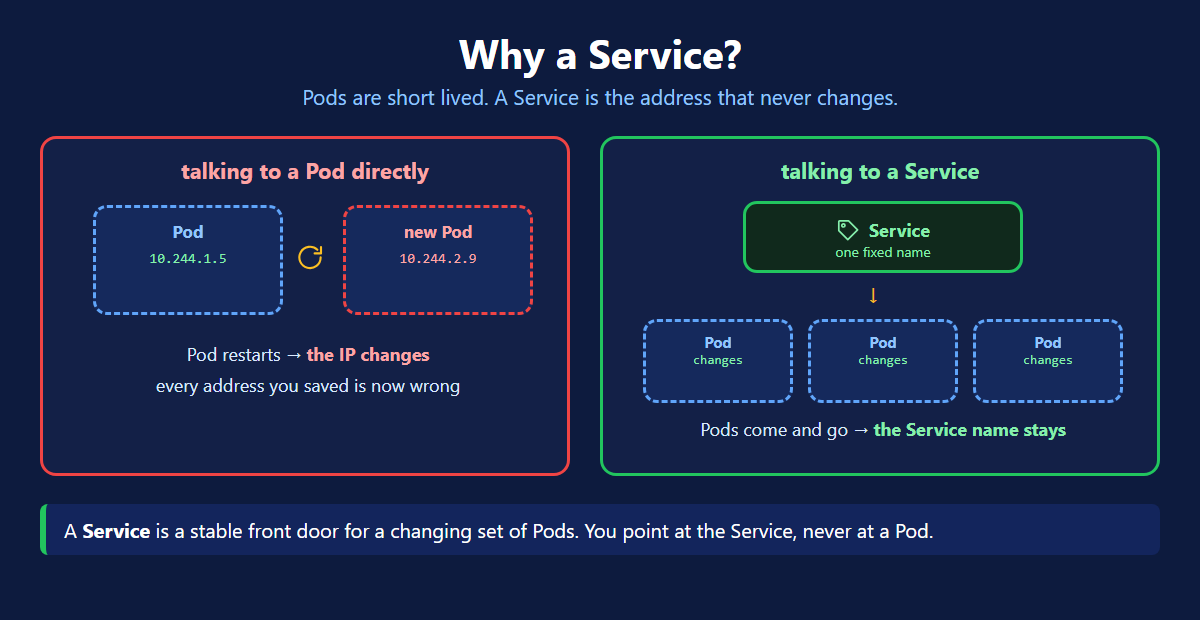
A Pod is not permanent. Kubernetes deletes and recreates Pods all the time:
- the node dies
- you deploy a new version
- you scale down, then up again
Every new Pod gets a brand new IP. So you can never save a Pod IP anywhere. It will be wrong tomorrow.
And Pod IPs are private to the cluster. Even while the Pod is alive, a user cannot reach it.
Two problems, one answer: a Service.
How a Service Finds Pods
This is the part that confuses everyone, so look at it before the YAML.
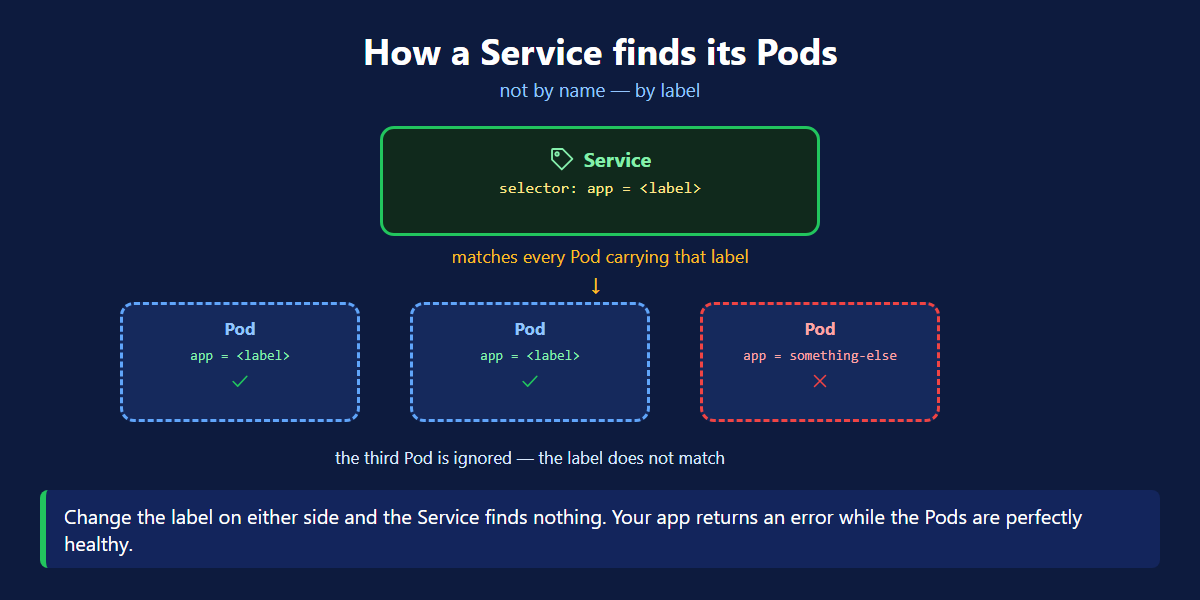
A Service does not know Pod names. It looks for Pods whose labels match its selector.
That is the whole connection. Your pod.yaml has a label. Your service.yaml has a selector. If they match, they are joined.
Change the label on either side and the Service finds nothing. Your app returns an error while the Pods are perfectly healthy. This is the number one Service bug.
The Three Types
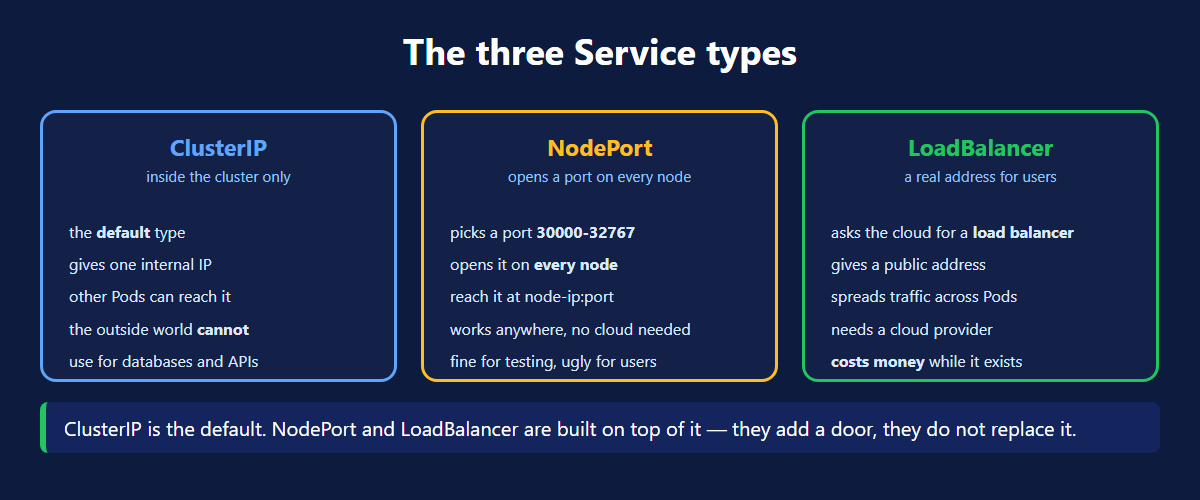
| Type | Who can reach it | Use it for |
|---|---|---|
| ClusterIP | inside the cluster only | databases, internal APIs |
| NodePort | anyone who can reach a node | testing, clusters with no cloud |
| LoadBalancer | the public internet | real apps with real users |
1. ClusterIP — the default
One internal address. Other Pods reach it by name. The outside world cannot.
Leave type out of your YAML and this is what you get.
2. NodePort — a port on every node
Kubernetes picks a port between 30000 and 32767 and opens it on every node. You reach the app at any node's IP plus that port.
It works anywhere, even on a laptop cluster. It is also ugly — nobody wants to visit a site on port 31472.
3. LoadBalancer — a real address
The cloud gives you a public address in the EXTERNAL-IP column. Open it in a browser and your app is live.
They Stack On Each Other
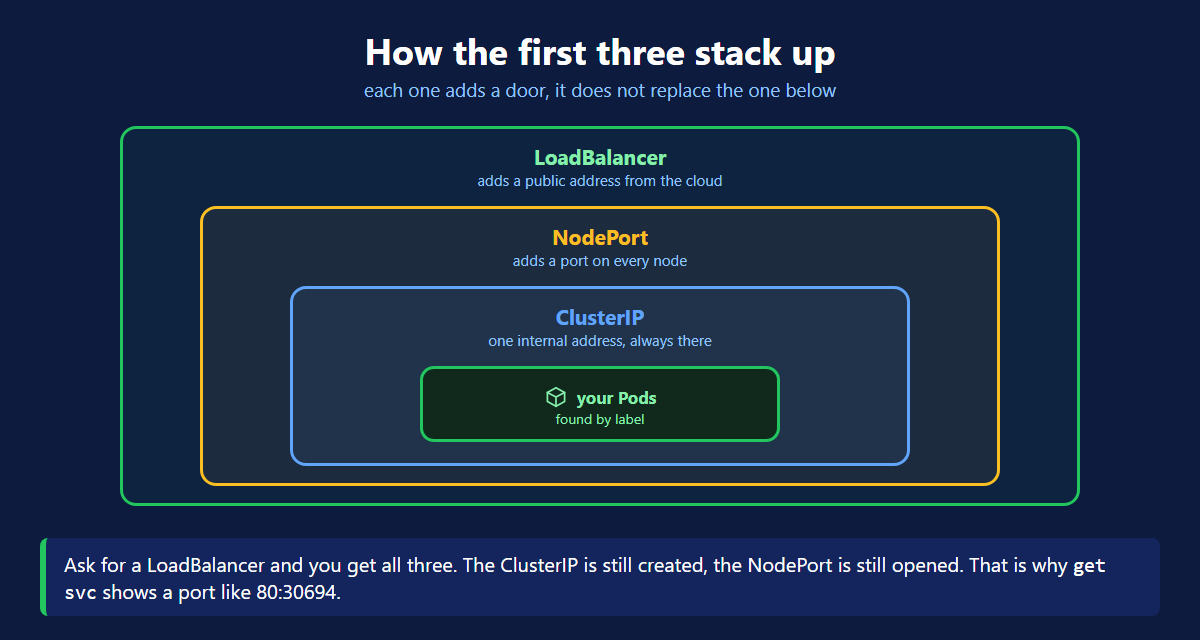
NodePort and LoadBalancer do not replace ClusterIP. They add to it.
Ask for a LoadBalancer and you get all three. A ClusterIP inside, a NodePort on every node, a public address on top.
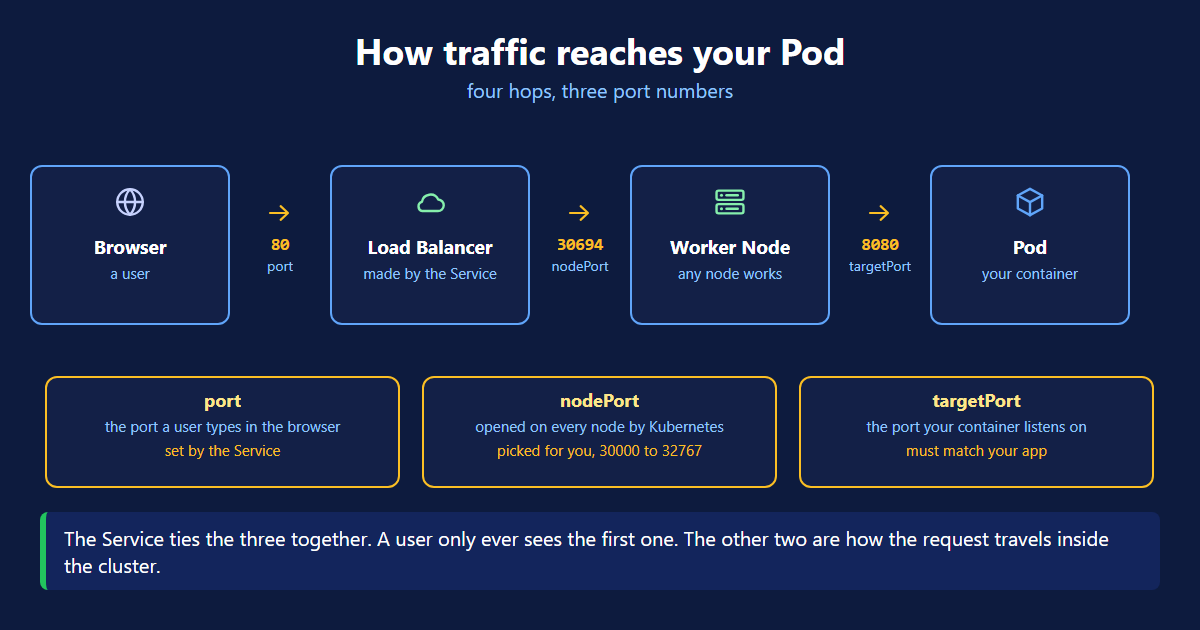
That is why kubectl get svc showed 80:30694/TCP. The 80 is the Service port. The 30694 is the NodePort it opened underneath.
Which Type Do You Pick?
Ask one thing: who needs to reach this app?
- Only other Pods need it. Use ClusterIP. A database, a cache, an internal API. Nothing outside the cluster should see it.
- You need it right now, to test. Use NodePort. No cloud setup, no waiting. Open the node IP and the port.
- Real users need it. Use LoadBalancer. One public address, and traffic spread across all your Pods.
Start with NodePort, because it works on every cluster. Move to LoadBalancer when real users need the app. Nobody is going to type a node IP and a five digit port into a browser.
One warning about LoadBalancer. Every LoadBalancer Service asks the cloud for its own load balancer. Ten such Services means ten load balancers, and ten line items on the bill. For one or two apps that is fine. Past that, teams put a single Ingress in front and leave every Service as ClusterIP.
port vs targetPort
Two ports in the YAML confuse people.
| Field | Meaning |
|---|---|
| port | the port on the Service — what callers use |
| targetPort | the port your container listens on |
Traffic arrives at port and Kubernetes forwards it to targetPort.
targetPort must match the containerPort in your Pod. If it does not, the connection goes nowhere.
The Commands
kubectl get endpoints is the one to remember. It shows which Pods the Service actually found.
Empty list = your selector does not match your labels. That is your bug.
A LoadBalancer is a real cloud load balancer and it costs money every hour it exists. Delete it with kubectl delete -f service.yaml as soon as you no longer need it.
Kubernetes Service Quick Reference
| Command | What it does |
|---|---|
kubectl apply -f service.yaml | create or update the Service |
kubectl get svc | list Services, types and EXTERNAL-IP |
kubectl get svc -o wide | same, plus the selector |
kubectl describe svc <name> | full details and events |
kubectl get endpoints <name> | which Pods it found |
kubectl delete -f service.yaml | delete it |
What's Next
A Pod runs your app. A Service gives it an address that does not change, and decides who can reach it. The official Service documentation (opens in a new tab) and the Service types page (opens in a new tab) go deeper on each type.
Continue to Kubernetes Namespace →
Frequently Asked Questions
Why do Kubernetes pods need a Service?
Because pods are short lived. A pod is thrown away and recreated when a node fails, when you deploy, or when you scale. Every new pod gets a new IP address. Any address you saved is wrong the next day. A Service gives you one fixed name that always points at whichever pods are alive right now. Pod IPs are also private. A Service is how you open an app to real users.
What are the three types of Kubernetes Service?
ClusterIP, NodePort and LoadBalancer. ClusterIP is the default and is reachable only inside the cluster. NodePort opens a port between 30000 and 32767 on every node. You reach the app at a node IP plus that port. LoadBalancer asks your cloud provider for a real load balancer with a public address. They are not three separate things. NodePort includes a ClusterIP, and LoadBalancer includes both.
What is ClusterIP in Kubernetes?
ClusterIP is the default Service type. It gives your pods one internal IP and one DNS name that other pods can use. Nothing outside the cluster can reach it. Use it for anything internal, such as a database or an API only your own services call. If you do not write a type in your YAML, you get a ClusterIP.
What is the difference between NodePort and LoadBalancer?
NodePort opens the same port on every node, somewhere between 30000 and 32767. You reach the app at a node IP plus that port. It works on any cluster, including a laptop, and it is free. LoadBalancer goes further. It asks your cloud provider for a real load balancer with a public address. That spreads traffic across your nodes. LoadBalancer needs a cloud provider and it costs money while it exists.
Which Kubernetes Service type should I use?
Ask who needs to reach the app. If only other Pods need it, use ClusterIP. If you just want to test it quickly on any cluster, use NodePort. If real users need it, use LoadBalancer. Remember that each LoadBalancer Service creates its own cloud load balancer, so ten of them means ten bills.
What is the difference between port and targetPort in a Service?
port is the port on the Service itself, the one callers use. targetPort is the port your container is listening on inside the pod. Traffic arrives at port and Kubernetes forwards it to targetPort. They are often different. Users hit port 80 while the app inside listens on 8080. The targetPort must match the containerPort in your pod, or the connection goes nowhere.
My Service returns an error but the pods are running. Why?
Nine times out of ten the selector does not match the pod labels. A Service does not know pod names, it finds pods by label. If the service.yaml selector and the pod labels do not agree, the Service matches nothing. Run kubectl get endpoints on the Service. An empty list means it found no pods, so the labels are the problem. Also check that targetPort matches the containerPort.