Published: October 6, 2026 · 10 min read
Docker Volumes Explained — Named, Anonymous & Bind Mounts
Here's an experiment that hurts: run MongoDB in a container, insert a document, delete the container — and watch your database vanish. This guide gets Docker volumes explained through that exact pain, straight from our class session on EC2: first the data-loss problem with a real mongo:8.2 container, then the fix with a named volume that survives docker rm, the mystery of anonymous volumes (those hash-named things flooding docker volume ls), and bind mounts for folders you control — each with a clear diagram. The networks lesson covered how containers talk; this one covers how they remember.
In this guide, you will:
- Watch a MongoDB container lose its data the moment it's removed — and understand exactly why
- Fix it with a named volume:
-v srinu-volume:/data/db, then destroy and resurrect the container with the data intact - See where volumes really live:
/var/lib/docker/volumes/srinu-volume/_data, WiredTiger files and all - Solve the mystery of anonymous volumes — why mongo creates hash-named volumes you never asked for
- Learn bind mounts and the one-character rule that separates them from named volumes
- Master the 4 commands:
volume ls,create,inspect,rm
Why Docker Volumes Exist — The Data Loss Problem
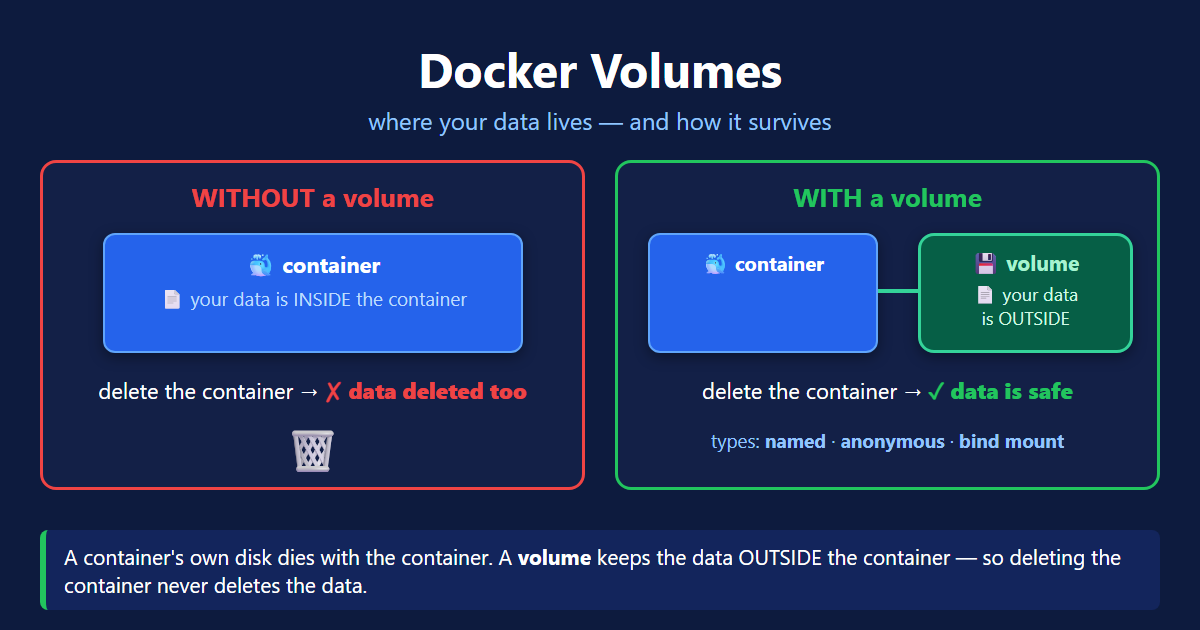
A container's filesystem has a thin writable layer on top of the image — every file your app writes lands there. The catch: that layer belongs to the container, and docker rm deletes them together.
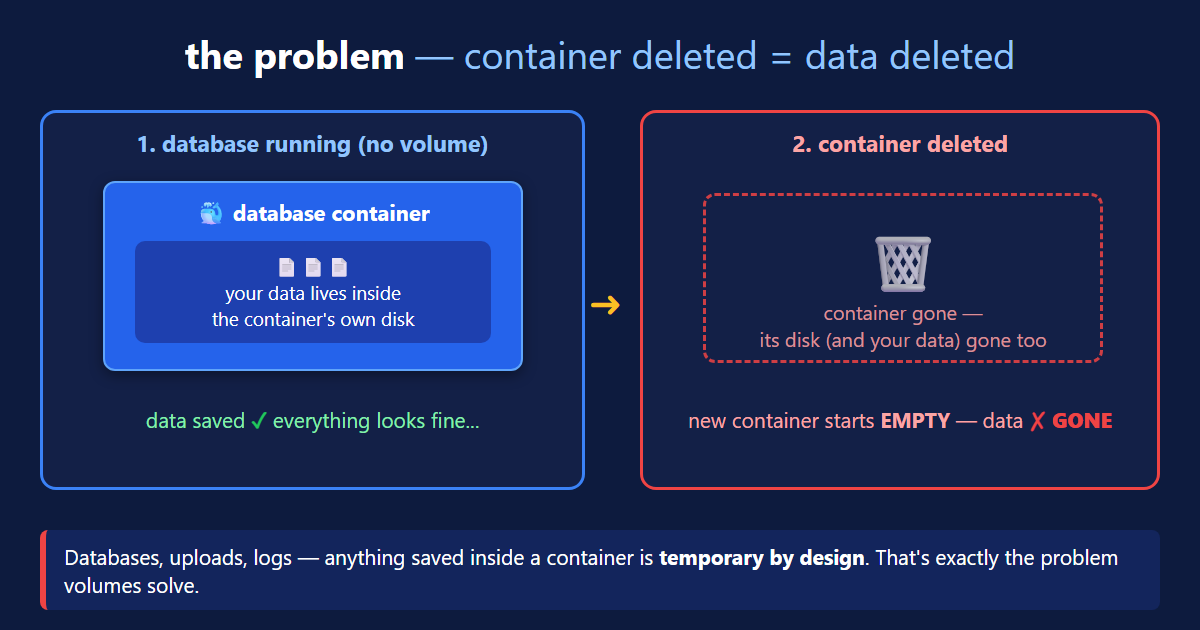
Here's the experiment exactly as we ran it in class:
This isn't a bug — containers are disposable by design. Deleting one is supposed to leave no trace. The problem is that databases are the opposite: their entire job is remembering. Volumes are how both stay true.
The 3 Ways to Keep Data
| Type | -v syntax | Who picks the location | Verdict |
|---|---|---|---|
| Named volume | -v srinu-volume:/data/db | Docker (/var/lib/docker/volumes/...) | ✅ the production pattern |
| Anonymous volume | (none — auto-created) | Docker, with a random hash name | ⚠️ data gets orphaned |
| Bind mount | -v /home/ubuntu/mongo-data:/data/db | You — any host folder | ✅ dev & direct file access |
Named Volumes — The MongoDB Practical
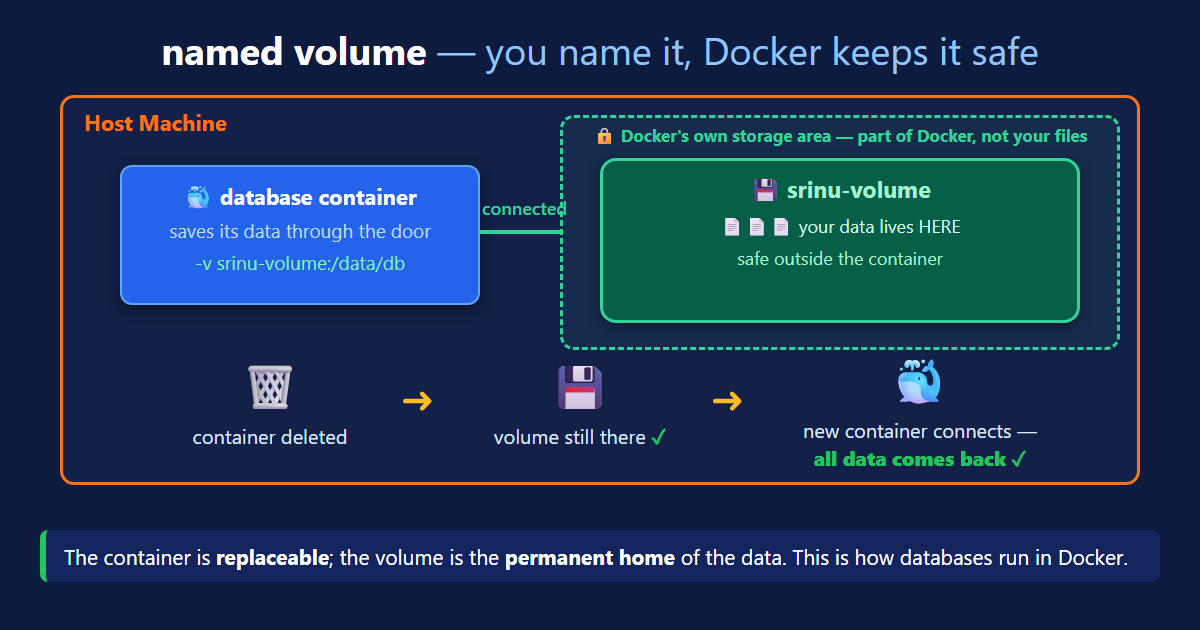
One flag changes everything — this is the exact command from class:
Now the full destroy-and-resurrect cycle, step by step:
And the part that makes it click — the volume is just a folder on the host. We went and looked:
Memory hook: the container is a hotel room — stripped and reset for the next guest. The volume is the locker downstairs: your stuff stays until you empty it, no matter how many guests pass through the room.
Anonymous Volumes — The Mystery Hashes
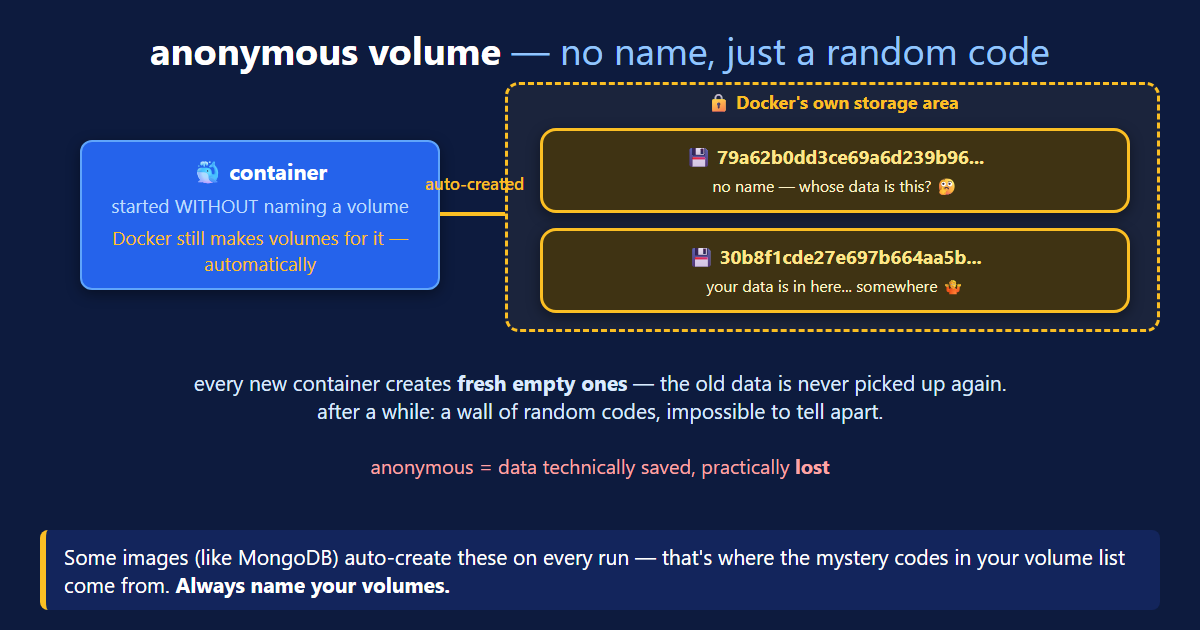
In class, docker volume ls showed something strange: volumes we never created, named like 79a62b0dd3ce69a6d... Where did they come from?
Bind Mounts — Your Folder, Your Rules
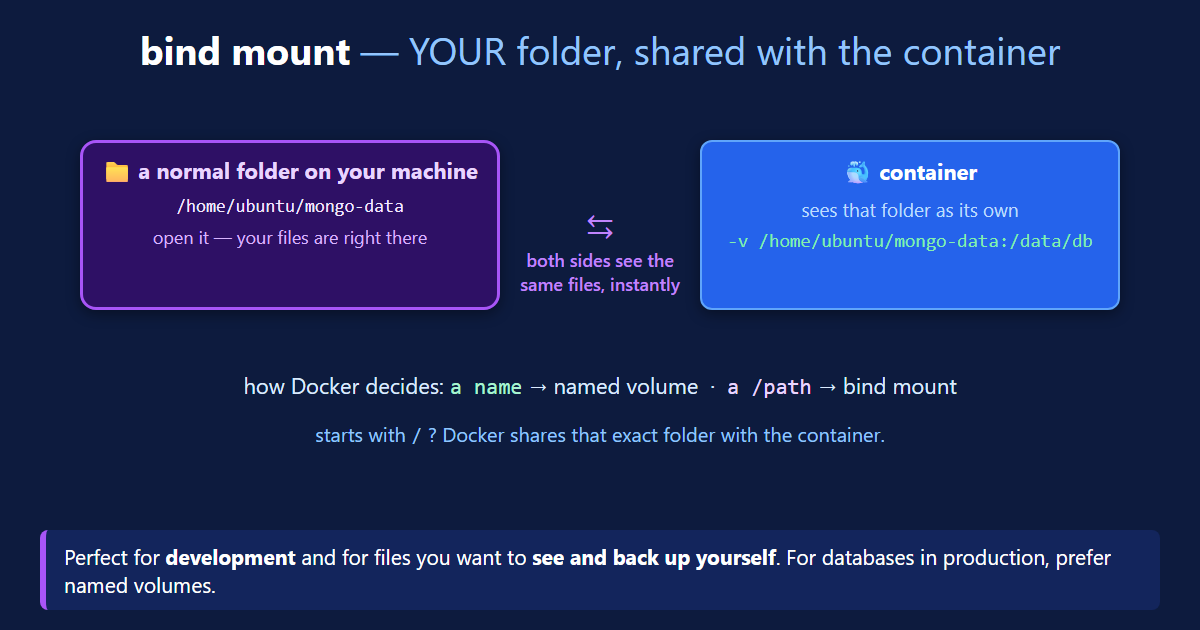
The entire named-vs-bind decision comes down to one character — compare the two:
The Docker Volume Commands
Same noun-verb grammar as networks — docker volume <verb>:
And the whole lesson as one practiceable block:
Docker Volumes Quick Reference
| I want to... | Command |
|---|---|
| List all volumes | docker volume ls (no volume ps!) |
| Create a volume | docker volume create app-data |
| See where it lives + details | docker volume inspect app-data |
| Attach it to a container | docker run -v app-data:/data/db mongo:8.2 |
| Bind-mount my own folder | docker run -v /home/ubuntu/mongo-data:/data/db mongo:8.2 |
| Delete a volume (and its data) | docker volume rm app-data |
| Remember | Rule |
|---|---|
docker rm container | volume survives |
docker volume rm | data is gone for real |
name: before the colon | named volume |
/path: before the colon | bind mount |
hash names in volume ls | anonymous volumes (an image's VOLUME instruction) |
What's Next
You now own the full data story: why a container's writable layer dies with docker rm, how -v srinu-volume:/data/db moves the data to /var/lib/docker/volumes/srinu-volume/_data where it outlives any container, why mongo's VOLUME instruction floods your machine with anonymous hashes, and when a bind mount's /path: beats a named volume's name:. Full details live in the official volumes documentation (opens in a new tab) and bind mounts guide (opens in a new tab), and the mongo image page (opens in a new tab) documents the /data/db convention we used. Next up, the pieces come together: networks + volumes + multiple containers = real applications.
← Back to Docker Network Types
Continue to Docker Multi-Stage Builds →
Frequently Asked Questions
What is a Docker volume and why do containers lose data without one?
Every file a container writes goes into its writable layer — a thin disk glued to that one container — and docker rm deletes the writable layer together with the container. So a MongoDB container without a volume loses every database the moment it is removed: in our class demo, db.users.insertOne({name:"srinu"}) was there before docker rm and show dbs no longer listed users afterwards. A Docker volume solves this by storing the data outside the container, in a folder managed by Docker on the host (/var/lib/docker/volumes/...), mounted into the container at a path like /data/db. The container becomes replaceable; the volume is the permanent home of the data.
What is the difference between a named volume and a bind mount?
Both put data outside the container; the difference is who picks the location. A named volume (-v srinu-volume:/data/db) is managed by Docker — it lives under /var/lib/docker/volumes/srinu-volume/_data, and Docker handles permissions and location; best for databases and production. A bind mount (-v /home/ubuntu/mongo-data:/data/db) mounts an exact host folder you chose — you can ls the files directly, back them up, or live-sync source code during development. The syntax rule: if the part before the colon is a plain name it's a named volume; if it starts with / or ./ it's a bind mount.
What is an anonymous Docker volume?
An anonymous volume is one Docker creates automatically with a random hash name, like 79a62b0dd3ce69a6d2... It happens when an image declares VOLUME paths in its Dockerfile and you run it without -v: the mongo image declares /data/db and /data/configdb, so every mongo container silently creates up to two anonymous volumes — that is why docker volume ls in class showed a wall of hashes. They are a trap: each new docker run creates fresh empty ones (old data is never reattached), and after a while you cannot tell which hash held what. The data is technically saved but practically lost — always name your volumes.
Where does Docker store volume data on the host machine?
Named and anonymous volumes live under /var/lib/docker/volumes/ on the host — each volume is a folder named after the volume (or its hash), with the actual files inside a _data subfolder. In class we verified it with sudo: /var/lib/docker/volumes/srinu-volume/_data contained MongoDB's real storage files — WiredTiger.wt, collection-*.wt, index-*.wt, journal/. You can also find the exact path for any volume with docker volume inspect, which prints it as the Mountpoint field. Bind mounts are different: they live wherever you pointed them, like /home/ubuntu/mongo-data.
How do I persist MongoDB data in Docker?
Mount a named volume over MongoDB's data directory: docker run -d --name mongodb -v srinu-volume:/data/db mongo:8.2. Mongo writes everything to /data/db inside the container, and the volume redirects those writes to the host. The proof from class: insert a document, docker stop + docker rm the container completely, then start a brand-new container with the same -v srinu-volume:/data/db — show dbs lists users again and db.users.find() returns the same document with the same ObjectId. The container was destroyed and replaced; the data never moved.
How do I create, inspect, and delete a Docker volume?
Four commands, same noun-verb grammar as networks: docker volume ls lists all volumes (anonymous ones show as hashes); docker volume create app-data makes one explicitly (though -v app-data:/path also auto-creates it on first use); docker volume inspect app-data shows the details, most usefully Mountpoint — the real host folder; docker volume rm app-data deletes the volume and its data, and fails with "volume is in use" while a container still uses it, so remove the container first. Watch the spelling: docker volume ps and docker volumes are not commands — both failed live in class.
Does docker rm delete the volume too?
No — and that is the whole point. docker rm deletes the container and its writable layer, but every volume attached to it stays on disk: in class, docker rm mongodb removed the container while docker volume ls still showed srinu-volume, and a new container with the same -v got all the data back. Volumes are only deleted when you ask explicitly: docker volume rm <name> removes one (data included), and docker rm -v <container> also removes the container's anonymous volumes. That independence is what makes containers disposable and data permanent.