Published: October 26, 2026 · 8 min read
Kubernetes ReplicaSet vs ReplicationController Explained
So far we created Pods by hand. That was fine for learning.
In a real cluster you never do that.
Here is the short version:
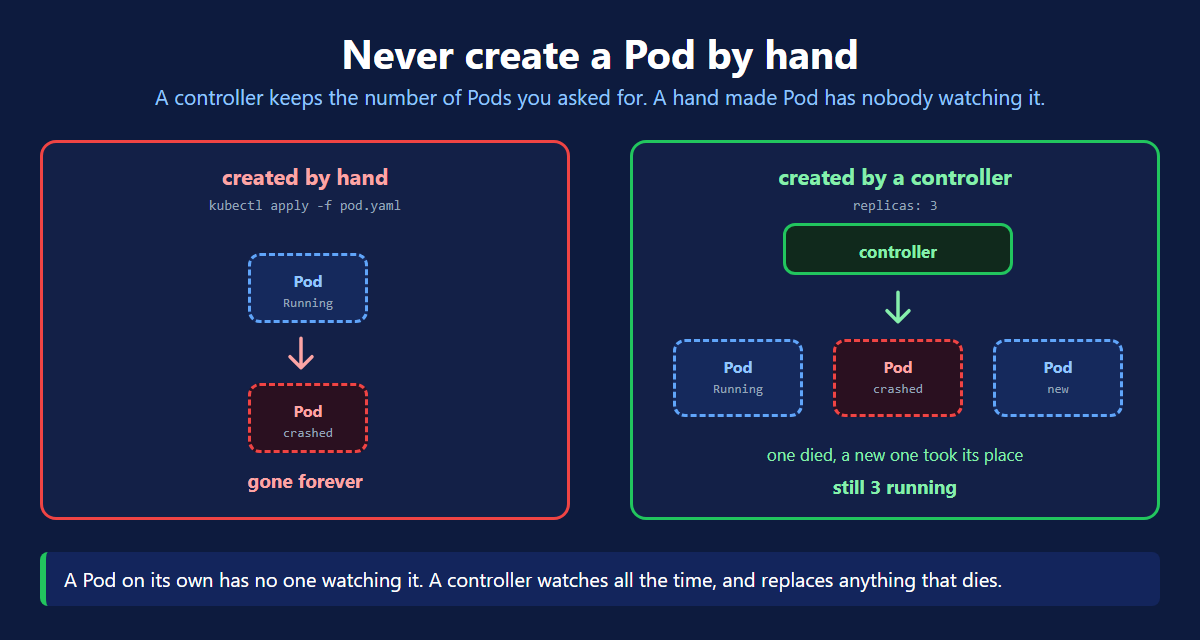
- A Pod you create by hand has nobody watching it. It dies, it stays dead.
- Always create Pods through a controller.
- A ReplicationController keeps a fixed number of Pods running. It is the old one.
- A ReplicaSet does the same job. It is the replacement.
- Both replace any Pod that dies, and both let you scale up and down.
- The real difference is the selector.
- ReplicationController matches one value. ReplicaSet can match many.
The Problem With a Hand Made Pod
Run kubectl apply -f pod.yaml and you get one Pod. That is all you get.
Now the node fails. Or the container crashes badly. Or somebody runs kubectl delete pod.
The Pod is gone. Nothing brings it back. Your app is down until you notice and run the command again.
A Pod created by hand is a one off. Kubernetes does not remember that you wanted it.
You need something that remembers.
What a Controller Does
You stop telling Kubernetes "create this Pod".
You start telling it "always keep 3 of these Pods running".
That is the whole idea. You give a number, and something watches it forever.
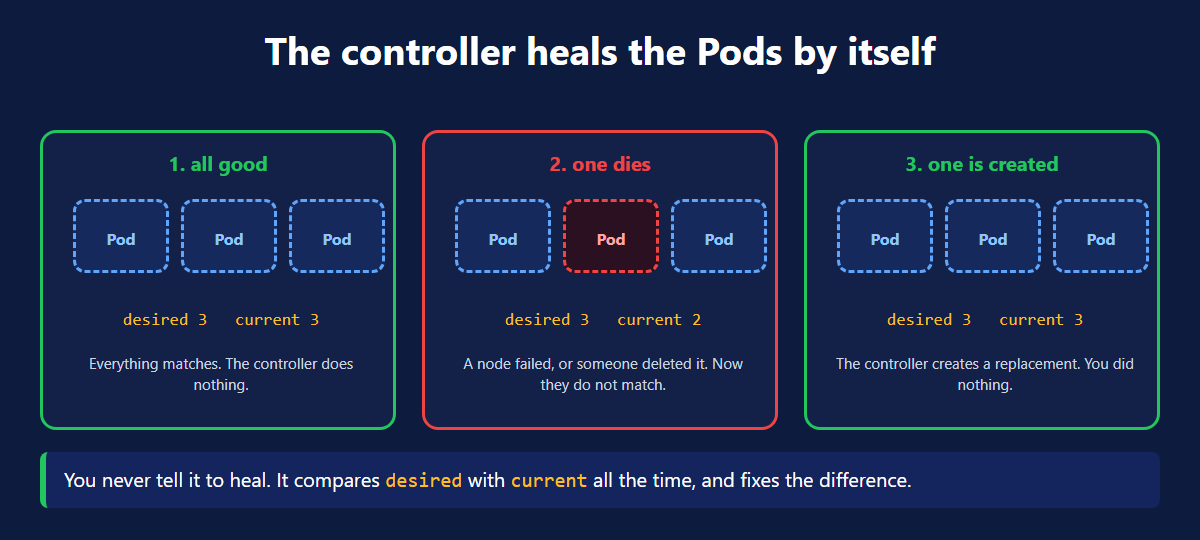
The controller holds two numbers:
- desired — what you asked for
- current — what is actually running
It compares them all the time. Different? It fixes the difference.
Too few Pods, it creates more. Too many, it deletes some. You never ask it to.
ReplicationController — The Old One
This is the original controller. It still works, and you should know it.
Three parts matter here:
| Field | What it means |
|---|---|
replicas | how many Pods you want, always |
selector | which Pods belong to it, matched by label |
template | the Pod to create when it needs one |
You asked for 3 and you got 3. Notice the Pod names: the controller added a random suffix to each.
Watch It Heal
Delete one Pod on purpose and see what happens.
A replacement was already being created. You did nothing.
The new Pod has a new name and a new IP. This is exactly why Pods need a Service in front of them.
ReplicaSet — The Replacement
The ReplicaSet does the same job. Keep a count, heal, scale.
Two things changed in the file.
| ReplicationController | ReplicaSet | |
|---|---|---|
apiVersion | v1 | apps/v1 |
kind | ReplicationController | ReplicaSet |
| selector written as | selector: directly | selector.matchLabels |
The Real Difference Is the Selector
This is the part people get asked in interviews.
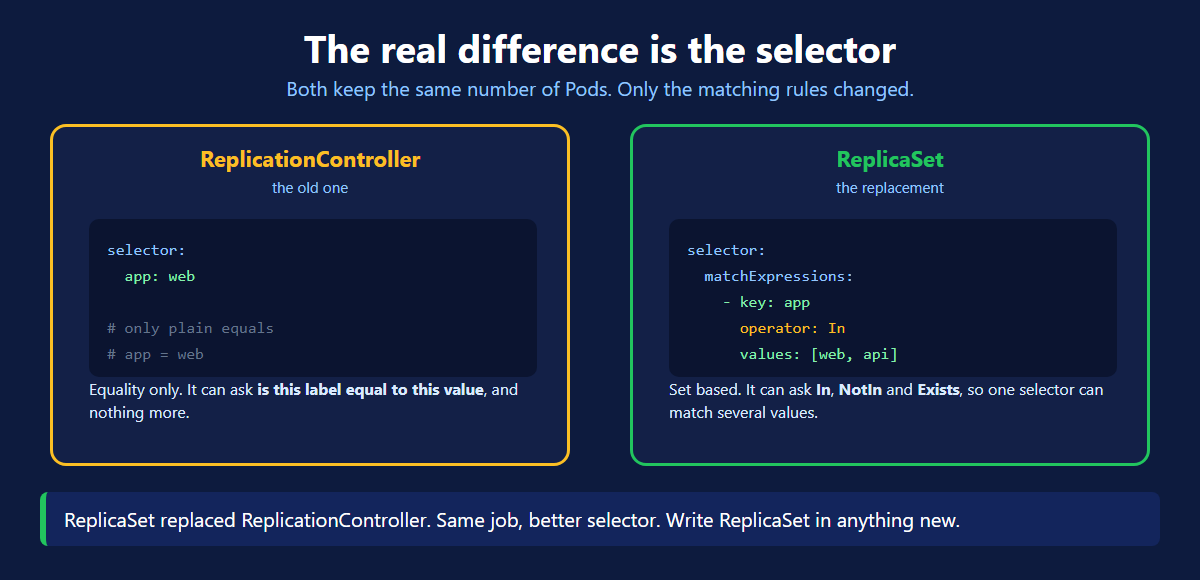
A ReplicationController has an equality based selector. It can only ask one thing:
is this label equal to this value?
app: hotel-app and nothing more.
A ReplicaSet also has a set based selector. It can ask much more:
| Operator | What it asks |
|---|---|
In | is the label one of these values |
NotIn | is the label none of these values |
Exists | does this label exist at all |
DoesNotExist | is this label missing |
One ReplicaSet selector can match several values at once. A ReplicationController cannot do that.
The labels in template.metadata.labels must match the selector. If they do not agree, the controller creates Pods it cannot see, then creates more, forever.
Scale Up and Scale Down
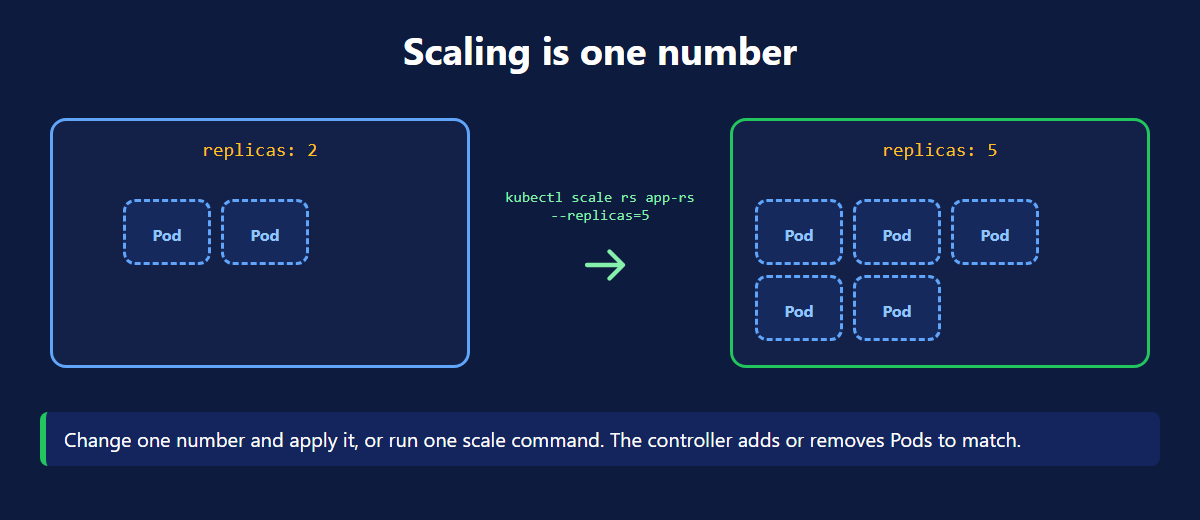
Two ways, same result:
kubectl scale— fast, good for a quick change- edit
replicasandkubectl apply— the file stays true, so use this for real work
Scale with the command and your YAML file now says something different. The next apply will undo your change. Keep the file honest.
Deleting
The ReplicaSet owns its Pods, so deleting it deletes them too. --cascade=orphan keeps the Pods but leaves nothing watching them.
Where This Breaks Down
A ReplicaSet keeps Pods alive. That is all it does.
Now change the image to version 2.0 and apply it.
Nothing happens. The running Pods keep version 1.0. A ReplicaSet does not know how to update Pods, only how to count them.
To get the new version you would have to delete the Pods yourself. Delete them all at once and your app goes down while they restart.
That is the gap a Deployment fills. It manages ReplicaSets for you and updates Pods a few at a time, with no downtime. That is the next article.
ReplicaSet Quick Reference
| Command | What it does |
|---|---|
kubectl get rs | list ReplicaSets with desired and current |
kubectl get rc | list ReplicationControllers |
kubectl describe rs <name> | selector, template and events |
kubectl get pods -l app=hotel-app | the Pods a selector owns |
kubectl scale rs <name> --replicas=5 | scale up |
kubectl scale rs <name> --replicas=2 | scale down |
kubectl delete rs <name> | delete it and its Pods |
kubectl delete rs <name> --cascade=orphan | delete it, keep the Pods |
What's Next
A controller is what turns a Pod from a one off into something that stays alive. The official ReplicaSet documentation (opens in a new tab) and the labels and selectors page (opens in a new tab) go deeper on set based matching.
← Back to Kubernetes Namespace
Continue to Kubernetes Deployment →
Frequently Asked Questions
Why should you not create a Pod directly in Kubernetes?
Because nothing is watching it. A Pod you create by hand is a one off. The node fails, the container crashes badly, or somebody deletes it. That Pod is gone and nobody brings it back. Your app is simply down. A controller such as a ReplicaSet is different. You tell it how many Pods you want, and it keeps that number alive. Create Pods through a controller, not by hand.
What is a ReplicationController in Kubernetes?
A ReplicationController is the older Kubernetes object that creates Pods and keeps a fixed number of them running. You give it a replicas number and a Pod template. It watches the Pods all the time. If one is deleted or crashes, it creates a replacement, so the count always matches. You can also scale up and scale down with it. It has been replaced by the ReplicaSet.
What is a ReplicaSet in Kubernetes?
A ReplicaSet is the replacement for the ReplicationController. It does the same job. It creates Pods and keeps the number you asked for running. It replaces any Pod that dies. It lets you scale up or down. The difference is the selector. A ReplicaSet supports set based selectors, so it can match several label values at once. Its apiVersion is apps/v1 rather than v1.
What is the difference between ReplicationController and ReplicaSet?
The real difference is the selector. A ReplicationController only supports equality based selectors, so it can ask whether a label equals one value and nothing more. A ReplicaSet also supports set based selectors through matchExpressions, with operators In, NotIn, Exists and DoesNotExist. That means one ReplicaSet selector can match several values at once. Everything else is the same, and ReplicaSet is what you should write today.
How does a ReplicaSet know which Pods belong to it?
By labels, not by name. The selector in the ReplicaSet is matched against the labels on the Pods. Any running Pod whose labels match the selector is counted as one of its replicas. This is why the labels in the Pod template must match the selector. If they do not agree, the ReplicaSet creates Pods it does not recognise and keeps creating more forever.
How do you scale up and scale down a ReplicaSet?
Two ways. The quick way is kubectl scale rs followed by the name and --replicas with the new number. The repeatable way is to change the replicas field in your YAML file and run kubectl apply again. Both reach the same result. The controller compares the new desired count with the current count, then creates or deletes Pods until they match.
What happens when you delete a ReplicaSet?
By default its Pods are deleted with it. The ReplicaSet owns those Pods, so removing the owner removes them too. To remove only the ReplicaSet and leave the Pods running, add --cascade=orphan to the delete command. The Pods then keep running with nothing watching them, which is rarely what you want.
Should I use a ReplicaSet directly in production?
Usually not. A ReplicaSet keeps Pods alive, but it has no idea how to update them safely. Changing the image in a ReplicaSet does not restart the existing Pods. For real applications you use a Deployment, which creates and manages ReplicaSets for you and adds rolling updates and rollback. Learning the ReplicaSet still matters, because it is the thing a Deployment is built on.