Published: October 26, 2026 · 9 min read
Kubernetes Deployment Explained — Rollout and Rollback
A ReplicaSet keeps your Pods alive. It cannot update them.
That one missing piece is why nobody uses a ReplicaSet directly.
Here is the short version:
- A Kubernetes Deployment is the recommended way to run an app on a cluster.
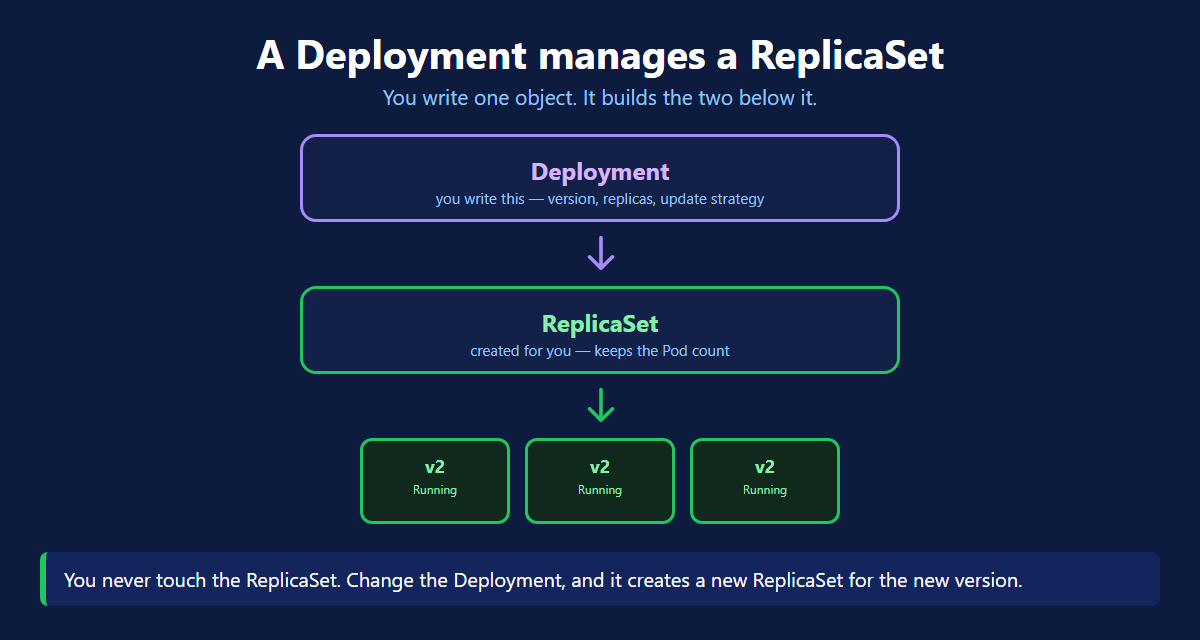
- You write the Deployment. It creates a ReplicaSet. That creates the Pods.
- It can scale up and scale down, same as before.
- It can roll out a new version with zero downtime.
- It can roll back to the old version in one command.
- The old ReplicaSet is kept at zero, which is what makes rollback instant.
- Autoscaling attaches to a Deployment.
The Problem
You have a ReplicaSet running version 1.0. Now 2.0 is ready.
You change the image and apply the file.
Nothing happens. The three Pods keep running 1.0.
A ReplicaSet only counts Pods. It has no idea how to replace them with a newer version.
So you delete the Pods yourself. All three go down together, and new ones start. For those few seconds your app is down.
Deleting Pods to deploy new code is how you get downtime on every release.
What a Deployment Is
A Deployment sits one level above the ReplicaSet.
| Layer | Who creates it | What it does |
|---|---|---|
| Deployment | you | which version, how many, how to update |
| ReplicaSet | the Deployment | keeps the Pod count |
| Pod | the ReplicaSet | runs your container |
You only ever touch the top one. The other two are managed for you.
The Deployment File
It is a ReplicaSet file plus one new block: strategy. That block is the whole difference.
Look at the names. The ReplicaSet got a hash, and every Pod carries that same hash. That hash identifies this version.
Deploying a New Version
No Pods were deleted by you. No downtime. Now look at the ReplicaSets.
The old ReplicaSet is still there, sitting at zero replicas. Remember this. It is the whole trick behind rollback.
Recreate vs RollingUpdate
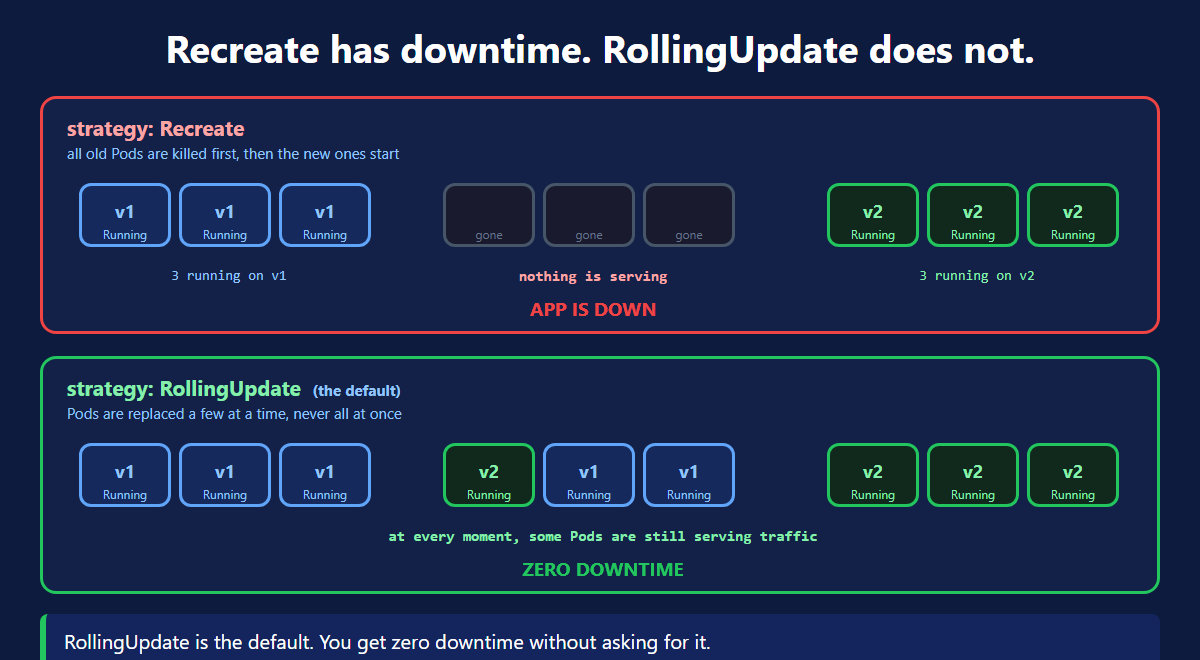
| Recreate | RollingUpdate | |
|---|---|---|
| Order | kill all, then start new | start new, then kill old |
| Downtime | yes | no |
| Two versions at once | never | for a short while |
| Default | no | yes |
Use Recreate only when the old and new version cannot run together. A breaking database change is the usual reason.
How a Rolling Update Really Works
This is the part worth understanding properly.
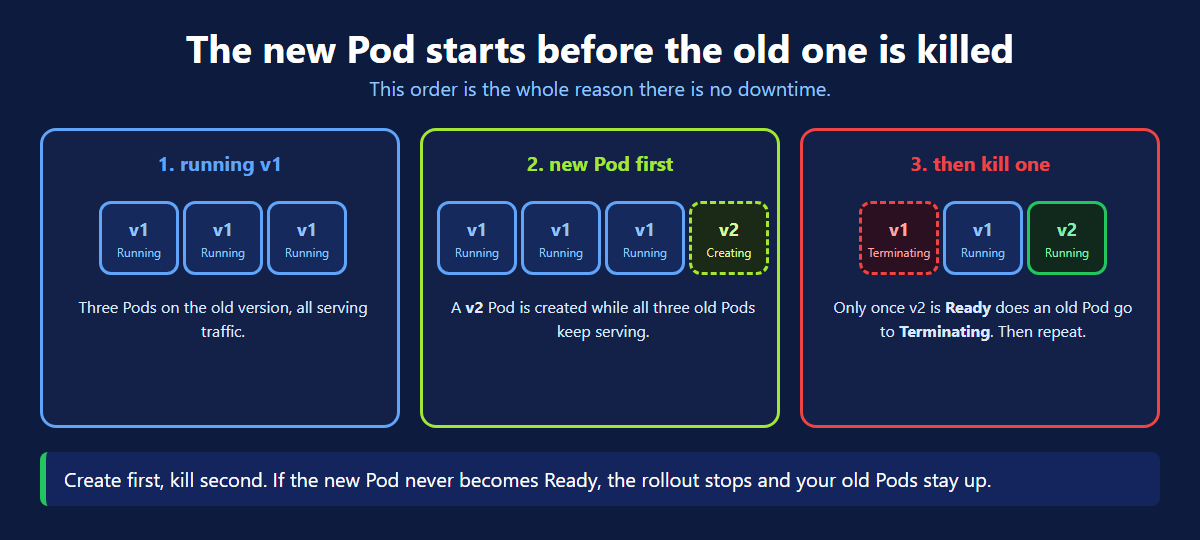
The order is always the same:
- A new Pod is created on the new version.
- Kubernetes waits for it to become
Ready. - Only then does one old Pod go to
Terminating. - Repeat until every Pod is on the new version.
Create first, kill second. That is why there is no downtime.
If the new Pod never becomes Ready, the rollout stops. Your old Pods keep running and keep serving traffic. A broken image cannot take your app down.
maxSurge and maxUnavailable
These two numbers control the speed.
| Field | Means | With replicas: 3 |
|---|---|---|
maxSurge: 1 | extra Pods allowed above the count | up to 4 Pods for a moment |
maxUnavailable: 0 | Pods allowed to be missing | never fewer than 3 working |
That pair is the safest setting. You always keep a full set of working Pods, and the update costs you one extra Pod.
Rollback
Version 2.0 is live and something is broken. One command.
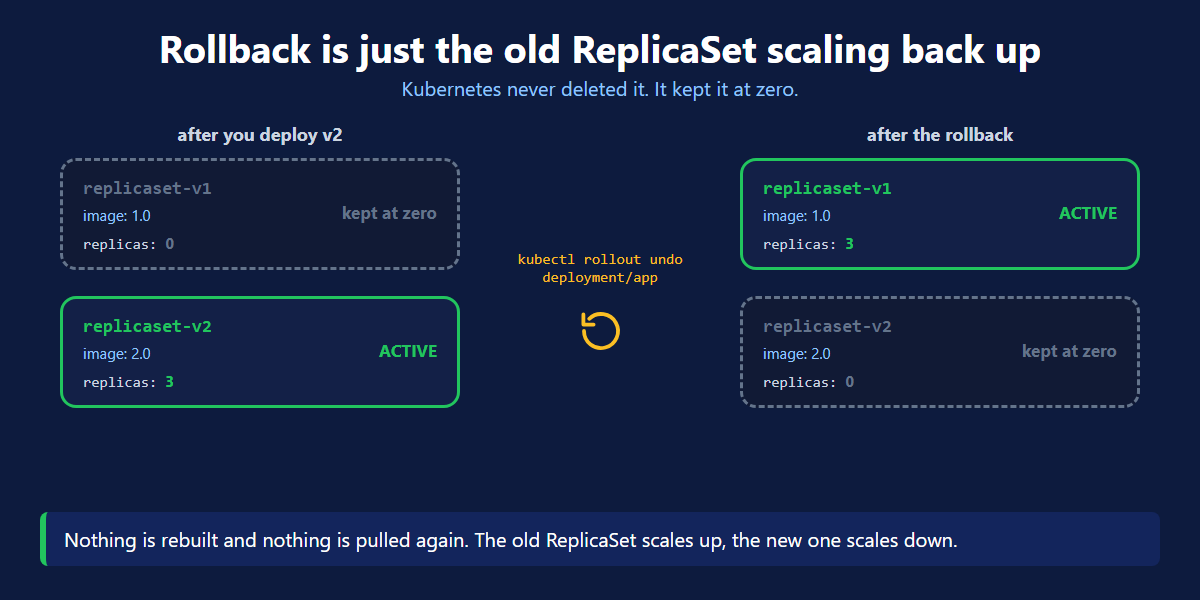
Nothing is rebuilt. No image is pulled. The old ReplicaSet simply scales back up, and the new one scales down to zero.
That is why rollback takes seconds, not minutes.
Rollback brings back the old Pods. It does not undo a database change. Plan those separately.
Scale Up and Scale Down
Same as a ReplicaSet, one level higher. The Deployment passes the number down to its ReplicaSet.
Autoscaling
You do not have to pick the number yourself.
A HorizontalPodAutoscaler watches the CPU and changes replicas for you. Busy means more Pods. Quiet means fewer.
Once an autoscaler is attached, stop running kubectl scale by hand. The autoscaler will just overwrite your number.
Kubernetes Deployment Quick Reference
| Command | What it does |
|---|---|
kubectl get deploy | list Deployments |
kubectl describe deploy <name> | details, strategy and events |
kubectl set image deployment/<name> <container>=<image> | release a new version |
kubectl rollout status deployment/<name> | watch a release |
kubectl rollout history deployment/<name> | list the revisions |
kubectl rollout undo deployment/<name> | go back one version |
kubectl rollout undo deployment/<name> --to-revision=1 | go back to a chosen one |
kubectl rollout restart deployment/<name> | restart every Pod |
kubectl scale deployment <name> --replicas=5 | scale |
kubectl delete deployment <name> | delete it and everything under it |
What's Next
A Deployment is what you will actually write for nearly every application. It keeps Pods alive, releases new code safely, and takes you back when a release goes wrong. The official Deployment documentation (opens in a new tab) and the HorizontalPodAutoscaler page (opens in a new tab) go deeper.
← Back to ReplicaSet & ReplicationController
Frequently Asked Questions
What is a Deployment in Kubernetes?
A Deployment is the Kubernetes object you use to run an application. You write one file saying which image to run and how many copies you want. The Deployment creates a ReplicaSet, and that ReplicaSet creates the Pods. It is the recommended way to deploy anything. It adds safe updates and rollback on top of what a ReplicaSet does.
Why use a Deployment instead of a ReplicaSet?
A ReplicaSet only keeps a number of Pods alive. It cannot update them. Change the image in a ReplicaSet and the running Pods stay on the old version. You would have to delete them yourself, and your app goes down while they restart. A Deployment replaces Pods a few at a time, so there is no downtime. It also remembers the old version, so you can roll back.
How does a Kubernetes Deployment achieve zero downtime?
It creates the new Pod before it kills an old one. The new Pod has to reach the Ready state first. Only then does one old Pod move to Terminating. Then the next one is replaced, and so on until every Pod is on the new version. Because some Pods are always running and Ready, the Service never runs out of healthy Pods to send traffic to.
What is the difference between Recreate and RollingUpdate?
RollingUpdate replaces Pods a few at a time and is the default. Old and new versions run side by side for a short while, and there is no downtime. Recreate kills every old Pod first, then starts the new ones. Nothing serves traffic in between, so your app is down. Use Recreate only when two versions cannot run at the same time, such as a breaking database change.
How does rollback work in a Kubernetes Deployment?
The old ReplicaSet is never deleted. It is kept with replicas set to zero. Then you run kubectl rollout undo. Kubernetes scales that old ReplicaSet back up, and scales the new one down to zero. Nothing is rebuilt and no image is pulled again, so it is very fast. You can also go back to a chosen revision with the flag --to-revision.
What do maxSurge and maxUnavailable mean?
They control how fast a rolling update goes. maxSurge is how many extra Pods may exist above your replicas count during the update. maxUnavailable is how many Pods are allowed to be missing at the same time. Setting maxSurge to 1 and maxUnavailable to 0 is the safest pair. You always keep a full set of working Pods, and the update costs one extra Pod.
How do you scale a Kubernetes Deployment?
Run kubectl scale deployment with the name and the --replicas flag. Or change the replicas number in your YAML file and apply it again. For real work prefer the file, so it always matches the cluster. The Deployment passes the new number to its ReplicaSet, which then adds or removes Pods until the count matches.
Can a Kubernetes Deployment autoscale by itself?
Not on its own, but it is what autoscaling attaches to. You add a HorizontalPodAutoscaler that points at the Deployment. You give it a minimum, a maximum and a target such as CPU at 70 percent. The autoscaler then changes the replicas number on the Deployment for you. Busy means more Pods, quiet means fewer. You can create one quickly with kubectl autoscale deployment.