Published: October 29, 2026 · 9 min read
EKS Storage Setup — EBS CSI Driver and StorageClass
A Pod is thrown away and recreated all the time. For an app that is fine.
For a database it is a disaster. The data goes with it.
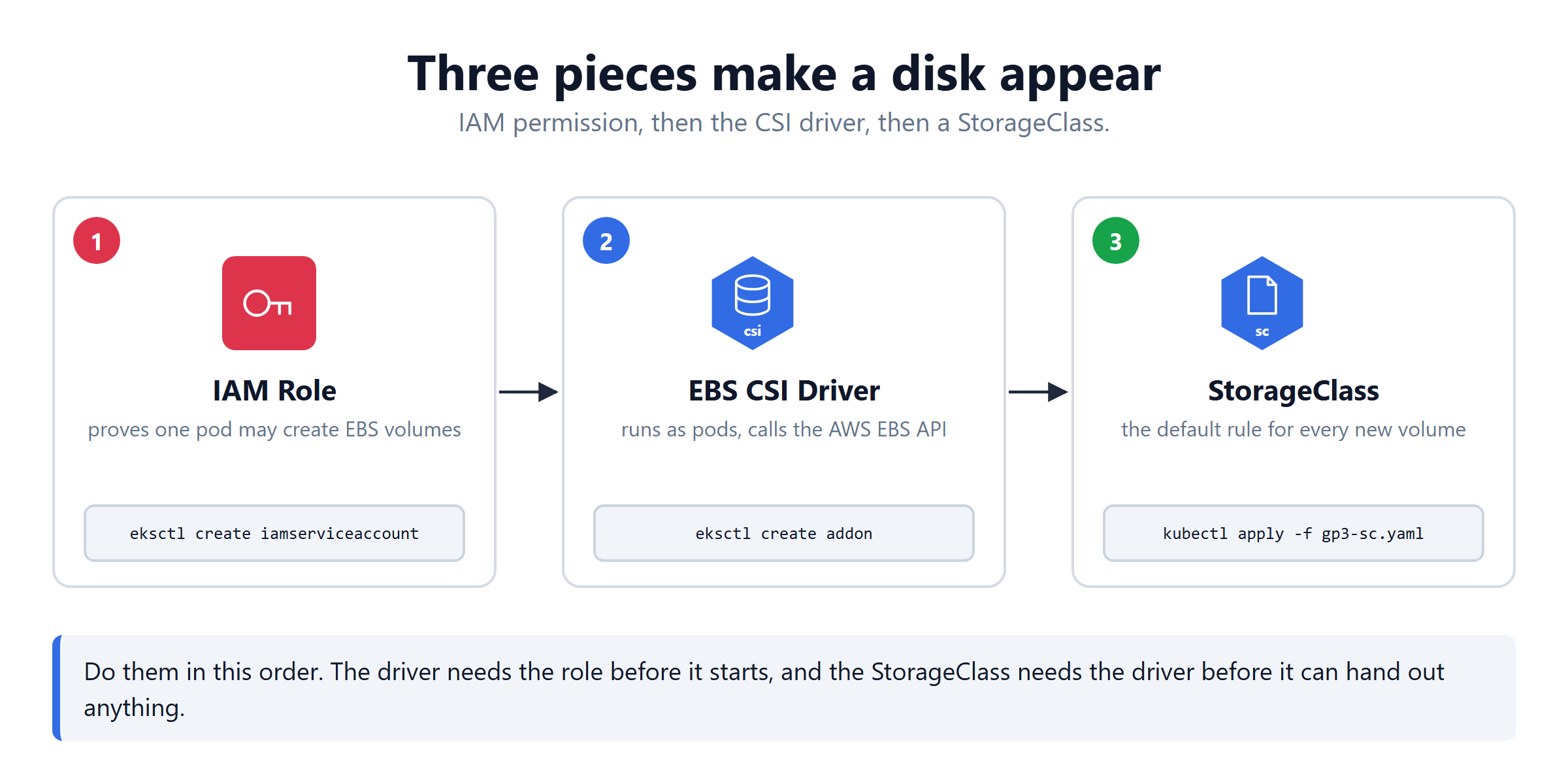
A database needs a real disk that outlives the Pod. On EKS that means an AWS EBS volume. Three pieces have to be in place before Kubernetes can ask for one.
Here is the short version:
- EKS gives you a cluster. It does not give you storage.
- Three pieces: IAM role → EBS CSI driver → StorageClass.
- CSI is a standard. Kubernetes never talks to AWS directly.
- The IAM permission goes to one pod, not to the whole node.
- A default StorageClass means your PVC files stay clean.
- Then a StatefulSet gets a real disk, and keeps it when the Pod dies.
Why Any of This Is Needed
Your cluster has no idea what an EBS volume is.
Kubernetes was built to work on any cloud, so its core contains no AWS code at all. Something has to stand between the two and translate. That something is a CSI driver, and it does not come installed.
Skip this setup and your first PersistentVolumeClaim sits in Pending forever. Nothing is broken. Nobody is listening.
Step 1 — Associate an OIDC Provider
Why this exists: in a moment we want to give a pod permission to create AWS disks. But AWS IAM has never heard of your pods. It needs proof that the thing asking really is a pod in your cluster.
The OIDC provider is that proof. Your cluster signs a token. IAM checks the signature, and the pod gets the role. This mechanism is called IRSA — IAM Roles for Service Accounts.
Run this once per cluster. A new cluster tomorrow needs its own.
Step 2 — Create the IAM Role
Read the important part slowly, because this is where people assume the wrong thing.
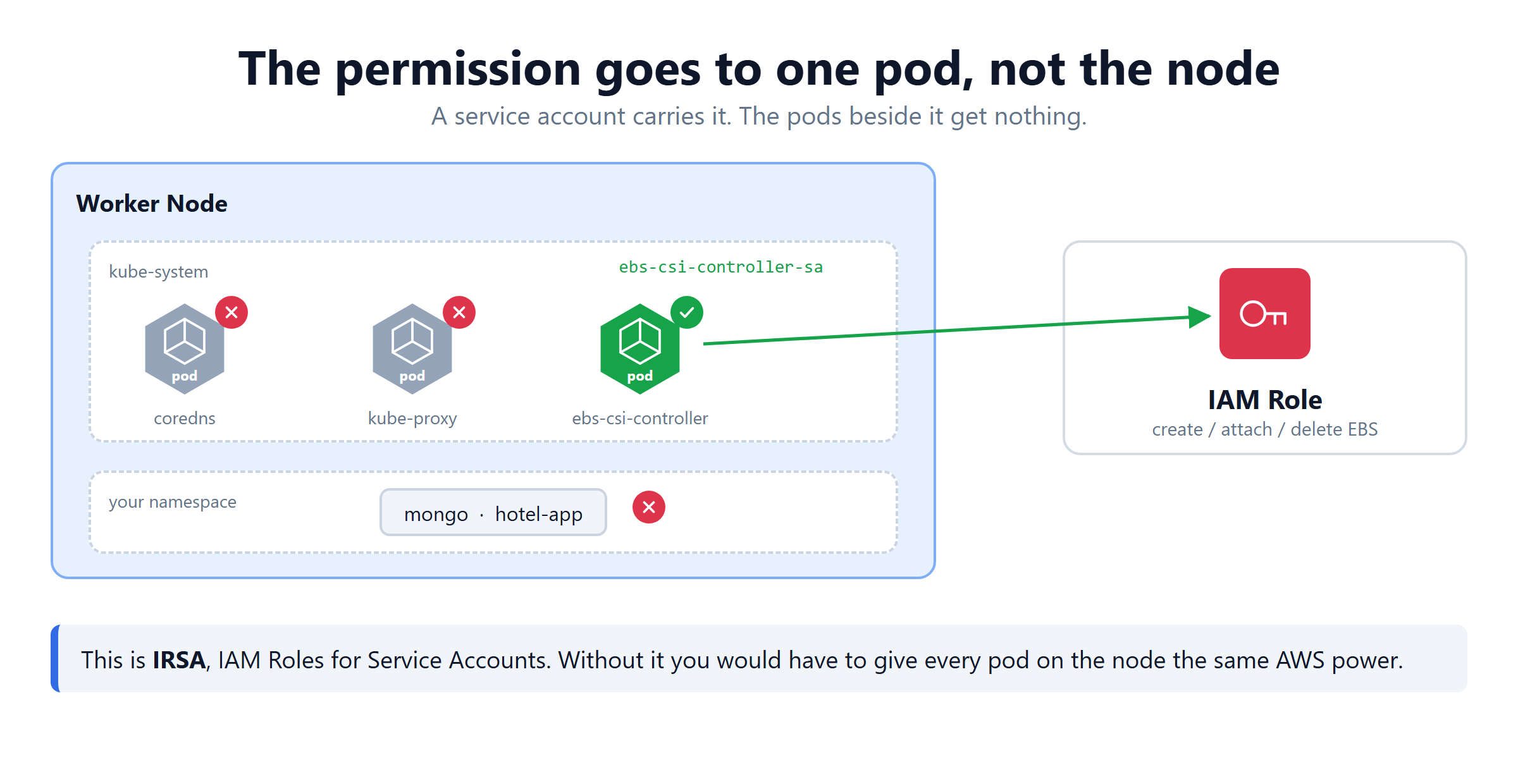
The permission is not given to the worker node. It is given to one ServiceAccount, ebs-csi-controller-sa, and only the pod running under that account can use it.
| On the same node | Can it create EBS volumes? |
|---|---|
ebs-csi-controller pod | yes |
coredns, kube-proxy | no |
your mongo and app pods | no |
If this were a node level permission, every pod on that node could create and delete AWS disks. One compromised app container could wipe your volumes. IRSA is what keeps that from being true.
--role-only is deliberate. It creates the IAM role and stops there. The add-on in the next step creates the matching ServiceAccount and wires the two together.
Step 3 — Install the EBS CSI Driver
What CSI Actually Means
CSI is short for Container Storage Interface. It is a standard, not a piece of software.
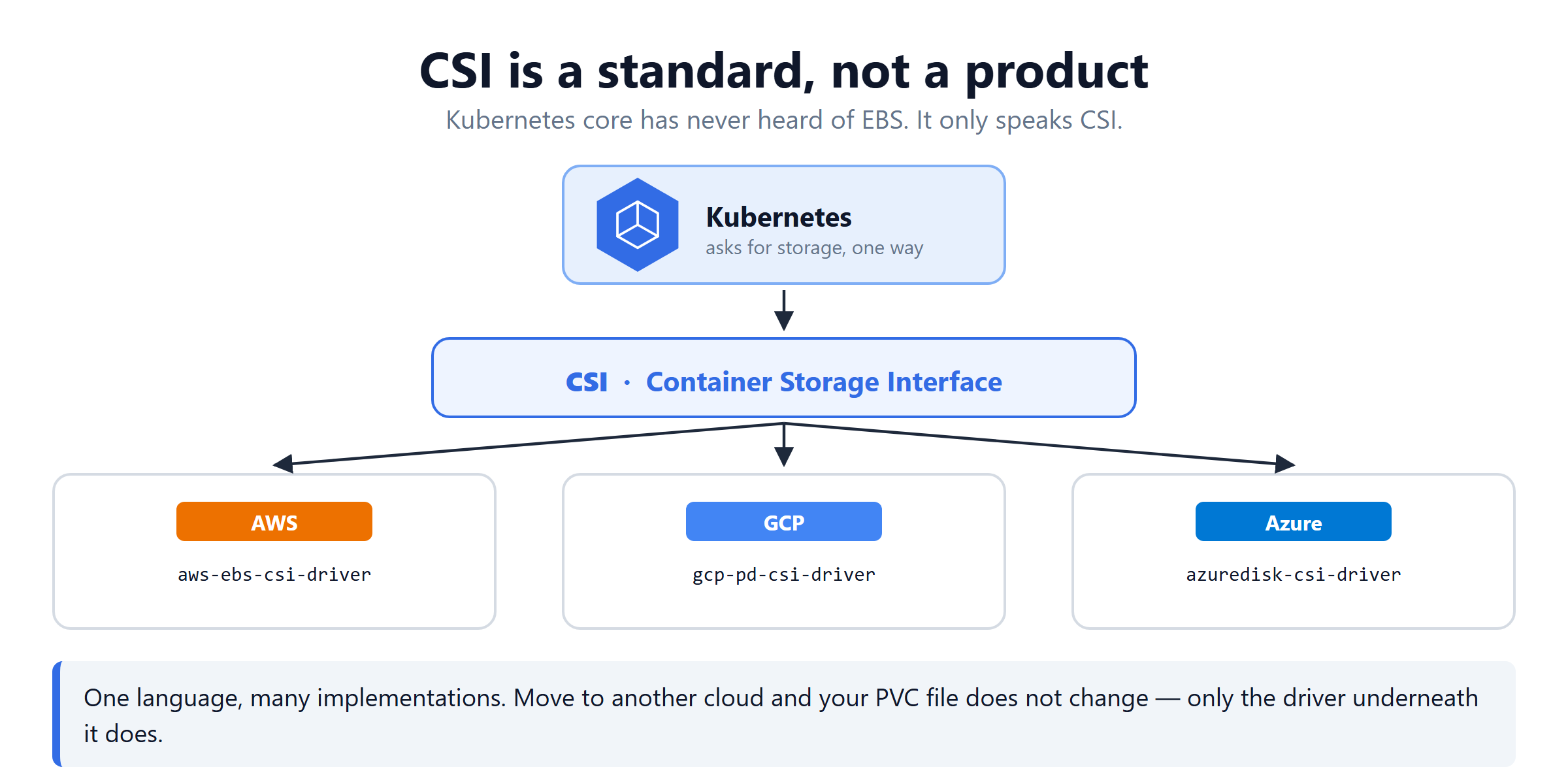
Kubernetes defines one way to ask for storage. Every cloud then writes its own driver that answers in that language.
| Cloud | Its driver |
|---|---|
| AWS | aws-ebs-csi-driver |
| Google Cloud | gcp-pd-csi-driver |
| Azure | azuredisk-csi-driver |
That is the whole point of a standard. Move the same PVC file to another cloud and it still works, because only the driver underneath changed.
The driver runs as ordinary pods. A controller calls the AWS API. A node pod on every worker attaches and mounts the disk.
Install the driver after the role exists. Do it the other way round and the controller pods start without permission, and every volume request fails.
Step 4 — Create a Default StorageClass
Four fields, four decisions:
| Field | What it decides |
|---|---|
provisioner | who creates the disk — the driver you just installed |
parameters.type | what kind — gp3 is the current general purpose SSD |
reclaimPolicy | what happens when the PVC is deleted — Delete removes the EBS volume too |
volumeBindingMode | when to create it — WaitForFirstConsumer waits for a Pod |
WaitForFirstConsumer matters on AWS. An EBS volume lives in one availability zone and can only attach to a node in that same zone. Waiting lets Kubernetes choose the node first, then create the disk in the right place.
That annotation is what prints (default). A PVC that names no StorageClass now gets this one automatically. Your YAML files stay free of cloud specific names.
Step 5 — Deploy a Database on It
The setup is done. Now use it.
A database is the reason you did all of this, so deploy one and watch the chain work.
Create a namespace
The StatefulSet file
Two objects go in one file: a headless Service and a StatefulSet.
Four lines carry the weight here:
| Line | Why it is there |
|---|---|
clusterIP: None | makes the Service headless, so each Pod gets a name like mongo-0.mongo |
kind: StatefulSet | the Pod comes back as mongo-0 every time, with the same disk |
volumeClaimTemplates | one PVC per replica, created automatically |
mountPath: /data/db | where MongoDB writes its files by default |
Use volumeClaimTemplates, not volumes. A plain volumes block would share one disk across every replica, which is exactly wrong for a database.
Apply it
Those three statuses are the whole setup paying off. Pending is the disk being created, ContainerCreating is it being attached, Running means it is mounted.
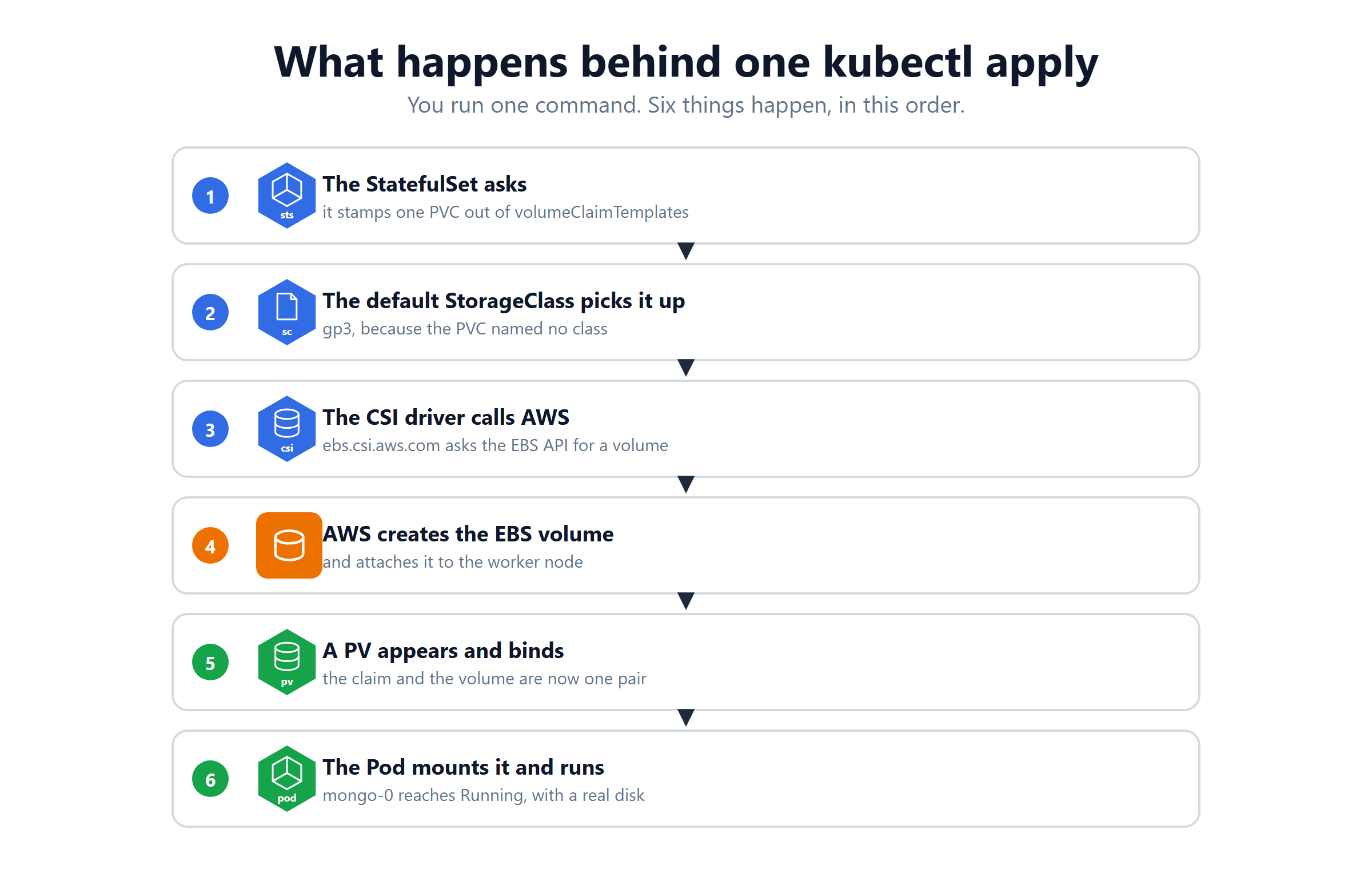
Six things happened from one command:
- The StatefulSet stamped a PVC out of
volumeClaimTemplates. - The default StorageClass picked it up, because the claim named none.
- The CSI driver called the AWS EBS API.
- AWS created the volume and attached it to the node.
- A PV appeared and bound to the claim.
- The Pod mounted it and reached
Running.
Verify
Note the claim name: mongo-data-mongo-0. The pattern is <template name>-<pod name>, so you can always tell which disk belongs to which Pod.
Step 6 — Prove the Data Survives
Put something in the database first.
Now delete the Pod and see what comes back.
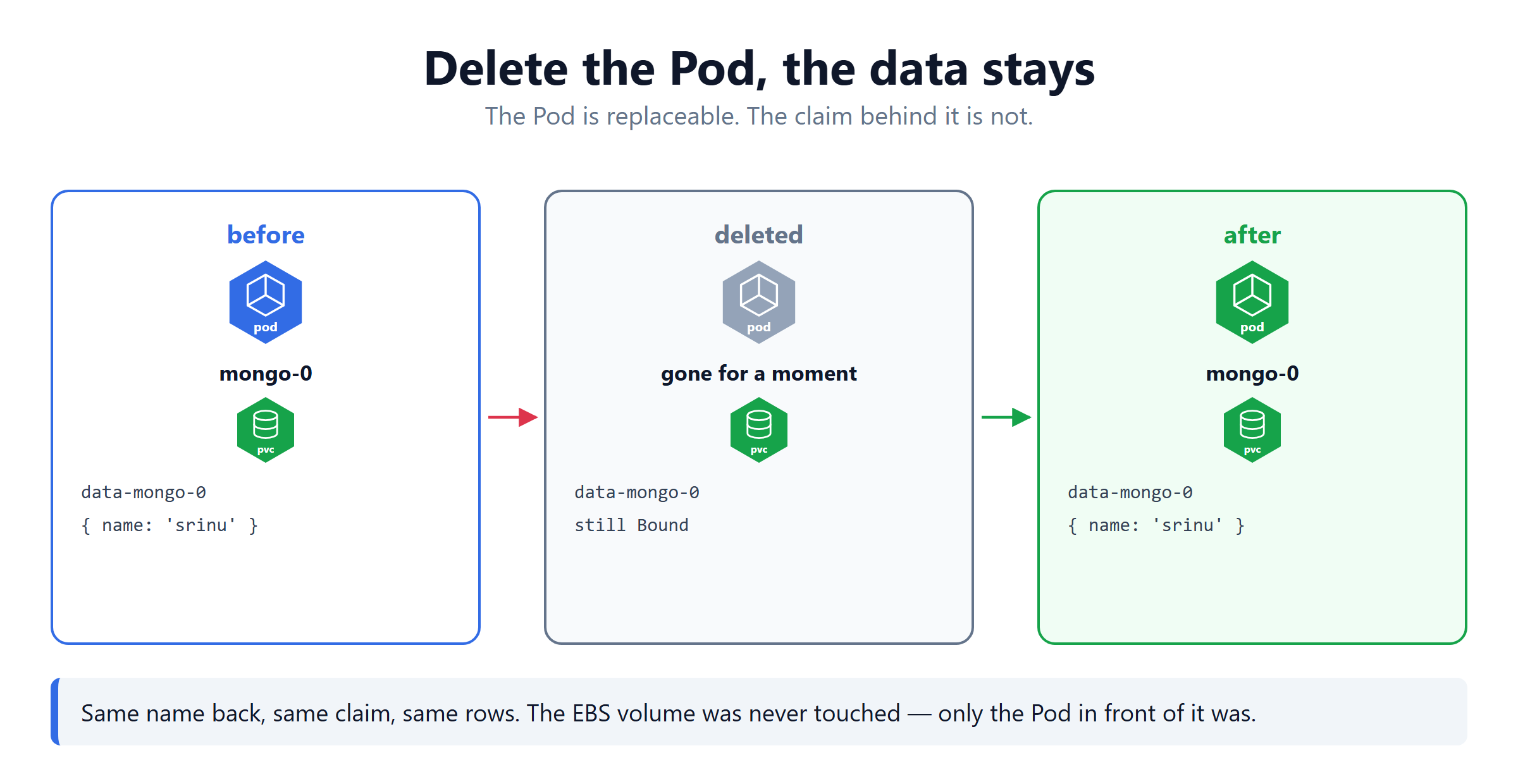
Same name. Same claim. Same row.
The Pod was replaced. The PVC, the PV and the EBS volume were never touched. That is the entire point of everything above.
When a PVC Stays Pending
If mongo-0 never leaves Pending, run kubectl describe pvc mongo-data-mongo-0 -n mongo-db and read the events.
| Event says | What it means |
|---|---|
waiting for first consumer | normal, the Pod has not been scheduled yet |
no persistent volumes available | no default StorageClass |
failed to provision volume | the driver is missing, or has no IAM role |
AccessDenied | the role is not attached to the service account |
EKS Storage Quick Reference
| Command | What it tells you |
|---|---|
kubectl get storageclass | is there a (default) one |
kubectl get pods -n kube-system | grep ebs-csi | is the driver running |
kubectl get pvc -n <ns> | Pending or Bound |
kubectl describe pvc <name> | the events that explain why |
kubectl get pv | the real volumes that exist |
kubectl exec -it mongo-0 -n mongo-db -- mongosh | go inside the database |
What's Next
Four commands, run once. After that every database just asks for a claim and gets a real disk. The official EBS CSI driver page (opens in a new tab) and the Kubernetes StorageClass page (opens in a new tab) go deeper.
Continue to StatefulSet & Storage →
Frequently Asked Questions
What is CSI in Kubernetes?
CSI stands for Container Storage Interface. It is a standard, not a product. Kubernetes core has never heard of EBS or any other disk. It only knows how to speak CSI, and each cloud provider writes a driver that understands it. AWS gives you aws-ebs-csi-driver, Google gives gcp-pd-csi-driver and Azure gives azuredisk-csi-driver.
Why does EKS need the EBS CSI driver?
Because nothing inside the cluster can create an AWS disk on its own. The EBS CSI driver runs as pods on your worker nodes and listens for storage requests. It then calls the AWS EBS API to create, attach and delete real volumes. Without it a PersistentVolumeClaim stays Pending forever, because nobody is listening.
What happens when you create a PVC in Kubernetes?
The PVC looks for a StorageClass. If you did not name one it uses the one marked default. That StorageClass names a provisioner, and the request goes to it. On EKS that provisioner is ebs.csi.aws.com. It calls AWS, creates a real EBS volume, wraps it in a PersistentVolume and binds that PV to your PVC.
Does the IAM role give permission to the whole worker node?
No. The role is attached to one Kubernetes ServiceAccount called ebs-csi-controller-sa, and only the pod using that account can assume it. Other pods on the same node, such as your database or your application, get nothing from it. This is called IRSA, which stands for IAM Roles for Service Accounts.
Why do you need an OIDC provider on an EKS cluster?
Because AWS IAM needs a way to trust a pod. The OIDC provider lets your cluster issue a signed token. That token proves a pod really belongs to this cluster, under this service account. IAM checks that token before handing over the role. Without the OIDC provider, IRSA cannot work and the driver has no permission.
What is a default StorageClass in Kubernetes?
It is the StorageClass used when a PVC does not name one. You mark it with the annotation storageclass.kubernetes.io/is-default-class set to true. kubectl get storageclass then shows the word default beside it. Every PVC written without a storageClassName quietly uses it. That keeps your YAML files portable.
Why is my PVC stuck in Pending on EKS?
There are two very different reasons. If your StorageClass uses WaitForFirstConsumer, Pending is normal and correct until a Pod actually mounts the claim. If no Pod is waiting, there are three usual causes. A missing default StorageClass, the EBS CSI driver not installed, or the driver lacking its IAM role. Run kubectl describe pvc and read the events at the bottom.
What does WaitForFirstConsumer mean in a StorageClass?
It tells Kubernetes not to create the disk until a Pod is actually scheduled. This matters on AWS. An EBS volume lives in one availability zone, and can only attach to a node in that same zone. Waiting lets Kubernetes pick the node first, then create the volume in the right zone. The other option, Immediate, creates the disk straight away and can strand it in the wrong zone.