Published: October 28, 2026 · 8 min read
Kubernetes ConfigMap and Secret Explained for Beginners
Your app needs a database address and a password. Right now both are inside the image.
A Kubernetes ConfigMap and a Secret take them out of it.
Here is the short version:
- A ConfigMap holds plain settings. A Secret holds sensitive ones.
- Both are just key and value pairs.
- Both are namespaced — a Pod can only use ones in its own namespace.
- A container reads them in two ways: environment variables, or files.
- A Secret is base64 encoded, not encrypted.
- Change a ConfigMap and nothing restarts on its own.
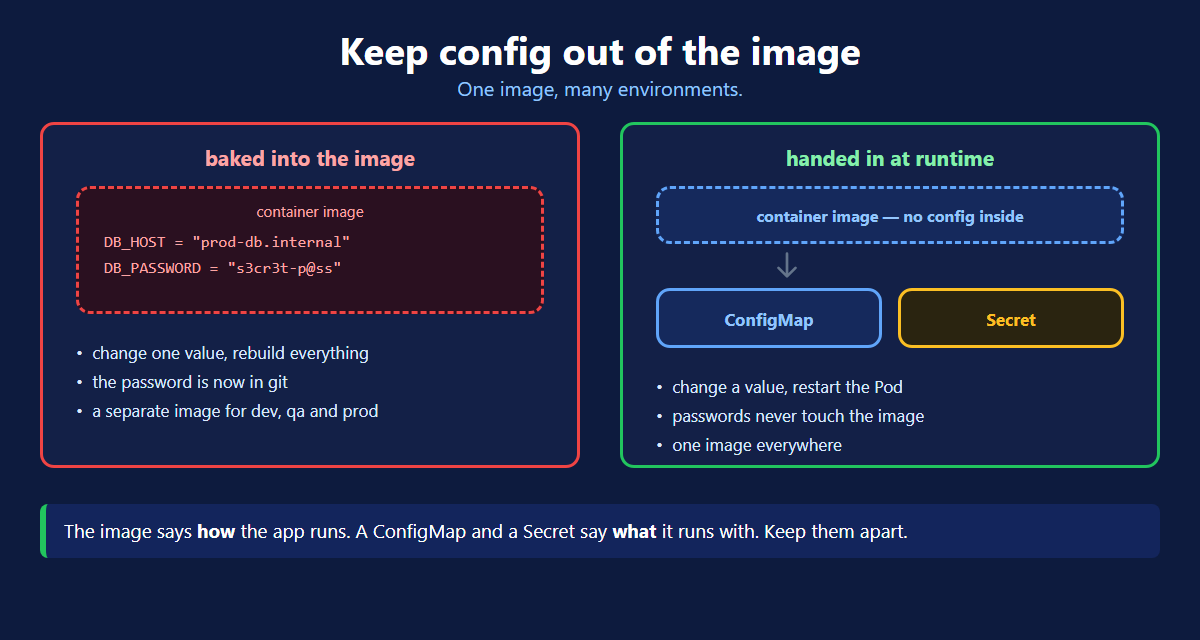
The Problem
Put DB_PASSWORD = "s3cr3t-p@ss" in your Dockerfile and three things go wrong:
- Change one value and you rebuild the whole image.
- The password is now in git, forever, for everyone.
- You need a different image for dev, qa and prod.
The image should say how your app runs. Not what it runs with.
ConfigMap vs Secret
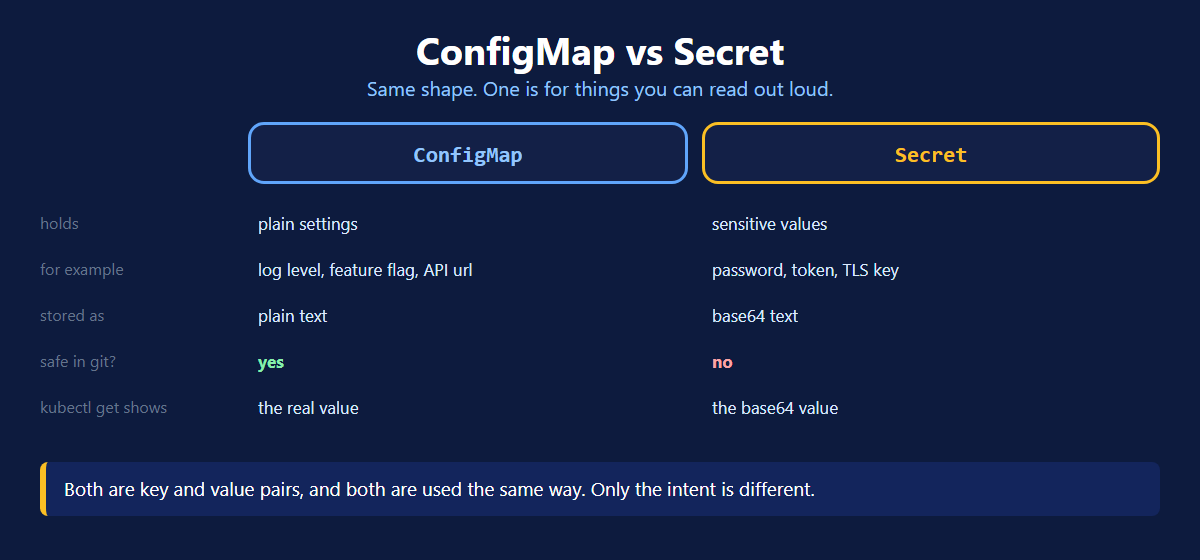
| ConfigMap | Secret | |
|---|---|---|
| Holds | plain settings | sensitive values |
| Example | log level, feature flag, API url | password, token, TLS key |
| Stored as | plain text | base64 text |
| Safe in git? | yes | no |
kubectl describe shows | the real value | <hidden> |
Same shape, same usage. Ask one question: would you read this out loud in a meeting? If no, it is a Secret.
Creating a ConfigMap
The quick way
The YAML way
Same four parts as every manifest: apiVersion, kind, metadata, and then data instead of spec.
Every value under data must be a string. Write MAX_BOOKINGS: "50" with quotes. Plain 50 is a number and is rejected.
From a whole file
Your app may already read a config file. You do not have to split it into keys.
The file name becomes the key and the whole file becomes the value. Mount it as a volume and your app finds the exact same file it expects, at the path you chose.
A ConfigMap can hold at most 1 MiB. That is plenty for settings, and far too small for data. Anything bigger belongs in a volume.
Creating a Secret
Two fields do the same job:
| Field | You write | Kubernetes does |
|---|---|---|
stringData | the plain value | encodes it for you |
data | the base64 value | stores it as given |
Use stringData. It is easier to read and harder to get wrong.
A Secret Is Not Encrypted
This catches everyone, so be clear about it.
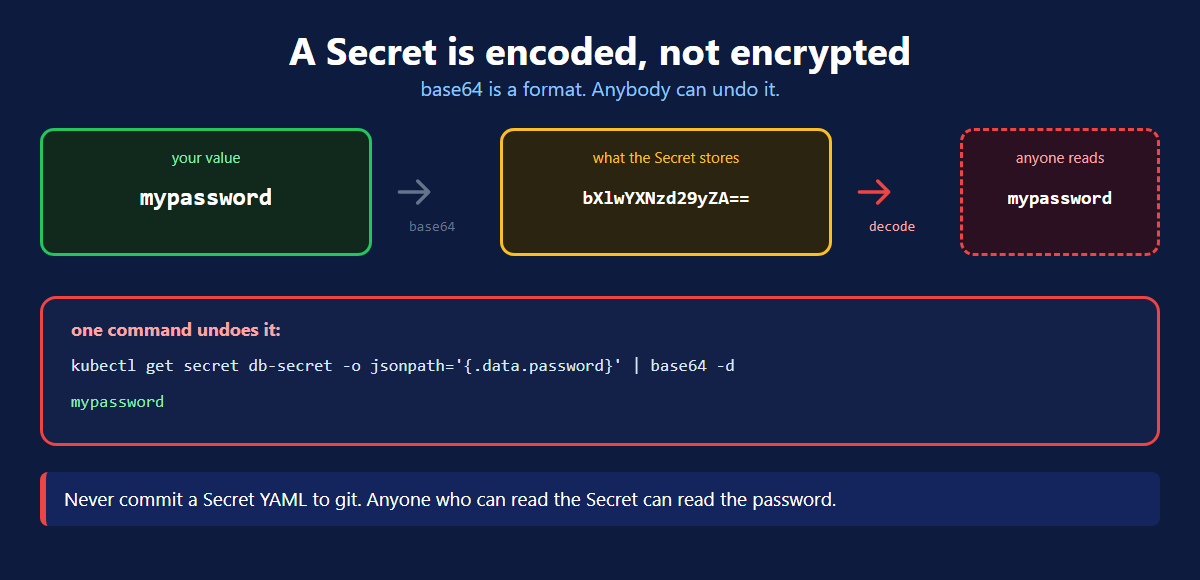
base64 is a format, not a lock. One command undoes it:
kubectl get secret hotel-secret -o jsonpath='{.data.DB_PASSWORD}' | base64 -d
mypasswordNever commit a Secret YAML to git. Base64 hides nothing. Anyone who can read the Secret can read the password.
Real protection takes three more things. Encryption at rest in the cluster. RBAC, so only some people may read Secrets. An external vault for anything serious.
Using Them in a Pod
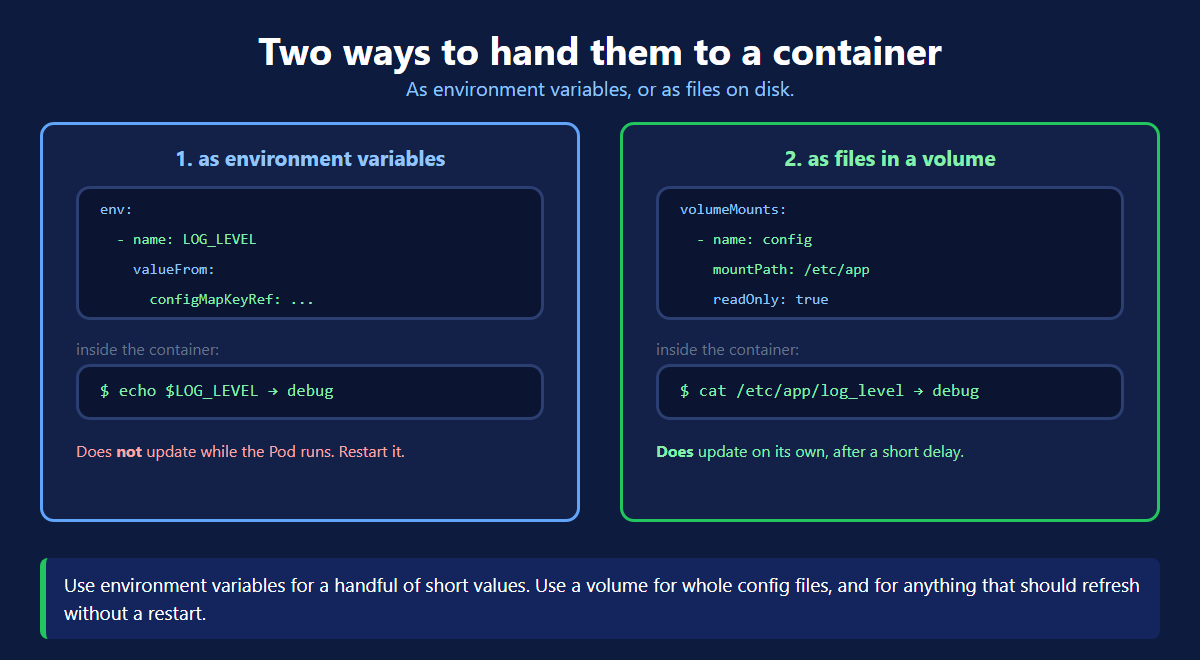
1. As environment variables
Read it inside out. key picks a value. name picks the object. The outer name is what the variable is called in your container.
Two reference names, one for each object type:
| Object | Reference |
|---|---|
| ConfigMap | configMapKeyRef |
| Secret | secretKeyRef |
Pulling in every key at once
envFrom saves a lot of typing. Every key becomes a variable with the same name.
2. As files in a volume
You get one file per key, and the file name is the key. Good for whole config files your app already knows how to read.
For a Secret, swap configMap: for secret: and name: for secretName:. Everything else is the same.
Which One Should You Use?
| Environment variables | Volume files | |
|---|---|---|
| Good for | a few short values | whole config files |
| Updates on change? | no, needs a restart | yes, after a short delay |
Visible in kubectl describe pod | yes | no |
Edit a ConfigMap and nothing restarts. Mounted files refresh on their own, but environment variables do not. For those you need kubectl rollout restart deployment <name>.
Checking It Worked
Three questions, three commands: is the variable set, is the file there, and what is actually inside the Secret.
ConfigMap and Secret Commands
| Command | What it does |
|---|---|
kubectl create configmap <name> --from-literal=K=v | create from the command line |
kubectl create configmap <name> --from-file=app.properties | create from a whole file |
kubectl create secret generic <name> --from-literal=K=v | create a Secret, encoded for you |
kubectl get configmap / kubectl get secret | list them |
kubectl describe configmap <name> | show the values |
kubectl get secret <name> -o jsonpath='{.data.K}' | base64 -d | read one Secret value |
kubectl rollout restart deployment <name> | pick up new environment variables |
What's Next
Config and passwords now live outside your image, and one image runs everywhere. The official ConfigMap page (opens in a new tab) and the Secret page (opens in a new tab) go deeper.
Frequently Asked Questions
What is a ConfigMap in Kubernetes?
A ConfigMap is a Kubernetes object that holds plain configuration as key and value pairs. Things like a log level, a feature flag or an API address. Your container image stays clean and the settings are handed to it when the Pod starts. One image can then run in dev, qa and prod with different values.
What is the difference between a ConfigMap and a Secret?
They have the same shape and are used the same way. A ConfigMap holds plain settings that are safe to read, such as a log level. A Secret holds sensitive values such as a password or a token, and Kubernetes stores those base64 encoded. kubectl describe shows ConfigMap values but hides Secret values. Only the intent is different.
Is a Kubernetes Secret encrypted?
No, not by default. A Secret is base64 encoded, and base64 is a format, not encryption. Anybody who can read the Secret can decode it with one command. To really protect it you turn on encryption at rest in the cluster. You also restrict who can read Secrets with RBAC, and keep Secret YAML out of git.
How do you use a ConfigMap inside a Pod?
Two ways. As environment variables, using valueFrom with configMapKeyRef for one key, or envFrom with configMapRef for every key at once. Or as files, by adding the ConfigMap as a volume and mounting it at a path. With a volume you get one file per key, and the file name is the key.
What is the difference between env vars and volume mounts for a ConfigMap?
Environment variables are read once when the container starts, so changing the ConfigMap does nothing until you restart the Pod. A mounted volume is different. Kubernetes updates the files on its own after a short delay, with no restart. Use env vars for a few short values and a volume for whole config files.
Do Pods restart automatically when a ConfigMap changes?
No. Kubernetes does not restart anything when you edit a ConfigMap or a Secret. If you used a volume mount, the files inside the container are refreshed on their own. Your application still has to notice and re-read them. If you used environment variables, nothing changes at all until you run kubectl rollout restart on the Deployment.
What is stringData in a Kubernetes Secret?
stringData lets you write the value plainly in your YAML. Kubernetes does the base64 encoding for you when it saves it. The data field is the other option, and there you must encode every value yourself first. Use stringData, because it is far easier to read and far harder to get wrong.
Can a ConfigMap and a Secret be used by Pods in another namespace?
No. Both are namespaced objects, so a Pod can only use a ConfigMap or Secret that lives in its own namespace. If two namespaces need the same values, you create the object in each one. There is no built in way to share a single copy across namespaces.