Published: October 28, 2026 · 8 min read
Kubernetes Network Policy Explained Simply
- By default the cluster network is flat — any Pod reaches any Pod.
- A NetworkPolicy is a firewall rule for Pods.
- It is namespaced — one per namespace.
- Ingress is traffic coming in. Egress is traffic going out.
- The moment a policy selects a Pod, that direction becomes deny by default.
- Policies only add allowed traffic. There is no deny rule.
- Blocked traffic times out, it is never refused.
- It needs a CNI plugin that supports it, or nothing happens.
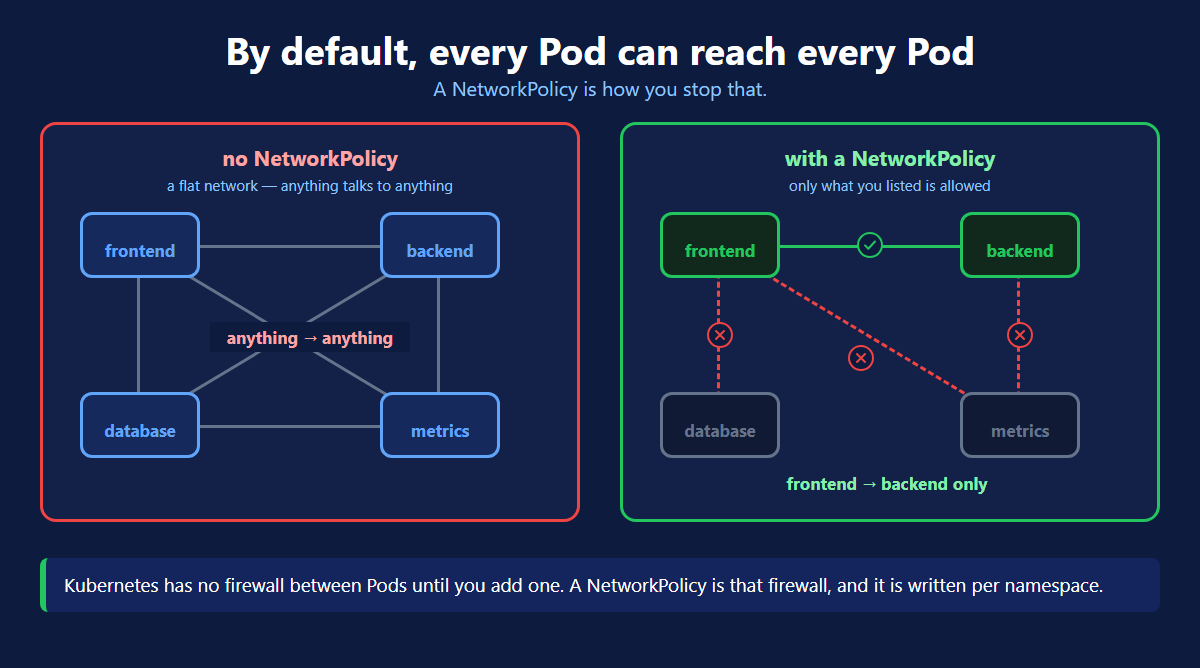
The Problem
A namespace groups your objects. It does not wall them off.
Your frontend, backend, database and metrics Pods can all reach each other. So can Pods in other namespaces.
If one Pod is compromised, your database is one curl away.
A namespace is a label on a shelf, not a locked door. The door is a NetworkPolicy.
Ingress and Egress
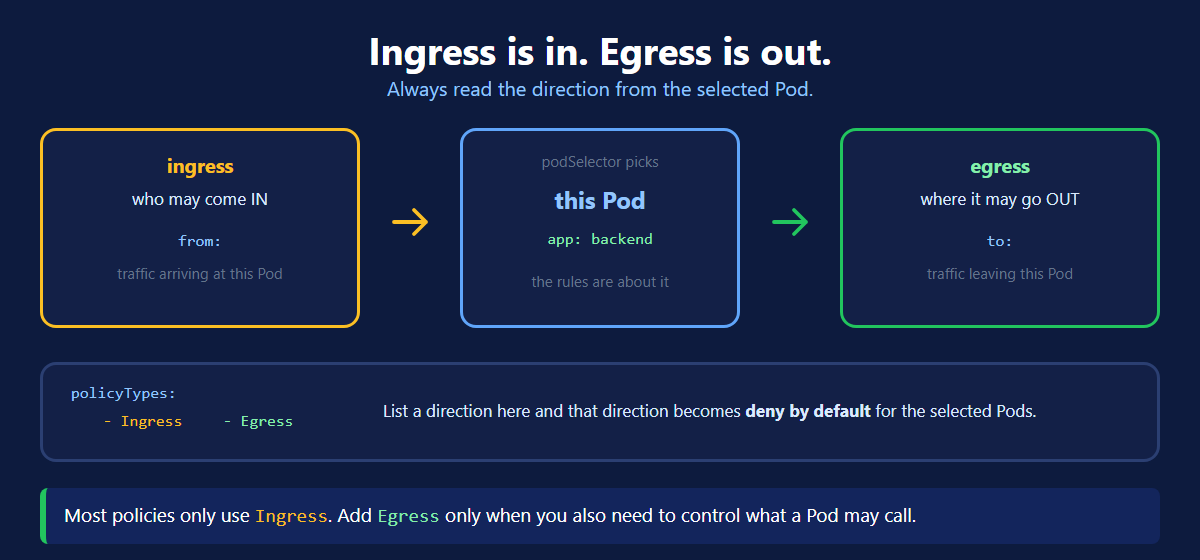
Always read the direction from the Pod the policy selects.
| Direction | Means | You write |
|---|---|---|
| Ingress | who may come in | from: |
| Egress | where it may go out | to: |
Most policies only use Ingress. That alone fixes the biggest problem.
Your First Policy
Only the frontend may reach the backend, and only on port 8080.
Four blocks, four questions:
| Block | Question it answers |
|---|---|
podSelector | which Pods does this policy protect? |
policyTypes | which direction am I controlling? |
ingress.from | who is allowed? |
ingress.ports | on which port? |
podSelector appears twice and means two different things. At the top it picks the Pods being protected. Inside from: it picks the Pods being allowed.
Deny by Default
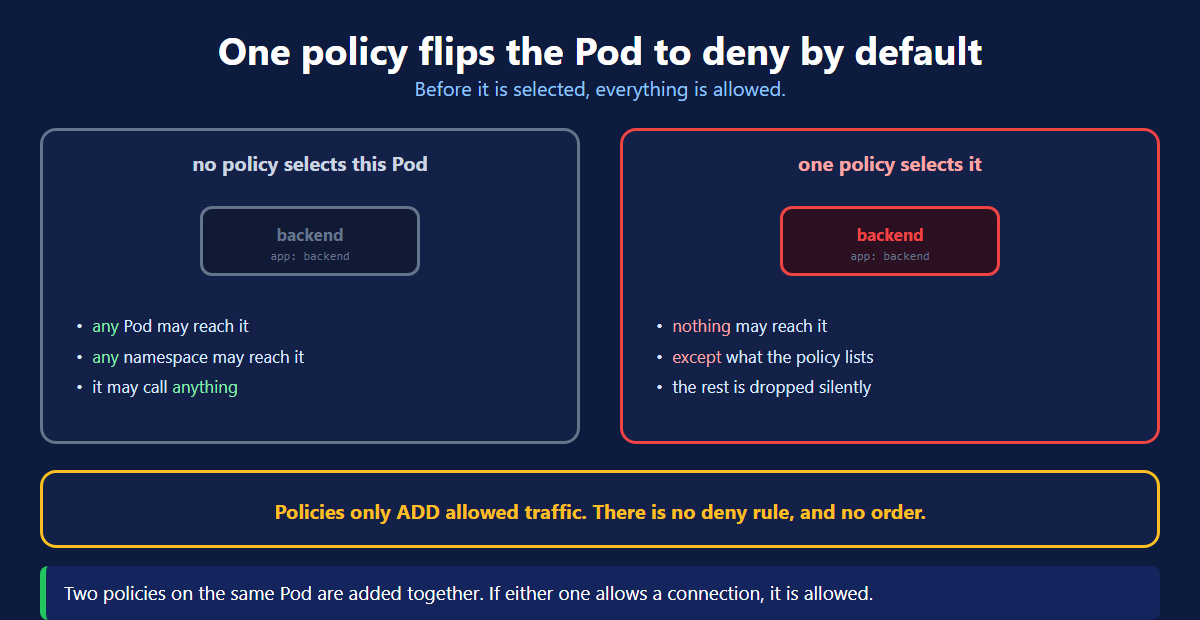
This is the rule everything else depends on.
| State | What happens |
|---|---|
| No policy selects the Pod | everything is allowed |
One policy selects it for Ingress | nothing comes in, except what is listed |
One small policy flips a Pod from fully open to fully closed. Then you open it back up, one rule at a time.
Policies are added together. Two policies on the same Pod do not conflict and have no order. If either one allows a connection, it is allowed.
Testing It
Look at the failure. It is a timeout, not connection refused.
Blocked traffic is dropped silently. A timeout looks exactly like a crashed Pod or a wrong address. When something that used to work starts hanging, check for a NetworkPolicy first.
The Three Selectors
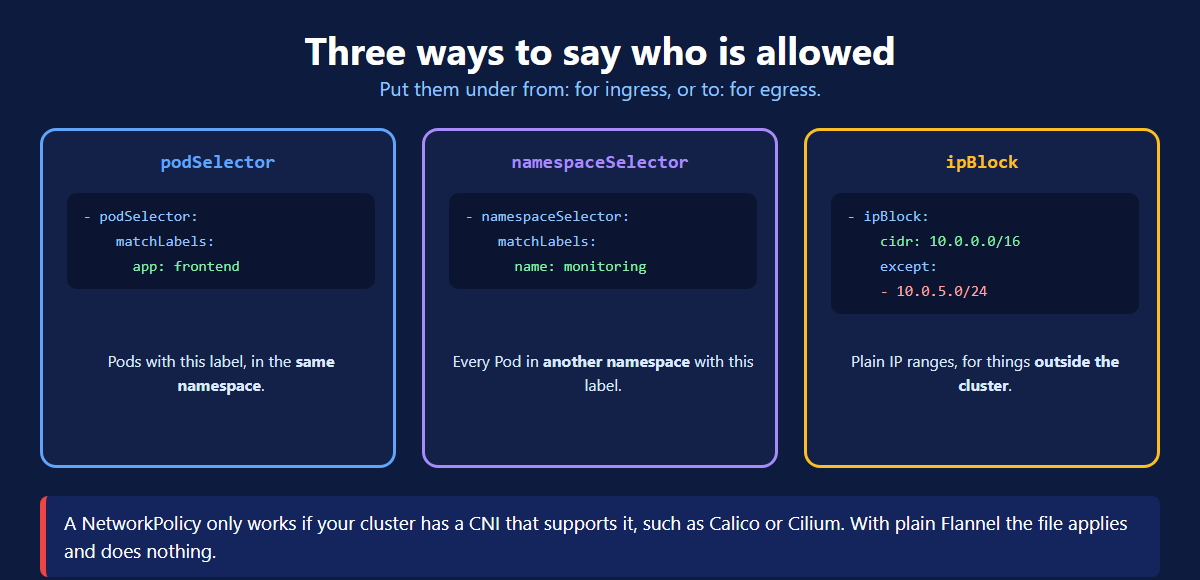
| Selector | Allows |
|---|---|
podSelector | Pods with a label, in the same namespace |
namespaceSelector | every Pod in another namespace |
ipBlock | plain IP ranges, outside the cluster |
One Dash Changes Everything
This trips up almost everyone, so look at it closely.
| Written as | Means |
|---|---|
| Two list items, each with a dash | OR — either one is enough |
| One list item holding two selectors | AND — both must match |
Get this wrong and you open far more than you meant to. A missing dash turns a narrow rule into a wide one.
Lock a Whole Namespace
Start by closing everything, then open what you need.
Two details make this work:
podSelector: {}— an empty selector matches every Pod in the namespace.- No
ingress:block at all — so nothing is allowed in.
Apply this first, then add one policy per connection you actually want.
Controlling Egress
Add an egress policy and you must allow DNS on port 53 to kube-system. Forget it and every hostname lookup fails. This is the single most common egress mistake.
It Needs the Right CNI
Kubernetes accepts the NetworkPolicy object. It does not enforce it.
Your network plugin does that work, and not all of them can.
| Plugin | Enforces policies? |
|---|---|
| Calico | yes |
| Cilium | yes |
| Weave Net | yes |
| Flannel (on its own) | no |
kubectl get pods -n kube-system | grep -iE 'calico|cilium|weave'With a plugin that does not support them, your policy applies with no error and does absolutely nothing. Check this before you spend an hour debugging a rule.
Network Policy Commands
| Command | What it does |
|---|---|
kubectl get netpol -n <ns> | list policies in a namespace |
kubectl get netpol -A | list them across every namespace |
kubectl describe netpol <name> -n <ns> | the rules, in plain words |
kubectl get pods -n <ns> -l app=backend | which Pods a selector matches |
kubectl exec -it <pod> -- curl -m 3 <url> | test a connection from inside |
kubectl delete netpol <name> -n <ns> | remove it |
What's Next
A NetworkPolicy turns a flat, open cluster into one where every connection is on purpose. Start with a default deny on one namespace, then open the connections you actually need. The official NetworkPolicy page (opens in a new tab) and the recipes collection (opens in a new tab) have ready made examples.
← Back to ConfigMap and Secret
Continue to EKS Storage Setup →
Frequently Asked Questions
What is a Network Policy in Kubernetes?
A NetworkPolicy is a firewall rule for Pods. By default every Pod in a cluster can reach every other Pod, with nothing in the way. A NetworkPolicy lets you say which Pods may talk to which, on which ports. It is a namespaced object, so you write one for each namespace you want to protect.
Can all pods talk to each other in Kubernetes by default?
Yes. A fresh cluster has a flat network. Any Pod can reach any other Pod in any namespace, and nothing stops it. There is no firewall between Pods until you create a NetworkPolicy. That is why one compromised Pod can reach your database straight away.
What is the difference between ingress and egress in a Network Policy?
Read both from the Pod the policy selects. Ingress is traffic coming in to that Pod, and you list who is allowed under from. Egress is traffic leaving that Pod, and you list where it may go under to. Most policies only use ingress. Add egress when you also need to control what the Pod is allowed to call.
What happens when a Network Policy selects a Pod?
That direction becomes deny by default for it. Before any policy selects a Pod, everything is allowed. The moment one policy selects it and lists Ingress in policyTypes, everything incoming is blocked. Only what the policy allows gets through. Nothing changes for egress unless you list Egress too.
What is podSelector in a Kubernetes Network Policy?
podSelector appears in two places and means something different in each. At the top of the spec it chooses which Pods the policy protects. Inside a from or to block it chooses which Pods are allowed. An empty podSelector written as a pair of braces means every Pod in the namespace.
How do you create a default deny Network Policy?
Write a policy whose podSelector is an empty pair of braces. List Ingress under policyTypes, and give it no ingress rules at all. The empty selector matches every Pod in the namespace, and with no rules nothing is allowed in. You then add a separate policy for each connection you want to permit.
Why is my Kubernetes Network Policy not working?
Almost always the CNI plugin. Kubernetes accepts the NetworkPolicy object but does not enforce it itself. Your network plugin has to implement it. Calico, Cilium and Weave do. Plain Flannel does not, so the policy applies cleanly and changes nothing. Check which plugin is running in kube-system before you debug anything else.
Does a Network Policy block traffic or refuse it?
It drops the packets silently. The caller gets a timeout, never a connection refused error. This matters when you are debugging, because a timeout looks exactly like a crashed Pod or a wrong address. If a connection that used to work now hangs, check for a NetworkPolicy first.