Published: October 30, 2026 · 11 min read
Kubernetes StatefulSet and Storage Explained Simply
A web app can be thrown away and recreated. A database cannot.
Running a database on Kubernetes needs six objects you have not met yet. Here they all are, in the order you will meet them.
Here is the short version:
- A database has three parts. Only the data files need a real disk.
- A PersistentVolume is the real disk.
- A PersistentVolumeClaim is your request for one.
- A StorageClass is the rule that creates it.
- A headless Service gives each Pod its own DNS name.
- A StatefulSet keeps the name and the disk together.
- A DaemonSet runs one Pod on every node.
StatefulSet — identity that survives
A StatefulSet is for Pods that must keep their identity, not be thrown away and replaced by a lookalike. A database replica is the normal example.
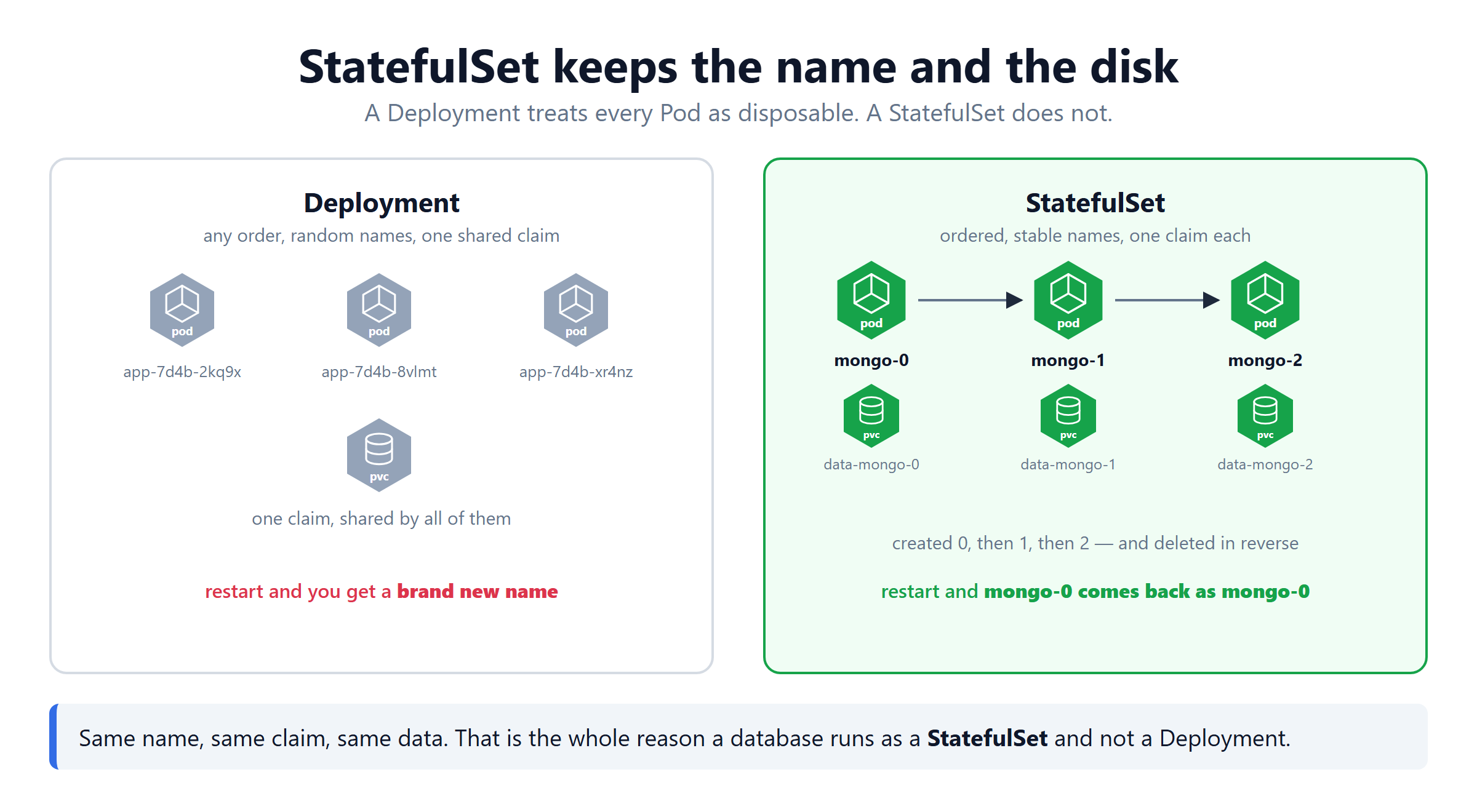
A regular Deployment treats every Pod as identical. Kill one, a new one appears with a random name, and nobody notices the difference. A StatefulSet refuses to do that.
| Deployment | StatefulSet | |
|---|---|---|
| Pod names | random — app-7d4b-2kq9x | fixed — mongo-0, mongo-1 |
| Start order | all at once | one at a time, in order |
| Delete order | any | reverse order |
| Storage | one shared claim | one claim per Pod |
How creation behaves: ask for 3 replicas and mongo-0 is created first. Kubernetes waits for it to be ready, then creates mongo-1, waits again, then mongo-2. Each Pod gets the exact same fixed name every time, not a random suffix.
The field that makes this happen is volumeClaimTemplates. It is a template, not a single volume. Kubernetes stamps out one PersistentVolumeClaim per Pod from it, so mongo-0 and mongo-1 never share a disk.
Look at the claim names: data-mongo-0, data-mongo-1, data-mongo-2. The pattern is <template name>-<pod name> — one claim per Pod, matched by name.
How deletion behaves: delete mongo-0 and Kubernetes recreates it with the same name. It reattaches the same claim, so the Pod comes back with its old data already there. Scale the whole StatefulSet down and Pods are removed in reverse order — the highest number goes first.
Same name back. Same claim. Same data. That is the whole point.
Deleting a StatefulSet does not delete its PVCs. That is on purpose, so your data survives a mistake. Delete them yourself with kubectl delete pvc when you really mean it.
DaemonSet — one Pod per node
A DaemonSet has a different purpose entirely: run exactly one Pod on every node in the cluster. Not a count you choose — the node count decides it.
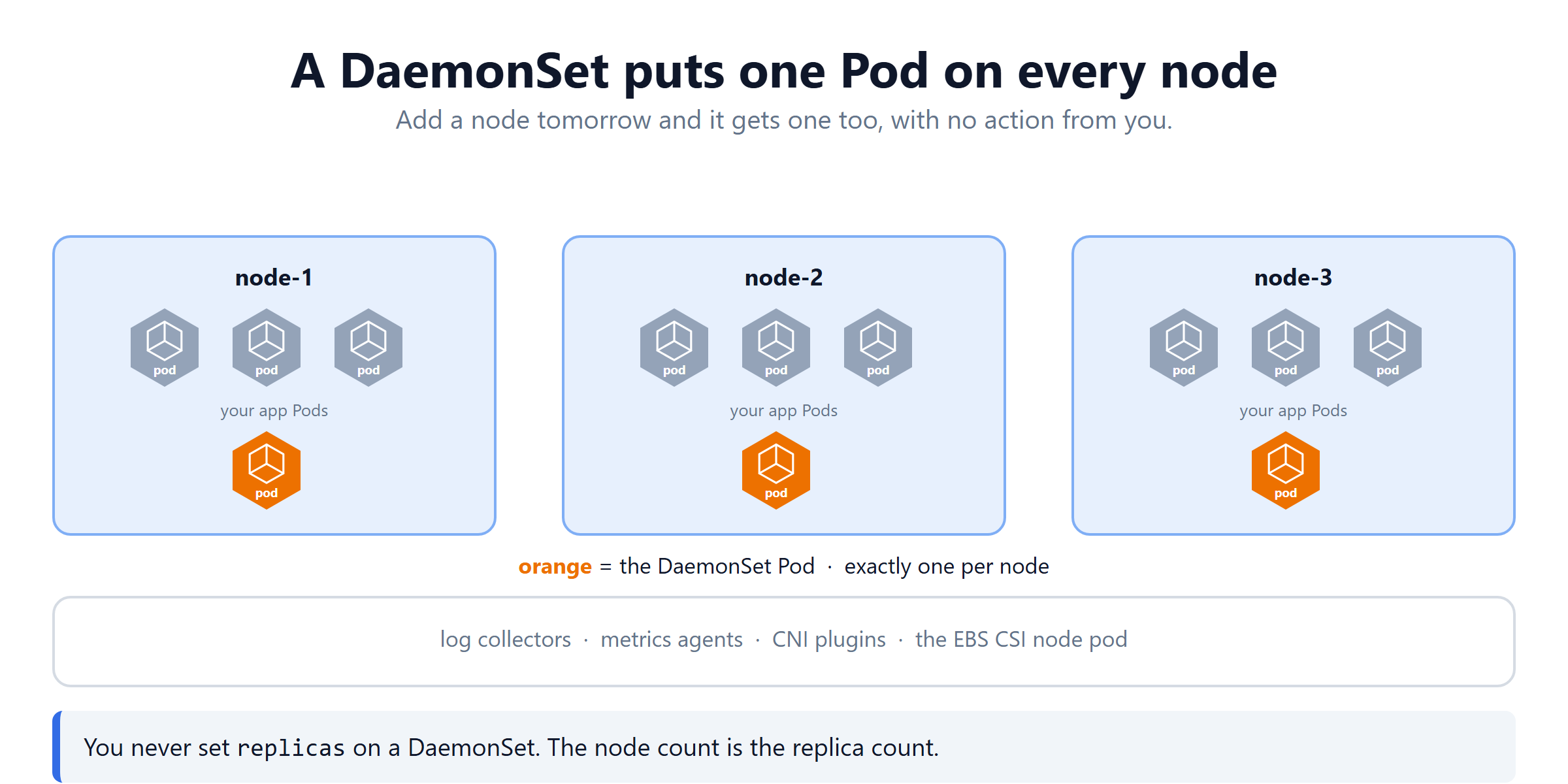
You use it for anything that must touch every machine, not just a few:
- log collectors reading each node's own
/var/log - metrics agents
- CNI network plugins
- the EBS CSI node pod from the storage setup
There is no replicas field. The node count is the replica count. That is the one thing to remember.
How it behaves: add a node to the cluster tomorrow. The DaemonSet's Pod appears on it automatically, with no action from you. Remove a node and its Pod is simply gone with it. Deletion works the same as any controller. Delete the DaemonSet and every one of its Pods, on every node, goes with it.
Headless Service — a name for every Pod
A normal Service gives you one address and picks a Pod at random. For a web app that is exactly right.
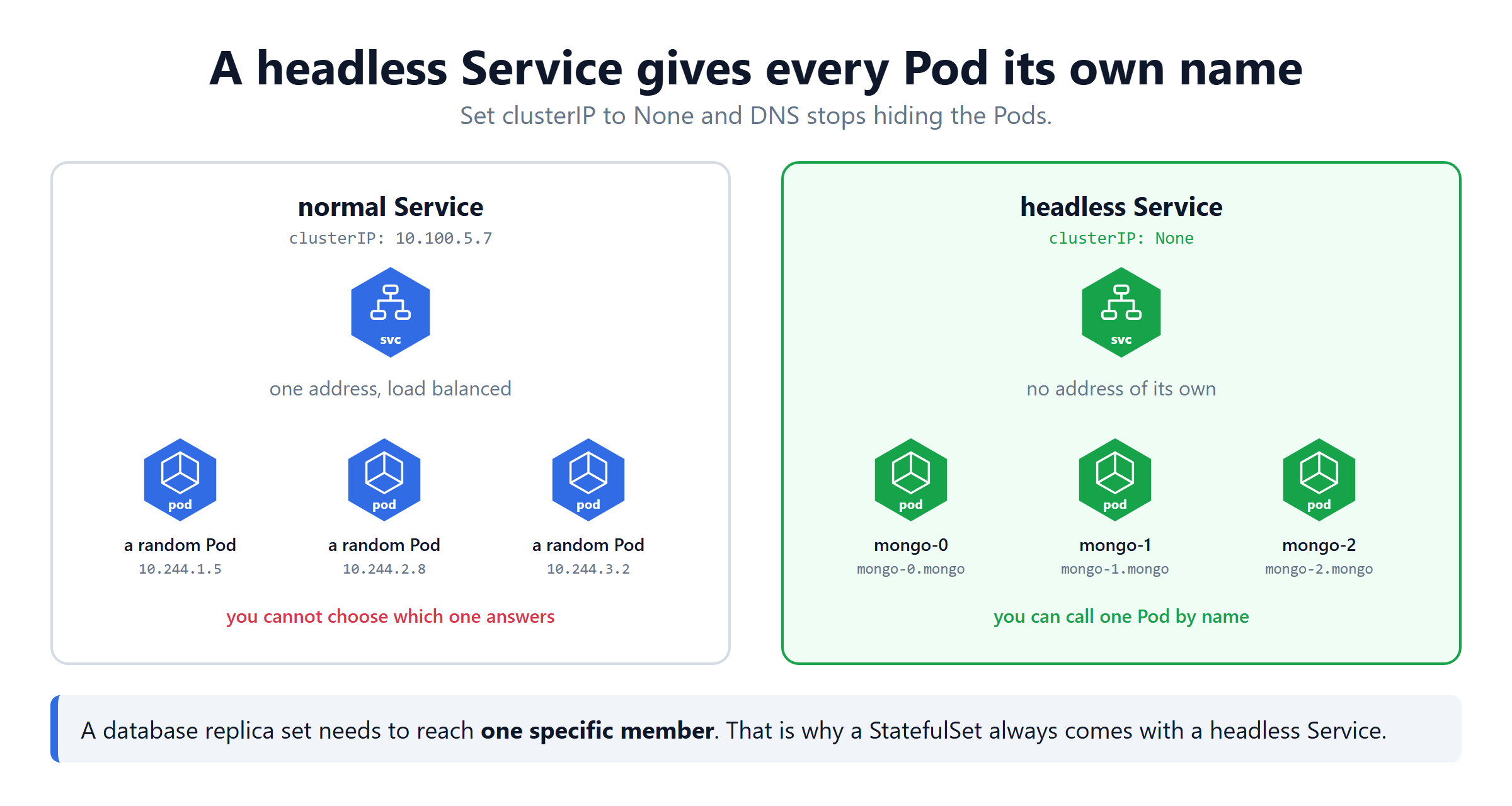
For a StatefulSet it is useless, because each Pod there is a distinct member, not an interchangeable one. You need to reach mongo-0 specifically, not whichever Pod the Service feels like picking.
One line does it: clusterIP: None. That single line turns off the "pick one address" behaviour.
| Normal Service | Headless Service | |
|---|---|---|
clusterIP | an IP address | None |
| DNS returns | the one service IP | every Pod IP |
| You reach | a random Pod | mongo-0, mongo-1, by name |
A StatefulSet's serviceName field points at a headless Service like this one. That is how each of its Pods gets its own stable DNS name.
Persistent Volumes — where the data actually lives
Step back to the thing a database needs underneath all of this. Somewhere its data files physically survive.
A database management system is the software that stores your data and answers questions about it. MongoDB, MySQL, PostgreSQL. They all work the same way inside.
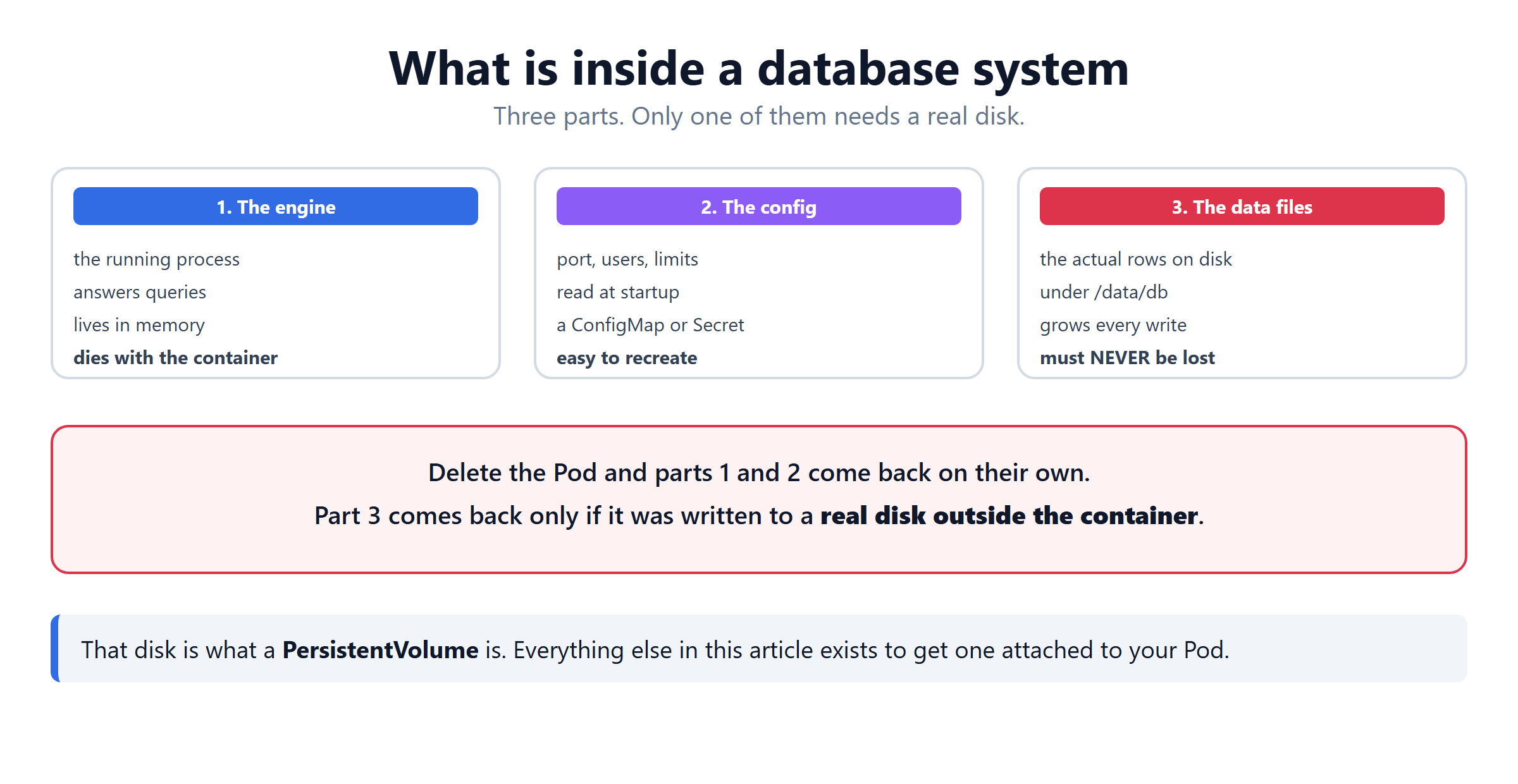
| Part | What it is | If the Pod dies |
|---|---|---|
| The engine | the running process that answers queries | comes back on its own |
| The config | port, users, limits — a ConfigMap or Secret | comes back on its own |
| The data files | the real rows, under /data/db | gone forever |
That third row is the entire problem.
A container's filesystem dies with the container. Write your database files there and one restart wipes every record.
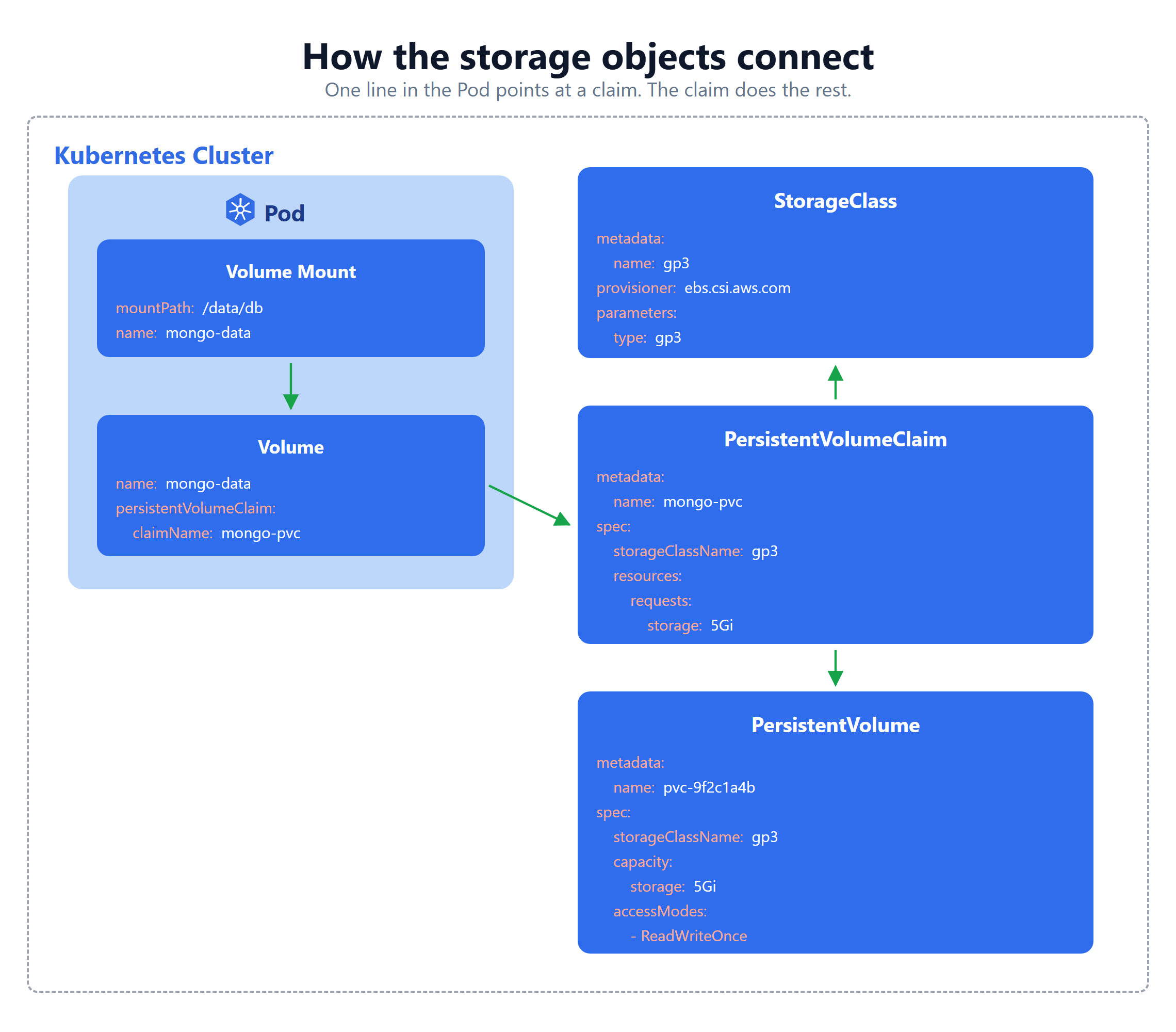
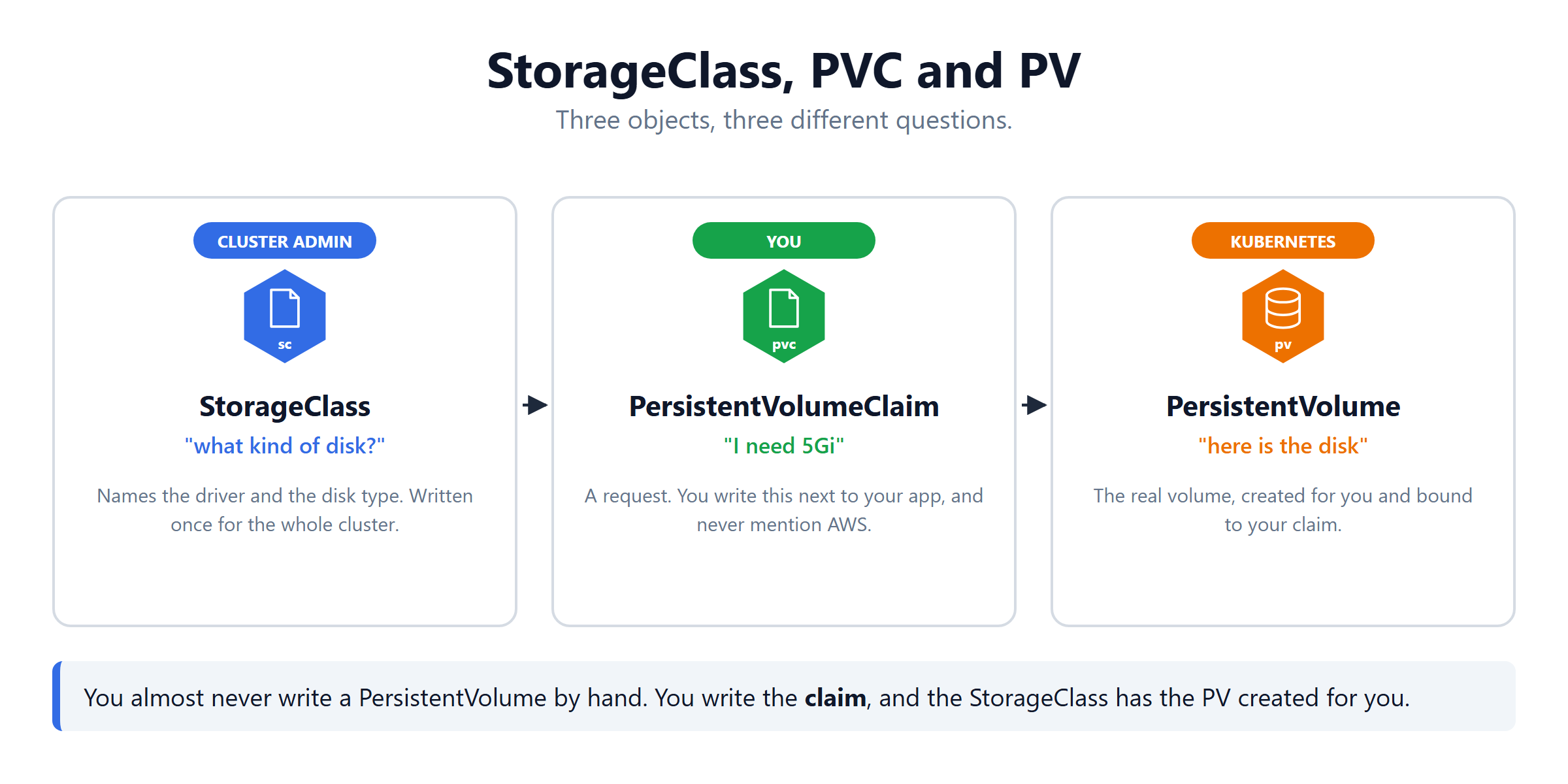
The fix is to put the data files on a disk that lives outside the Pod. That disk is a PersistentVolume, and it is requested and provisioned through three objects.
PersistentVolume — the disk
A PV is a real piece of storage in the cluster. On EKS it is an AWS EBS disk.
It is a cluster level object. It does not belong to any Pod, and deleting a Pod does not delete it.
You will almost never write this file. Read it once to see what a PV holds, then let the StorageClass create them for you.
PersistentVolumeClaim — the request
A PVC is you asking for a disk. You say how much and what kind. You never say which disk.
Think of it as a ticket. You hand in the ticket, Kubernetes hands back a volume. This is exactly what a StatefulSet's volumeClaimTemplates stamps out automatically, one per Pod.
| Object | Who writes it | Scope |
|---|---|---|
| PersistentVolume | Kubernetes, usually | the whole cluster |
| PersistentVolumeClaim | you (or a StatefulSet, on your behalf) | one namespace |
StorageClass — the rule
A StorageClass answers two questions: who creates the disk, and what kind is it.
| Field | Meaning |
|---|---|
provisioner | the driver that does the work |
parameters.type | the disk type, here a gp3 SSD |
reclaimPolicy | Delete removes the real disk with the claim |
volumeBindingMode | WaitForFirstConsumer waits for a Pod before creating it |
Mark one as default and every PVC that names no class gets it automatically.
How a Pod actually uses it
Two blocks, and the names between them must match.
volumessays where the storage comes from — a claim.volumeMountssays where it appears inside the container — a path.
volumes[].name and volumeMounts[].name must be the same word. Mistype one and the container starts with an empty folder.
The Three Controllers Side by Side
| Deployment | StatefulSet | DaemonSet | |
|---|---|---|---|
| How many Pods | replicas | replicas | one per node |
| Pod names | random | fixed and numbered | random |
| Own storage | no | yes, one each | usually a hostPath |
| Use it for | web apps, APIs | databases, queues | agents on every node |
Quick Reference
| Command | What it shows |
|---|---|
kubectl get pvc -n <ns> | your claims, Pending or Bound |
kubectl get pv | the real disks that exist |
kubectl get storageclass | which one is (default) |
kubectl get sts -n <ns> | StatefulSets and their ready count |
kubectl get svc <name> | CLUSTER-IP is None if headless |
kubectl get daemonset -A | one Pod per node, everywhere |
kubectl delete sts <name> --cascade=orphan | remove the controller, keep the Pods |
What's Next
Six objects, one job: keep the data when everything else is replaced. The official StatefulSet page (opens in a new tab) and the persistent volumes page (opens in a new tab) go deeper on each.
Frequently Asked Questions
What is a database management system?
A database management system is the software that stores your data and answers questions about it. MongoDB, MySQL and PostgreSQL are all examples. It has three parts. The engine is the running process. The config holds the port and the users. The data files are the actual rows on disk. Only the data files have to survive a restart.
What is a PersistentVolume in Kubernetes?
A PersistentVolume is a real piece of storage in the cluster, such as an AWS EBS disk. It exists on its own, separate from any Pod, so deleting a Pod does not delete it. You rarely write one by hand. A StorageClass creates it for you when a claim asks for storage.
What is the difference between a PersistentVolume and a PersistentVolumeClaim?
A PersistentVolume is the actual disk. A PersistentVolumeClaim is a request for one. You write the claim saying how much space you need. Kubernetes finds or creates a volume that matches, then binds the two together. Your Pod only ever names the claim, never the volume.
What is a StorageClass in Kubernetes?
A StorageClass is a rule that says which driver creates a disk and what kind of disk it is. On EKS the provisioner is ebs.csi.aws.com and the type might be gp3. Mark one as the default and any claim that names no StorageClass quietly uses it. That keeps your YAML free of cloud specific names.
What is a headless Service in Kubernetes?
A headless Service is one with clusterIP set to None. A normal Service gives you one address and hides the Pods behind it. A headless Service gives no address of its own. DNS returns every Pod instead, each with a stable name such as mongo-0.mongo. That is how you reach one specific database member rather than a random one.
What is a StatefulSet in Kubernetes?
A StatefulSet runs Pods that must keep their identity. Each Pod gets a fixed name ending in a number, such as mongo-0 and mongo-1. Each gets its own PersistentVolumeClaim from the volumeClaimTemplates block. They are created in order and deleted in reverse. Delete mongo-0 and it comes back as mongo-0, with the same disk.
What is the difference between a StatefulSet and a Deployment?
A Deployment treats every Pod as interchangeable. Names are random, order does not matter, and one claim is shared by all of them. A StatefulSet treats each Pod as a distinct member. Names are fixed and numbered, Pods start in order, and each one gets its own claim. Use a Deployment for an app and a StatefulSet for a database.
What is a DaemonSet in Kubernetes?
A DaemonSet runs exactly one Pod on every node. You never set a replicas number, because the node count is the replica count. Add a node tomorrow and it gets its Pod automatically. It is used for things that must touch every machine. Log collectors, metrics agents, CNI plugins and the EBS CSI node pod.