Published: October 31, 2026 · 10 min read
Database Connection Pooling with Microservices Explained
You deployed a database on the cluster. Now your services have to talk to it.
How they open that connection decides whether the database survives your traffic.
Here is the short version:
- Opening a database connection takes about 50 ms. The query takes 2 ms.
- A pool opens a few connections once and reuses them.
- Your code borrows, queries, and gives back.
- A pooled connection is not immortal — an idle one is closed.
- Create the pool once per process, never per request.
- Every pod has its own pool, so the numbers multiply.
- On MongoDB the pool is per server, so they multiply again.
- Size the pool from the database limit, not from the app.
- A bigger pool is not a faster app.
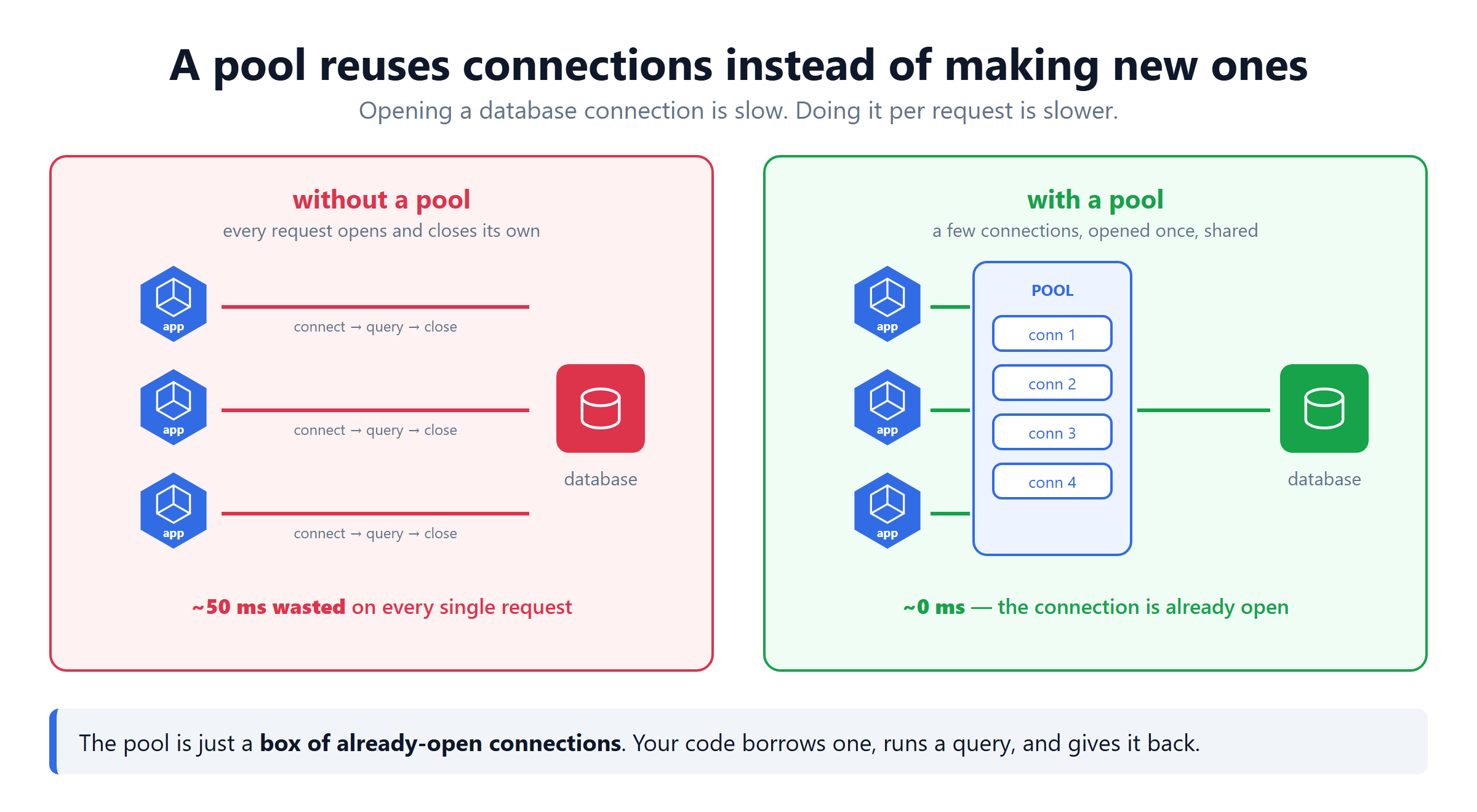
What a Connection Really Costs
A connection is not a variable. It is a live network session, and setting one up is expensive.
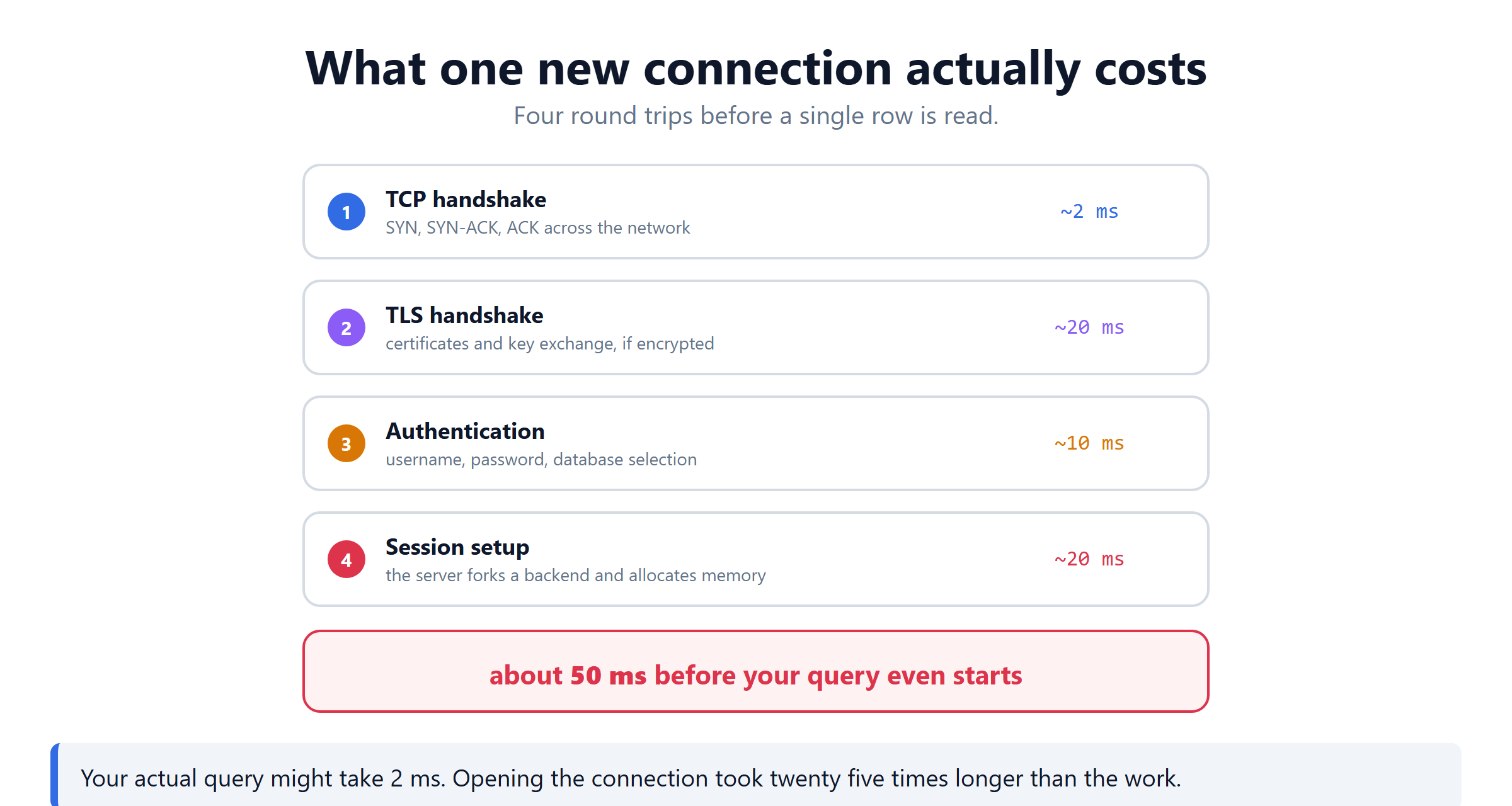
| Step | What happens | Roughly |
|---|---|---|
| TCP handshake | SYN, SYN-ACK, ACK across the network | ~2 ms |
| TLS handshake | certificates and key exchange | ~20 ms |
| Authentication | username, password, pick the database | ~10 ms |
| Session setup | the server allocates memory for you | ~20 ms |
That is ~50 ms before your query starts. If the query itself takes 2 ms, you spent 25 times longer getting ready than doing the work.
PostgreSQL makes it worse: every connection is a separate operating system process, using several megabytes of memory. A thousand connections is a thousand processes.
The Slow Way
It works. It also pays the full 50 ms on every single request. The database spends its day opening and closing sessions.
The Pool
A pool is a box of already-open connections. Nothing more.
Four settings matter:
| Setting | What it means | Sensible value |
|---|---|---|
max | the most connections this pod may open | 5 to 10 |
min | how many to keep warm while idle | 1 to 2 |
idleTimeoutMillis | close a spare one after this long | 30 seconds |
connectionTimeoutMillis | give up when opening a new client | 5 seconds (default 0, no timeout) |
Those are chosen values, not the defaults. In node-postgres the defaults are max: 10, min: 0, idleTimeoutMillis: 10000 and connectionTimeoutMillis: 0.
Create the pool once, in a module loaded at startup. Put new Pool() inside a route handler and you build a new pool on every request. That is worse than no pool at all.
Borrow, Use, Give Back
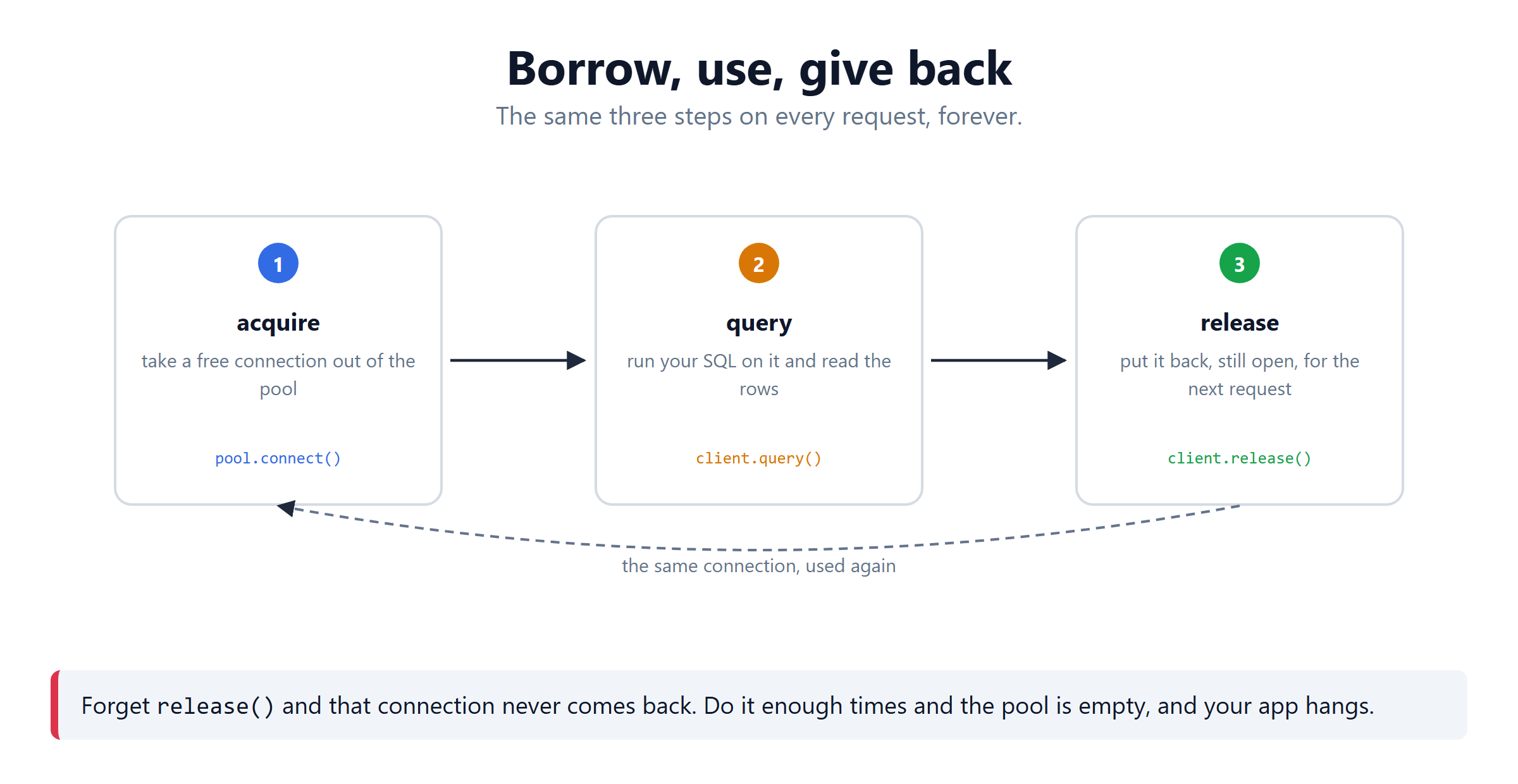
The finally block is not optional.
Miss one release() and that connection never returns. It still counts as busy. Leak enough and the pool is empty, so every request waits forever for a connection that is not coming. The app hangs with no error in the database.
How the Data Moves Through It
Follow one request end to end:
- A request arrives at your
orderspod. - The code calls
pool.connect()and gets connection 3, which is free. - The query goes down that already-open socket. No handshake.
- Rows come back up the same socket.
release()marks connection 3 free again.- The next request gets connection 3, still open.
The connection stays open between requests, so no handshake is paid again. Only the borrowing changes.
It is not open forever, though. That is the next section.
If all connections are busy, the next request waits in a queue. That is the pool doing its real job — protecting the database from more work than it can take.
Connection, Pool, Pooling
Three words that get used as if they mean one thing.
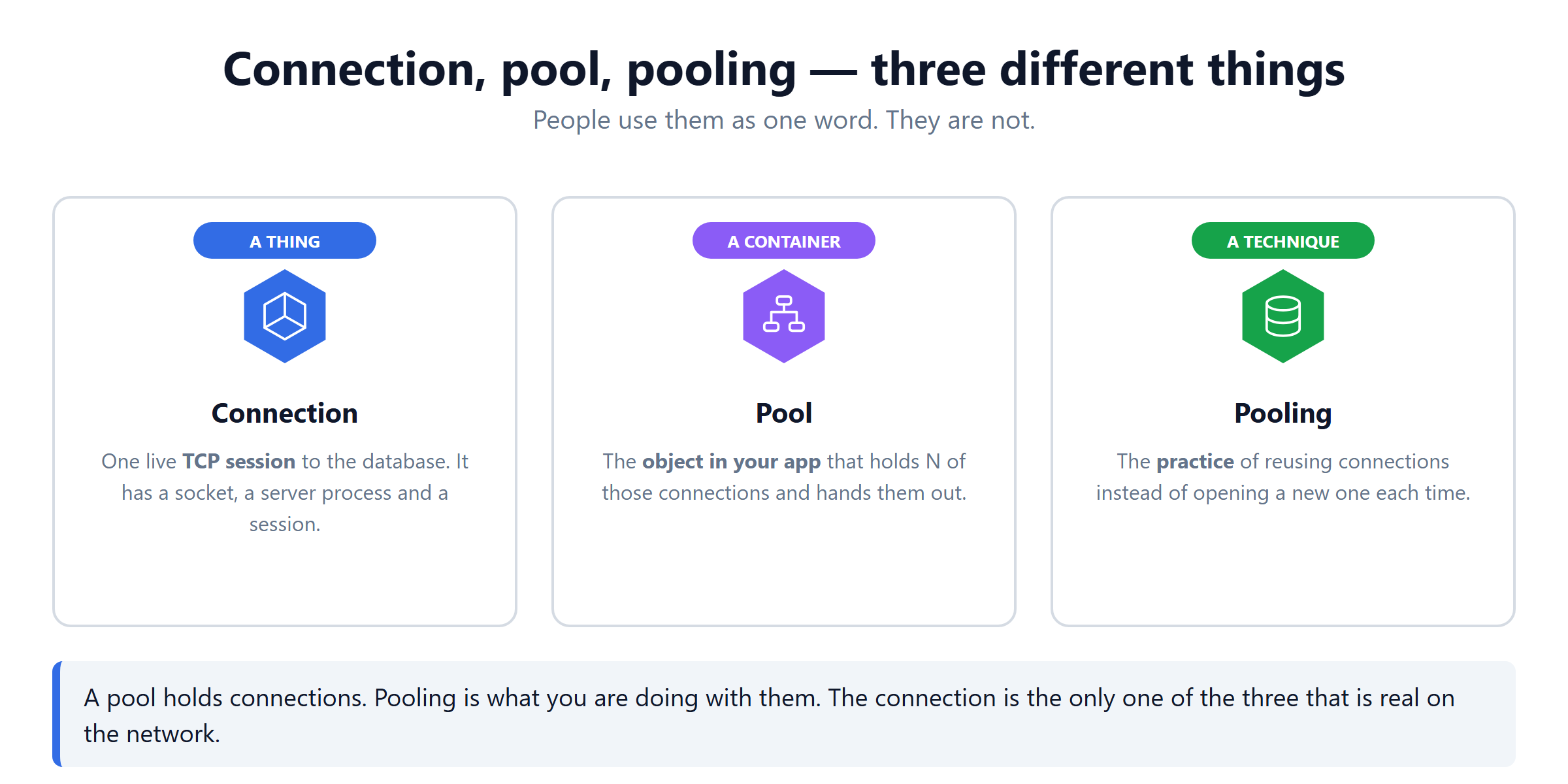
| Word | What it is | Where it lives |
|---|---|---|
| Connection | one live TCP session to the database | on the network |
| Pool | the object in your app holding N of them | in your process memory |
| Pooling | the technique of reusing them | nowhere, it is a practice |
Only the connection is real on the network. The pool is a container, and pooling is what you do with it.
Two places a pool can live
This is the bigger distinction, and it changes what you can fix.
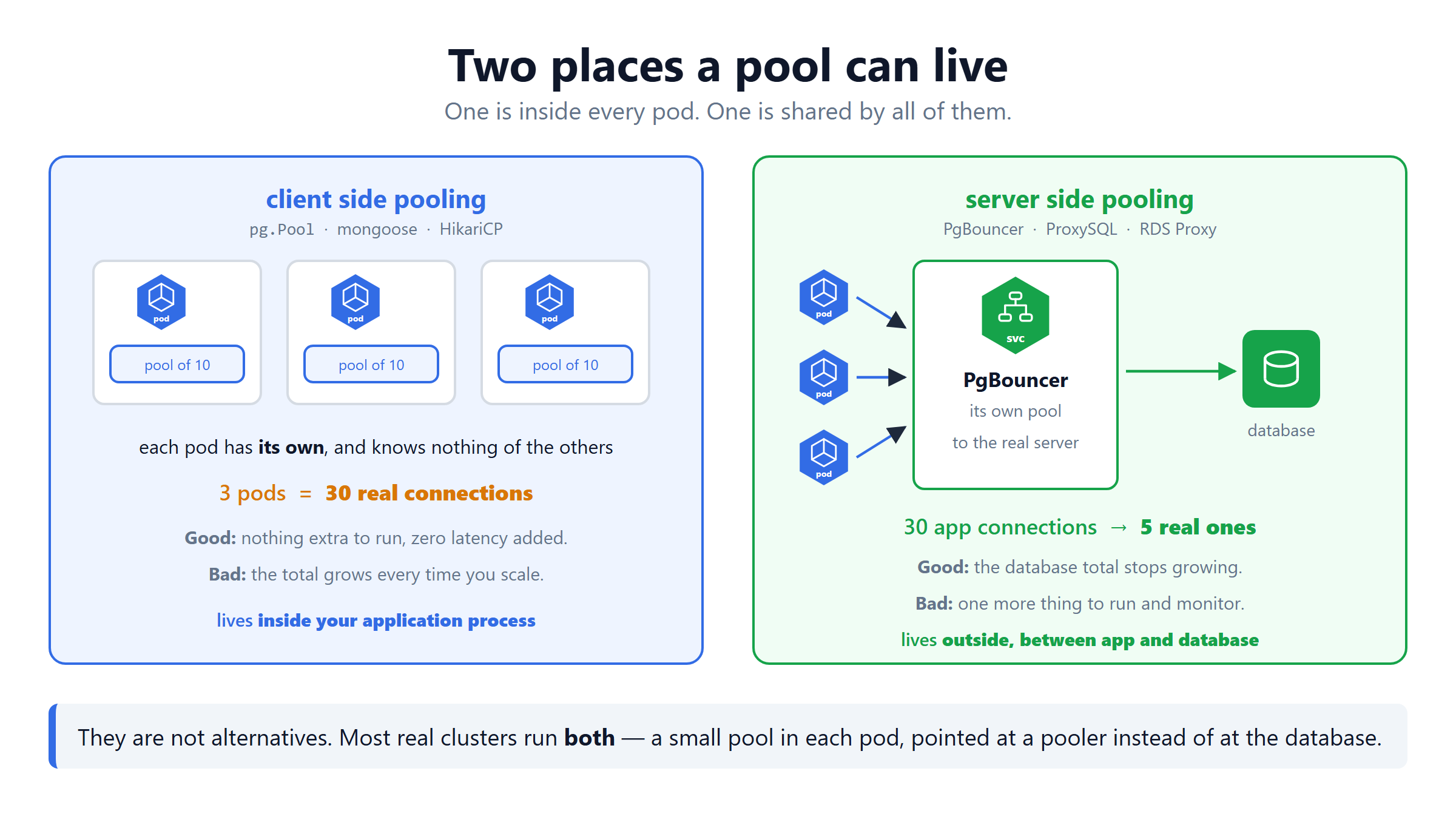
| Client side | Server side | |
|---|---|---|
| Examples | pg.Pool, mongoose, HikariCP | PgBouncer, ProxySQL, RDS Proxy |
| Lives | inside your application process | outside, between app and database |
| Shared? | no, one per pod | yes, by every pod |
| 3 pods of 10 | 30 real connections | 5, whatever you configure |
| Costs | nothing extra to run | one more thing to run and monitor |
They are not alternatives. Most real clusters run both. A small pool in each pod, pointed at a pooler instead of at the database.
A Pooled Connection Is Not Immortal
A pooled connection stays open between requests. That is the whole benefit.
It does not stay open forever. Four separate things can end it.
| What ends it | Setting | node-postgres default |
|---|---|---|
| sitting idle too long | idleTimeoutMillis | 10000 (10 seconds) |
| used too many times | maxUses | Infinity (off) |
| too old | maxLifetimeSeconds | 0 (off) |
| the database closes it | server side setting | varies |
The node-postgres documentation is exact about the first one.
idleTimeoutMillis — "Number of milliseconds a client must sit idle in the pool and not be checked out before it is disconnected from the backend and discarded. Default is 10000 (10 seconds) - set to 0 to disable auto-disconnection of idle clients."So with the defaults, a quiet service loses its pooled connections after 10 seconds of no traffic. The next request pays the full handshake again. If your traffic is bursty, raise idleTimeoutMillis or set min above zero.
The database can close it too
Your pool is not the only one deciding. The server has its own timeouts. A network device in between can also drop an idle TCP session, telling neither side.
A pool that hands out a dead connection fails on the next query. This is why good pools test a connection before handing it out. It is also why maxLifetimeSeconds exists. Rotating connections on purpose beats finding a dead one mid-request.
The Microservices Problem
This is where it goes wrong in production.
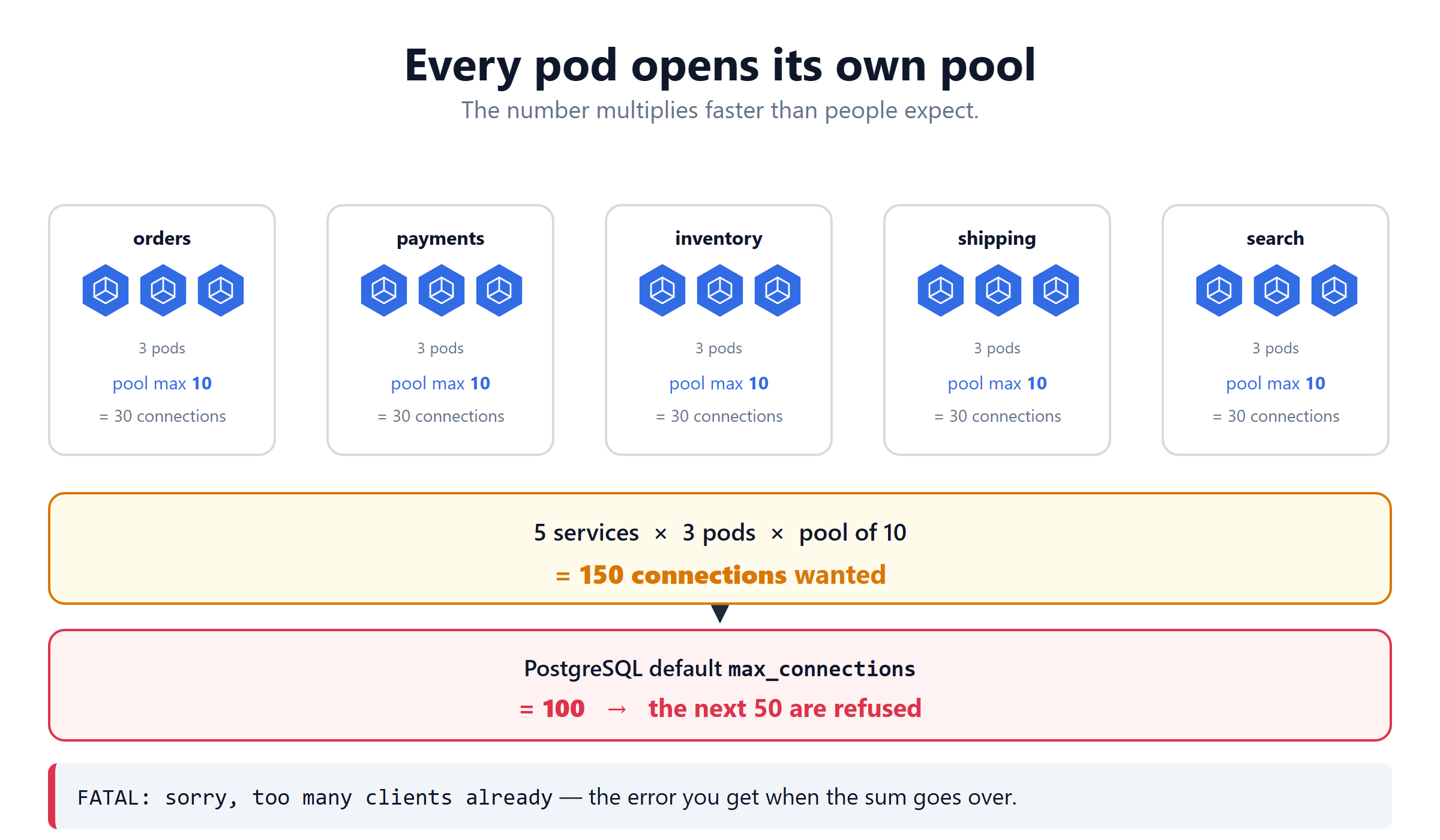
Every pod is a separate process, so every pod has its own pool.
Nobody set out to open 150 connections. Each team set max: 10, which looks harmless on its own.
FATAL: sorry, too many clients already is the error. It appears the moment traffic grows, not when you deploy. That is why it always lands at the worst time.
How Many Should You Set?
Work backwards from the database.
| Database | Default limit |
|---|---|
| PostgreSQL | max_connections 100 |
| MySQL | max_connections 151 |
| MongoDB | high server side, but maxPoolSize defaults to 100 per server |
A bigger pool does not make your app faster. The database can only do so much at once. Past that point extra connections add memory pressure and context switching. If requests are queueing, fix the query, not the pool.
Put the number in config, not in code
Now scaling replicas and tuning the pool are two separate decisions. You can change one without rebuilding the image.
MongoDB Counts Differently
The idea is the same. The arithmetic is not.
mongoose does not pool
This trips people up. mongoose does not implement a pool. It hands your options to the MongoDB Node.js driver. The driver does the pooling.
You never borrow or release, because every Model.find() takes a connection and returns it for you. There is no release() to forget.
The pool is per server, not per client
Here is the part that breaks the maths.
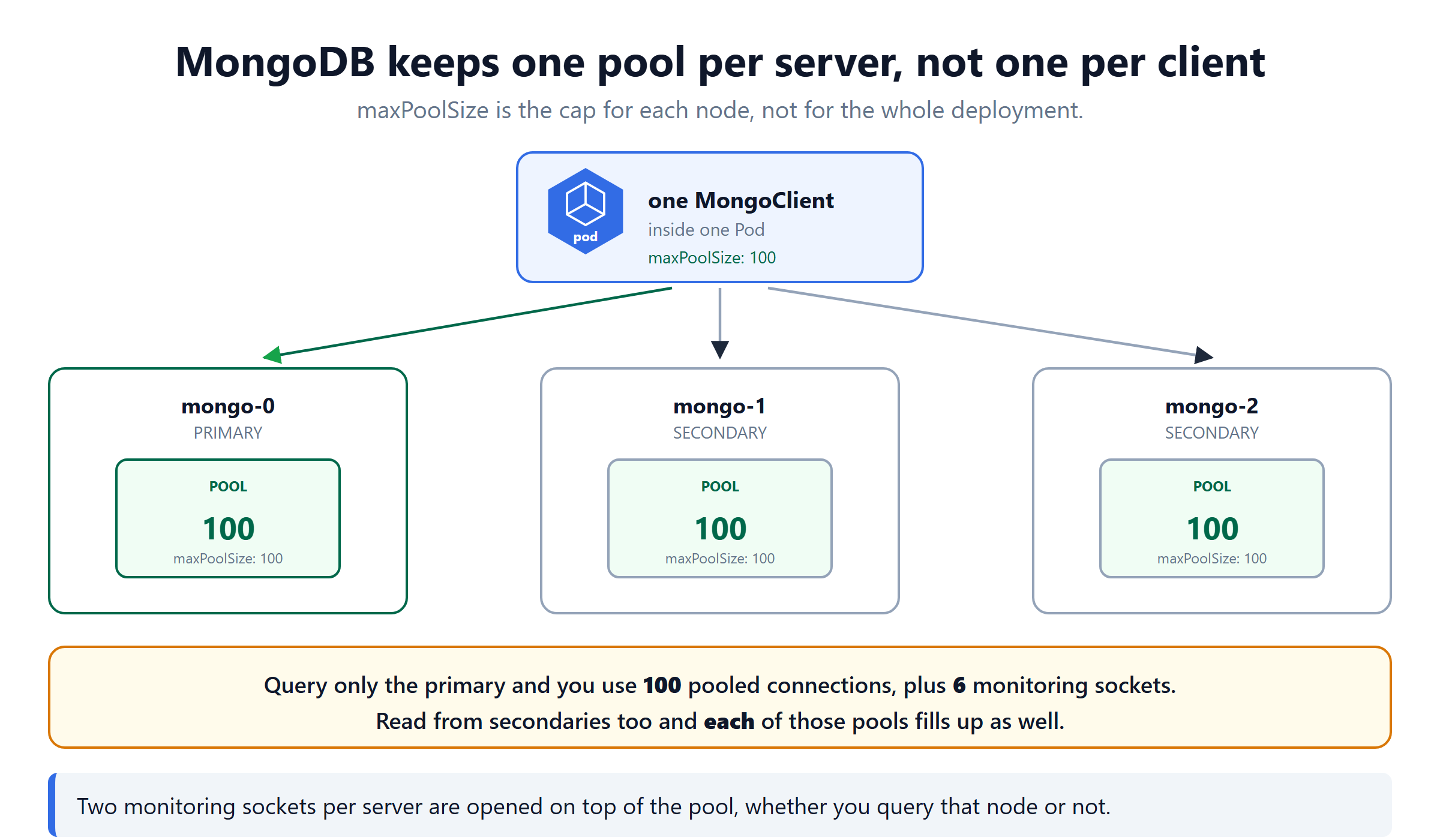
MongoClient instance has a built-in connection pool for each server in your MongoDB topology." — MongoDB Node.js driver documentationSo maxPoolSize: 10 does not mean ten connections to your deployment. It means up to ten per server you talk to.
The driver documentation gives the exact example. A client on a three-node replica set opens six monitoring sockets. Querying only the primary with the default maxPoolSize, there can be at most 106 open sockets. Of those, 100 are the pool.
pg.Pool | MongoDB driver | |
|---|---|---|
| Who pools | the pg library | the driver, underneath mongoose |
| Number of pools | one, to one server | one per server in the topology |
max / maxPoolSize of 10 means | 10 total | 10 per server |
| Borrow and release | you do it | the driver does it |
| Extra sockets | none | 2 monitoring sockets per server |
Leaving the default of 100 on a three-node replica set across 15 pods is not "1500 connections". It is 1500 per server you read from, plus 90 monitoring sockets. Set maxPoolSize explicitly, every time.
When Lowering the Pool Is Not Enough
Twenty pods, a pool of 3 each, and the database is still at its limit. Lowering further would starve each pod.
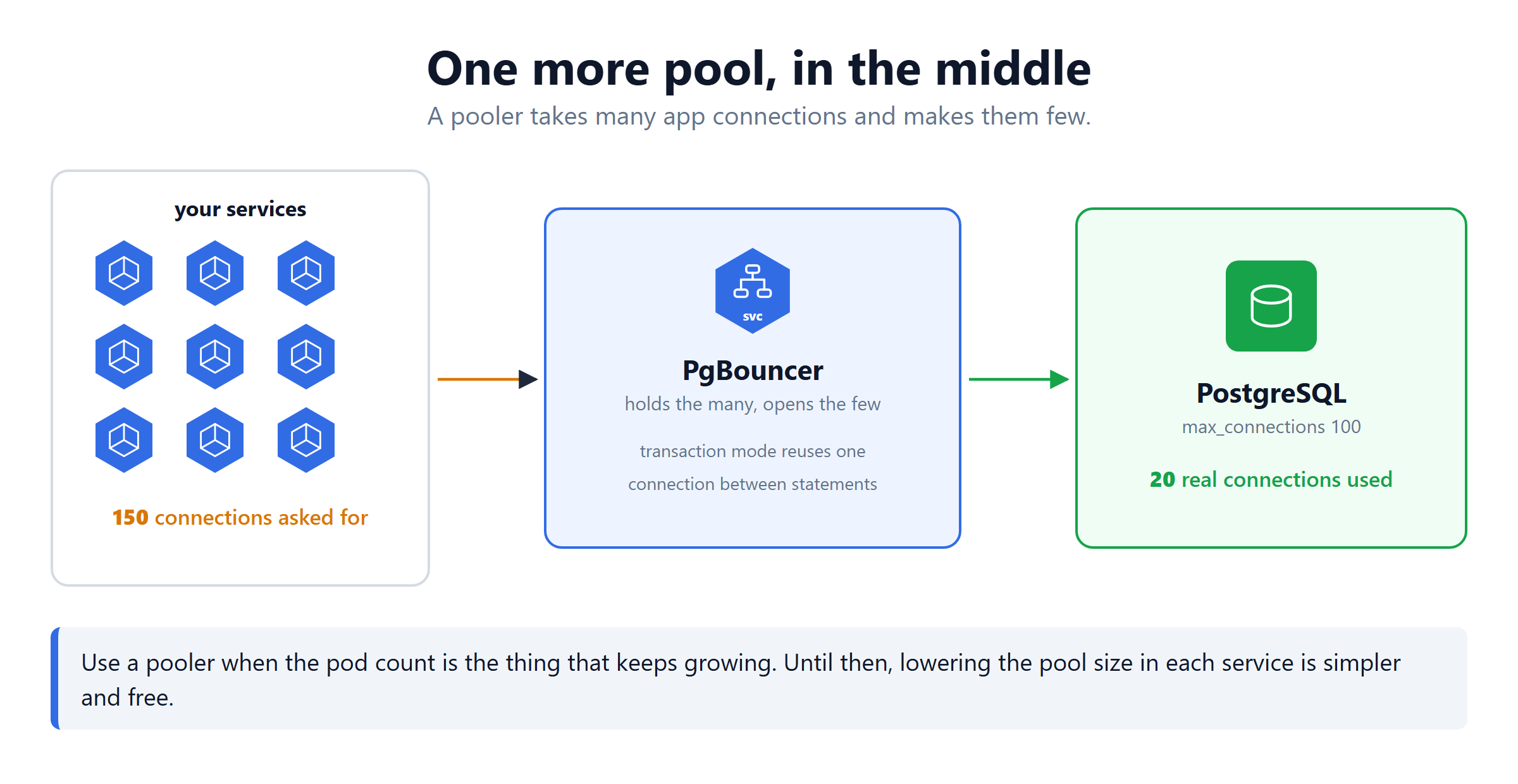
A pooler is a small proxy in front of the database. Your services connect to it, and it keeps only a few connections open to the real server.
| Tool | For |
|---|---|
| PgBouncer | PostgreSQL |
| ProxySQL | MySQL |
| RDS Proxy | AWS managed databases |
PgBouncer in transaction mode is the useful one. It hands the same database connection to different clients between transactions. So 150 app connections can sit on 20 real ones.
Reach for a pooler when the pod count is what keeps growing. Until then, lowering max in each service is simpler, free, and usually enough.
Checking What Is Really Open
Three numbers tell you everything:
| Number | Meaning |
|---|---|
totalCount | connections this pod has open |
idleCount | how many are free right now |
waitingCount | requests queued for a connection |
waitingCount above zero for more than a moment means something is wrong. Either the pool is too small, or a query is slow, or a connection is leaking.
Connection Pooling Quick Reference
| Rule | Why |
|---|---|
| One pool per process | a pool per request is worse than none |
Always release() in finally | a leak empties the pool silently |
| Size from the database limit | the app does not know the cap |
| Pool size in a ConfigMap | change it without a rebuild |
Set maxPoolSize on mongoose | the default 100 is per server, far too high |
Watch waitingCount | it is the first sign of trouble |
| Add a pooler late | lower the pool size first |
What's Next
A pool is a small idea with a large effect. Open a few connections, reuse them, and count them across every pod before the database does it for you. The node-postgres pooling docs (opens in a new tab) and the PgBouncer documentation (opens in a new tab) go deeper.
Continue to Helm & Ingress Controller →
Frequently Asked Questions
What is database connection pooling?
A connection pool is a small set of database connections that are opened once and then reused. Instead of opening a new connection for every request, your code borrows a free one from the pool. It runs its query, then gives it back. The connection stays open for the next request. The handshake cost is paid once, not thousands of times.
Why is opening a database connection slow?
Because four separate things happen before a single row is read. A TCP handshake, then a TLS handshake if the link is encrypted. Then authentication with your username and password, and session setup where the server allocates memory. Together that is often around fifty milliseconds, while the query itself might take two.
How many connections should be in a pool?
Work backwards from the database, not from the app. Take the server max connections and subtract a few for admin access. Then divide by the total number of pods that will connect. With a cap of 100, ten reserved and fifteen pods, each pool should hold about six. Smaller is usually better, because a pool is a queue and not a speed setting.
How does connection pooling work with microservices?
Every pod runs its own process, so every pod has its own pool. The totals multiply. Five services with three pods each and a pool of ten is 150 connections. That is already above the PostgreSQL default of 100. You either lower the pool size in each service or put a shared pooler in front of the database.
What is PgBouncer and when do you need it?
PgBouncer is a small proxy that sits between your services and PostgreSQL. It accepts many application connections and keeps only a few open to the real database. In transaction mode it hands the same database connection to different clients between transactions. Use it once the pod count is what keeps growing, because lowering each pool only takes you so far.
What happens if you forget to release a connection?
That connection is never returned to the pool. It is still counted as busy even though nothing is using it. Leak enough of them and the pool is empty. Every new request then waits for a free connection that is never coming. Your app appears to hang with no error in the database. Always release inside a finally block.
Does a bigger connection pool make the app faster?
Usually not. A database can only do so much work at once. Past that point more connections just add context switching and memory pressure. A pool is a queue, not a throttle you open wider for speed. If requests are waiting, the fix is almost always a faster query or an index, not a larger pool.
Where should the pool be created in a Node.js app?
Once, in a module that is loaded when the process starts, and then exported. Never inside a route handler. That would create a new pool on every request, which is worse than having no pool at all. One pool per process is the rule, and in Kubernetes that means one pool per pod.