Published: November 1, 2026 · 10 min read
Helm and Ingress Controller Explained with a Real Install
Your app runs in the cluster. Reaching it still means a NodePort with an ugly five digit number. Or a LoadBalancer per service, each with a bill.
Ingress fixes that. And Helm is how you install the thing that makes Ingress work.
It builds straight on the Service you already know.
Here is the short version:
- Helm is the package manager for Kubernetes.
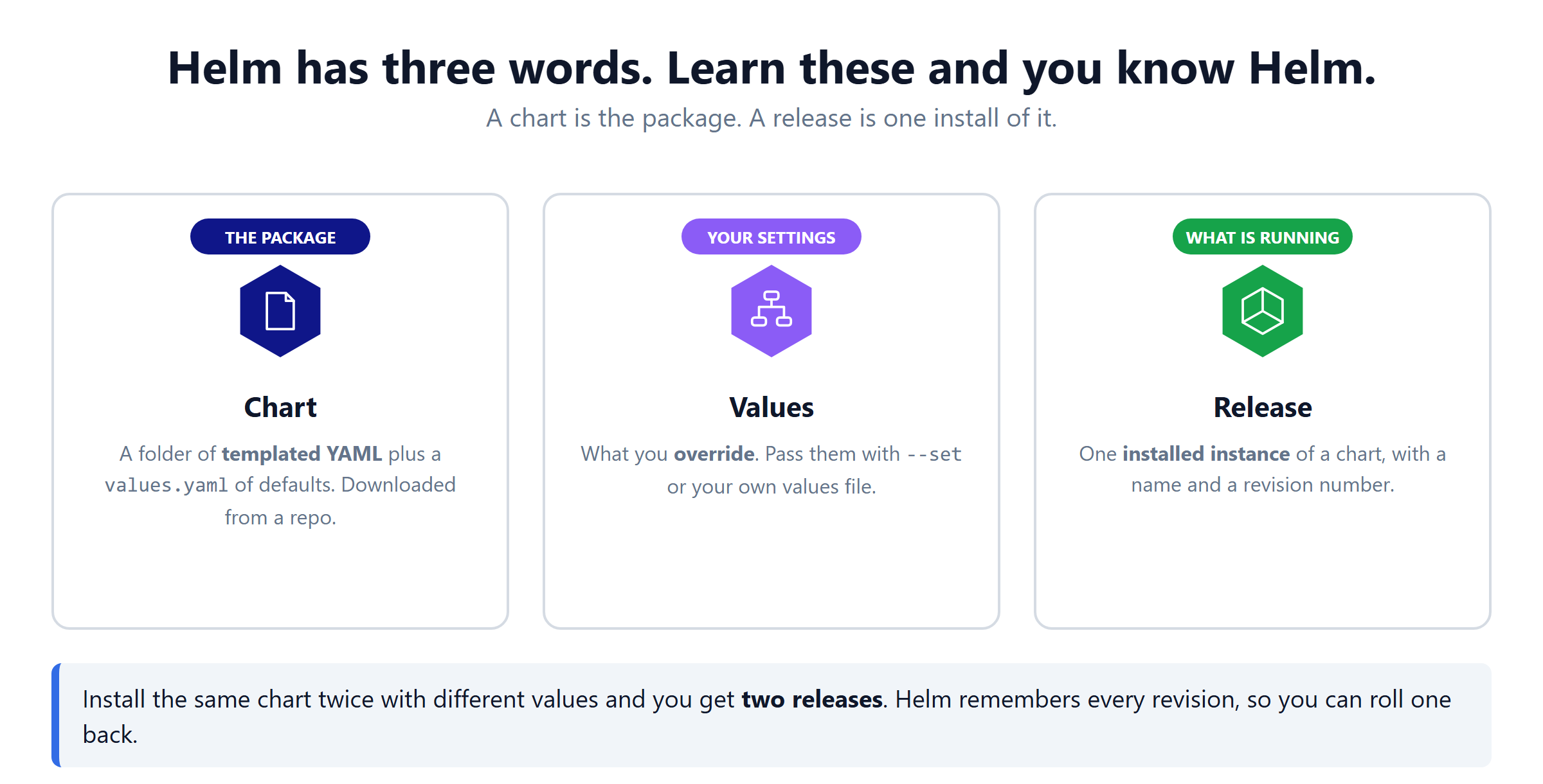
- Three words: chart (the package), values (your settings), release (one install).
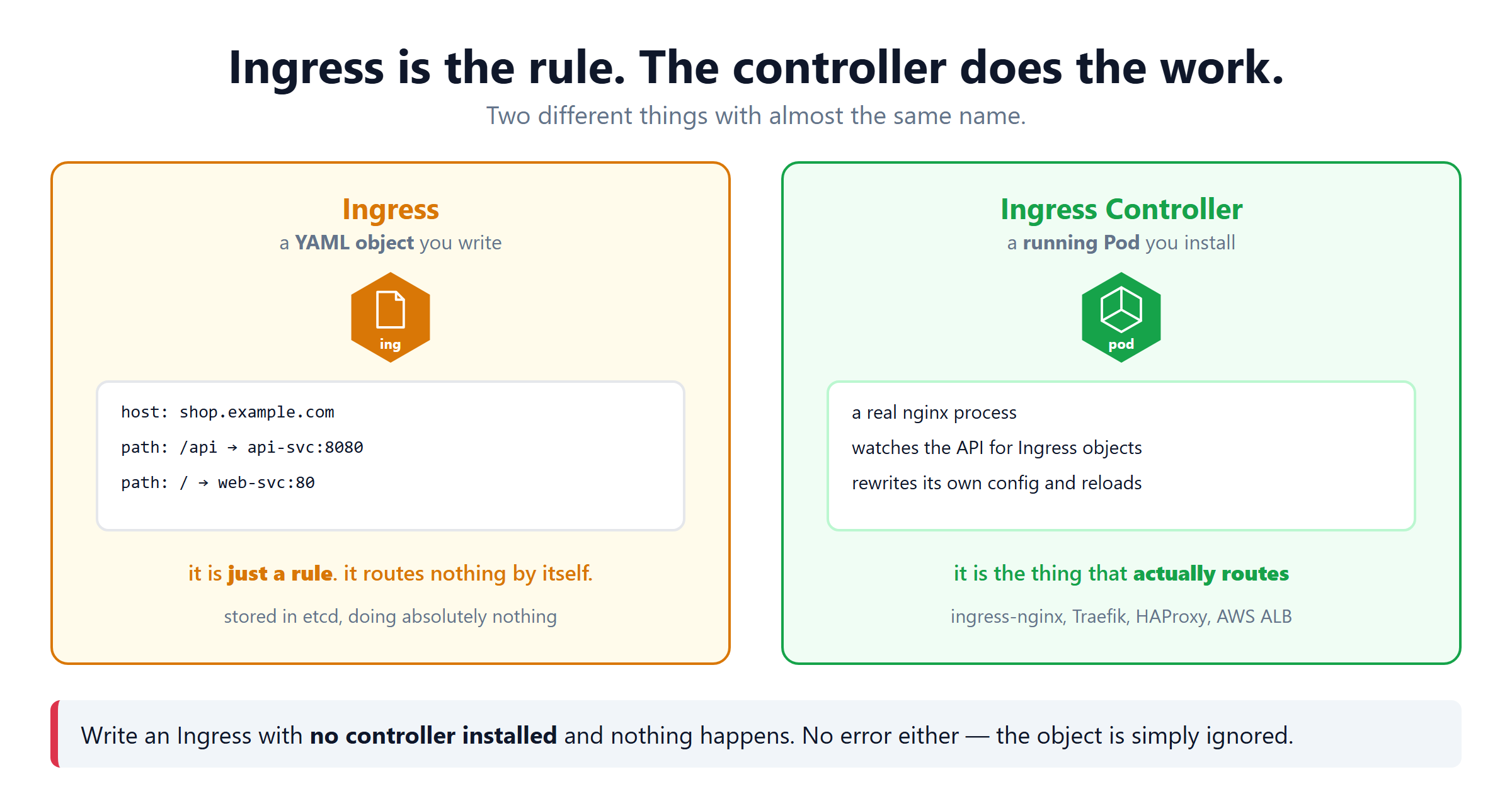
- An Ingress is only a rule. It routes nothing.
- An Ingress Controller is a running Pod that does the routing.
- No controller installed means your Ingress is silently ignored.
- One controller gives you one entry point for every service.
Why Helm Exists
Installing ingress-nginx by hand means writing nine objects or more. A namespace, a service account, a ClusterRole and a binding. Then a ConfigMap, a Deployment, a Service, an IngressClass and a webhook. Then maintaining all of it.
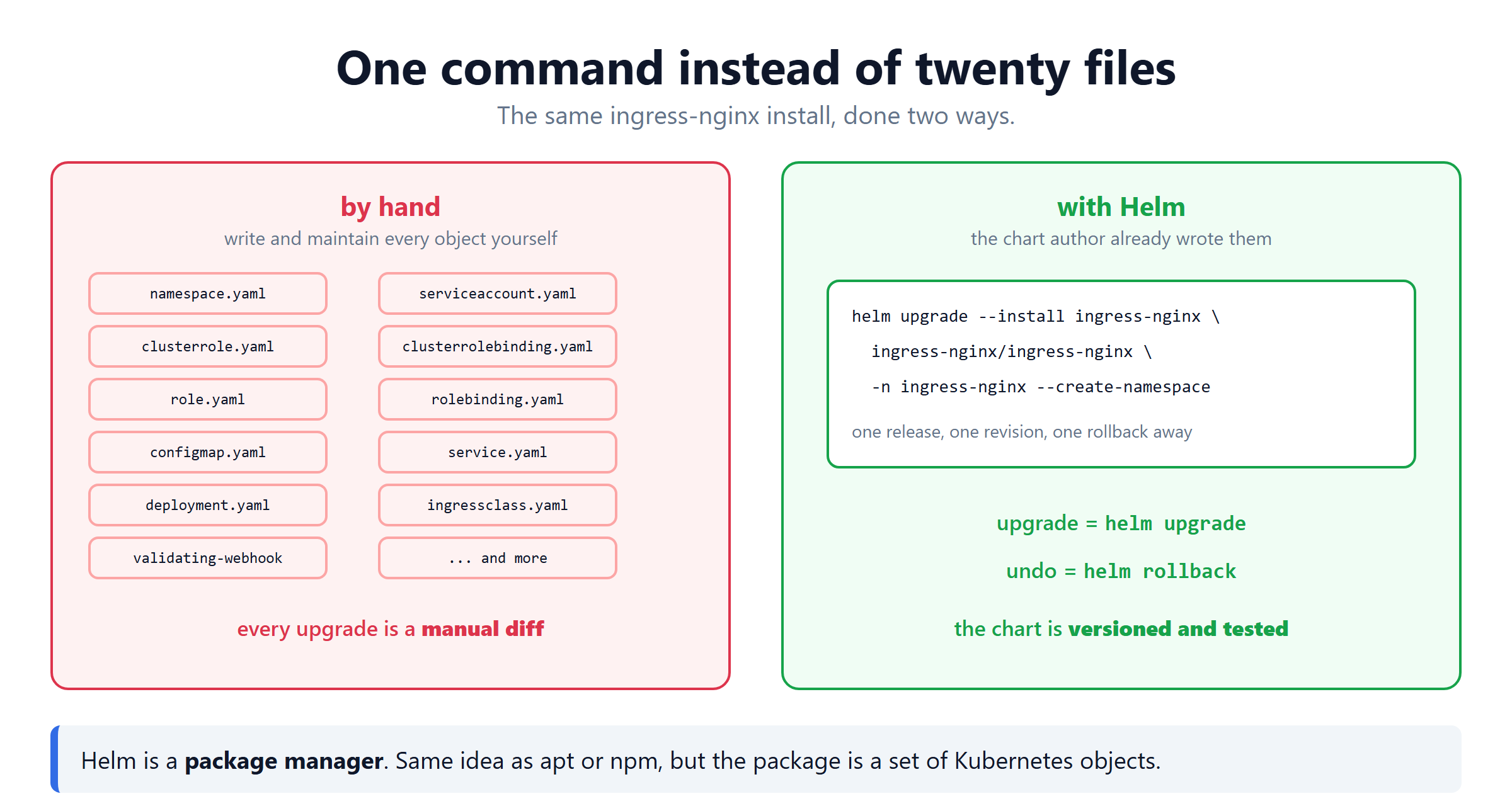
Helm is apt for Kubernetes. Somebody already wrote those files, versioned them and tested them. You install the package and override the handful of values you care about.
| Helm word | What it is |
|---|---|
| Chart | the package — templated YAML plus a values.yaml of defaults |
| Values | what you override, with --set or your own file |
| Release | one installed instance, with a name and a revision number |
| Repository | where charts are downloaded from |
Helm 3 has no Tiller. Nothing is installed in your cluster for Helm itself. It is just a CLI that talks to the API server as you.
Ingress Is Not the Ingress Controller
This is the part that confuses everyone, and it is worth getting straight before you install anything.
| Ingress | Ingress Controller | |
|---|---|---|
| What it is | a YAML object | a running Pod |
| Who writes it | you | installed once, by Helm |
| What it does | holds rules | does the routing |
| On its own | nothing | needs rules to be useful |
| Examples | your ingress.yaml | ingress-nginx, Traefik, HAProxy, AWS ALB |
Apply an Ingress with no controller running and Kubernetes accepts it without complaint. No error, no event, no routing. The object just sits in etcd. This is the single most common Ingress problem.
Step 1 — Install Helm
--classic is required for the snap. Helm needs to read your kubeconfig outside the snap sandbox, and it will not work without it.
Step 2 — Add the Chart Repository
helm repo add only saves the URL locally. helm repo update is what actually downloads the index of available charts.
Run helm repo update before an install if it has been a while. Otherwise Helm installs the newest chart version it knew about last time.
Step 3 — Install the Ingress Controller
That one line has a lot in it. Here is every part:
| Part | Why |
|---|---|
upgrade --install | installs the first time, upgrades every time after |
ingress-nginx (first) | the release name you are choosing |
ingress-nginx/ingress-nginx | repo name / chart name |
-n ingress-nginx | the namespace to install into |
--create-namespace | make that namespace if it does not exist |
--set controller.service.type=NodePort | override one value |
Why override the service type?
The chart's values.yaml sets this by default:
# -- Type of the external controller service.
type: LoadBalancer
LoadBalancer is right on EKS, GKE or AKS, where the cloud creates a real load balancer for you. On a plain EC2 cluster, bare metal or minikube nothing creates one. The service would sit in <pending> forever.
NodePort is the honest choice when there is no cloud load balancer. You reach the cluster at a node IP plus a port instead of a nice address.
Step 4 — Check It Worked
That jsonpath command is the useful one. It prints only the HTTP node port, so you can drop it straight into a script or a curl.
Step 5 — Write an Ingress
The controller is running. Now give it rules.
Three fields matter most:
| Field | What it decides |
|---|---|
ingressClassName | which controller picks this up |
host | which domain this rule is for |
path + pathType | which Service gets the request |
If CLASS shows <none>, no controller has claimed your Ingress. Check kubectl get ingressclass and make ingressClassName match.
How the Request Actually Travels
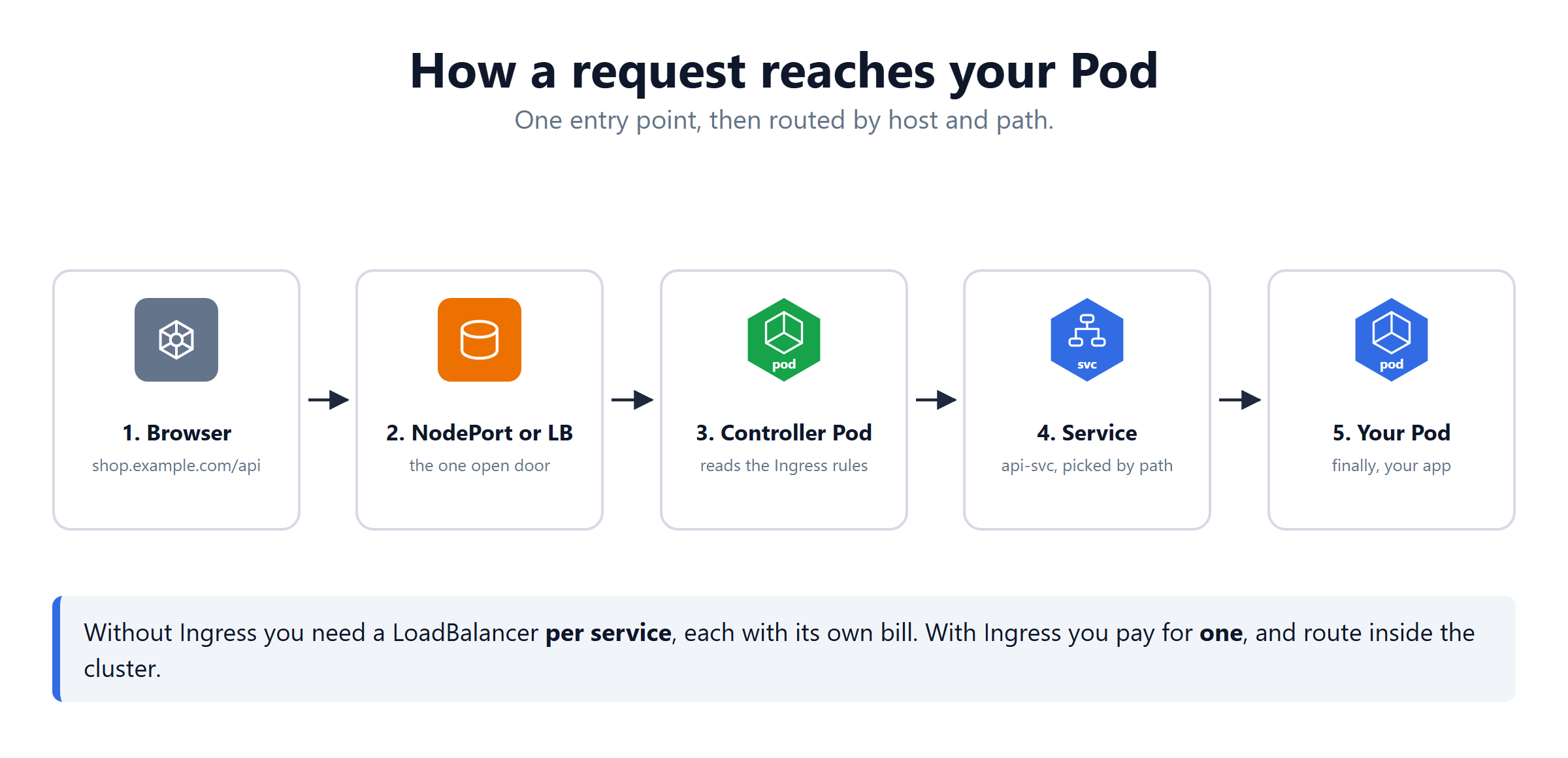
- The browser asks for
shop.example.com/api. - It arrives at the NodePort or the cloud load balancer.
- The controller Pod reads its rules and matches host and path.
- It forwards to the right Service.
- The Service picks one of your Pods.
The saving is at step 2. Without Ingress, every service needs its own LoadBalancer and its own bill. With Ingress you pay for one door and route behind it.
Values Files Beat Long Command Lines
Two or three --set flags are fine. Ten are not.
A values file can go in git, be reviewed, and be reused on the next cluster. A long shell command cannot.
Look Before You Install
| Command | Answers |
|---|---|
helm template | what YAML would this produce? |
--dry-run | would the cluster accept it? |
helm show values | what can I even configure? |
helm get values | what is my running release using? |
Upgrades and Rollback
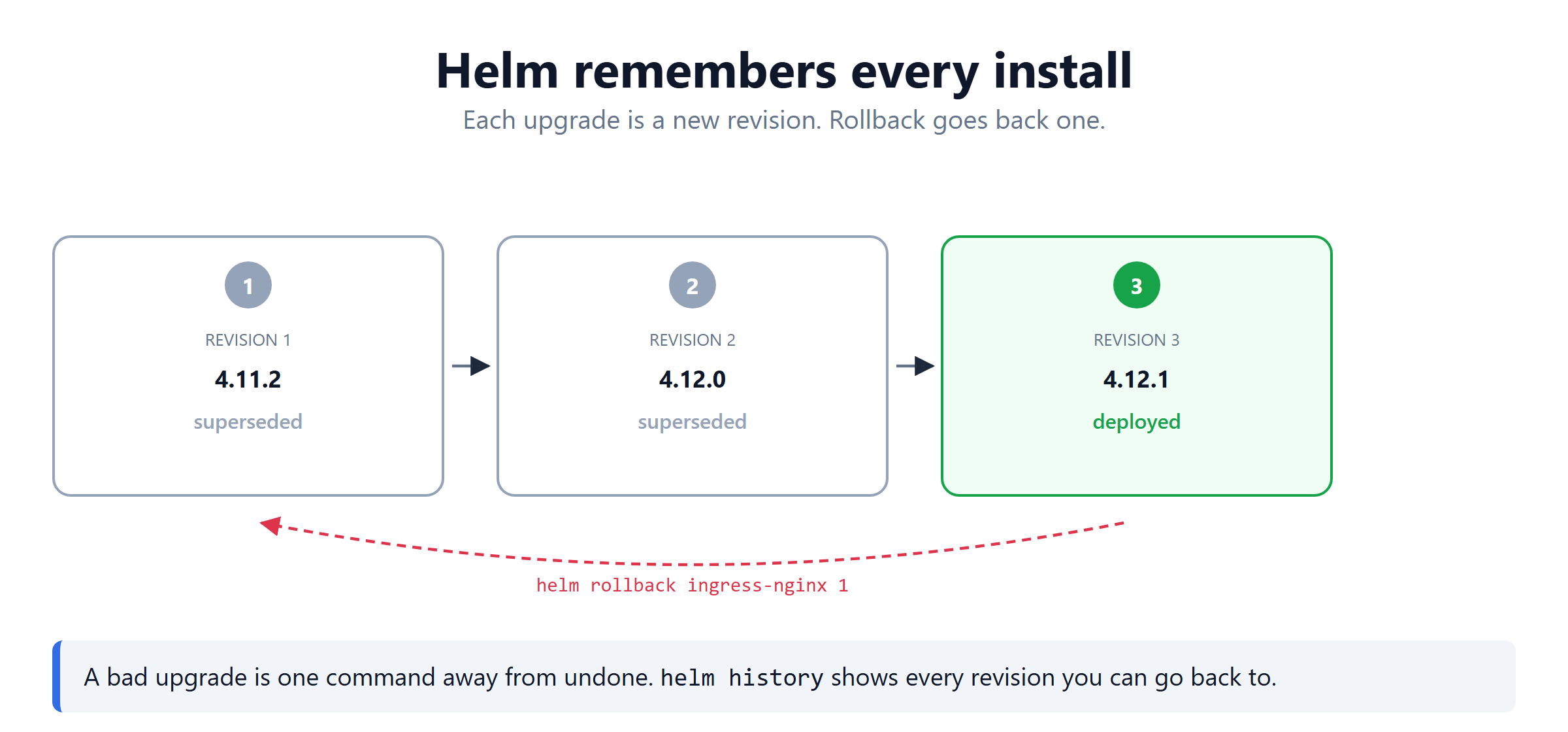
Every helm upgrade creates a new revision. The old ones are kept.
helm history ingress-nginx -n ingress-nginx
# REVISION  STATUS       CHART                  DESCRIPTION
# 1         superseded   ingress-nginx-4.11.2   Install complete
# 2         superseded   ingress-nginx-4.12.0   Upgrade complete
# 3         deployed     ingress-nginx-4.12.1   Upgrade complete

helm rollback ingress-nginx 1 -n ingress-nginx
# Rollback was a success! Happy Helming!
A rollback is itself a new revision. Going back from 3 to 1 creates revision 4, so the history is never lost.
Helm Commands Quick Reference
| Command | What it does |
|---|---|
helm repo add <name> <url> | remember a chart repository |
helm repo update | refresh the chart index |
helm upgrade --install | install, or upgrade if already there |
helm list -A | every release, every namespace |
helm show values <chart> | everything you may override |
helm get values <release> | what this release is actually using |
helm history <release> | every revision |
helm rollback <release> <n> | go back to a revision |
helm uninstall <release> | remove it |
What's Next
Helm turns a twenty file install into one repeatable command. An Ingress Controller turns many load balancers into one. The official Helm documentation (opens in a new tab) and the ingress-nginx install guide (opens in a new tab) go deeper.
Frequently Asked Questions
What is Helm in Kubernetes?
Helm is the package manager for Kubernetes. The same idea as apt or npm, except the package is a set of Kubernetes objects. Instead of writing twenty YAML files yourself, you install a chart somebody already wrote and tested. You then override only the values you care about.
What is the difference between a Helm chart and a release?
A chart is the package, a folder of templated YAML plus a values file of defaults. A release is one installed instance of that chart, with a name you chose and a revision number. Install the same chart twice with different names and you get two separate releases.
What is the difference between Ingress and an Ingress Controller?
An Ingress is a YAML object holding routing rules. It says which host and path goes to which Service. It routes nothing by itself. An Ingress Controller is a Pod actually running software like nginx. It watches for Ingress objects and turns them into real configuration. Without a controller installed, your Ingress object sits there doing nothing and gives no error.
How do you install an ingress controller with Helm?
Three commands. Add the repository with helm repo add ingress-nginx and the chart URL. Refresh it with helm repo update. Then run helm upgrade --install ingress-nginx ingress-nginx/ingress-nginx with a namespace. Add --set controller.service.type=NodePort if your cluster has no cloud load balancer.
Why use helm upgrade --install instead of helm install?
Because it works whether or not the release already exists. helm install fails if the release is there, and helm upgrade fails if it is not. The combined form installs on the first run and upgrades on every run after. That makes it safe to put in a script or a pipeline.
What is the default service type in the ingress-nginx chart?
LoadBalancer. The chart values file sets controller.service.type to LoadBalancer. That is right on AWS, Google Cloud or Azure, where a real load balancer can be created for you. On bare metal, minikube or a plain EC2 cluster nothing creates one. You override it to NodePort instead.
How do you find the NodePort of the ingress controller?
Run kubectl get svc in the ingress-nginx namespace, against the ingress-nginx-controller service. Use a jsonpath of spec.ports index zero and nodePort. That prints just the HTTP port number, usually something in the 30000 to 32767 range. You then reach the cluster at any node IP plus that port.
Why is my Ingress showing CLASS none?
Because the ingressClassName field is missing from your Ingress, or it does not match an IngressClass that exists. Run kubectl get ingressclass to see what is available. With ingress-nginx the class is usually called nginx. Without a matching class no controller claims the Ingress, so nothing routes.